00191413-01.pdf - 第69页
User Manual Line Computer UNIX Software Version 501.xx 01/99 Issue 3 - I Contents Page Desktop (Root Window) 3.1 Introduction . . . . . . . . . . . . . . . . . . . . . . . . . . . . . . . . . . . . . . . . . . . . . . . …
2 General Information on Using the Program User Manual Line Computer UNIX
2.5 Menu Bar in the Application Window Software Version 501.xx 01/99 Issue
2 - 34
- History
Every Help topic you have previously displayed is listed in a box.
- Back
The Help topic you saw most recently is displayed.
- <<
Lets you scroll the Help Index in upward direction.
- >>
Lets you scroll the Help Index in downward direction.
- Text Search
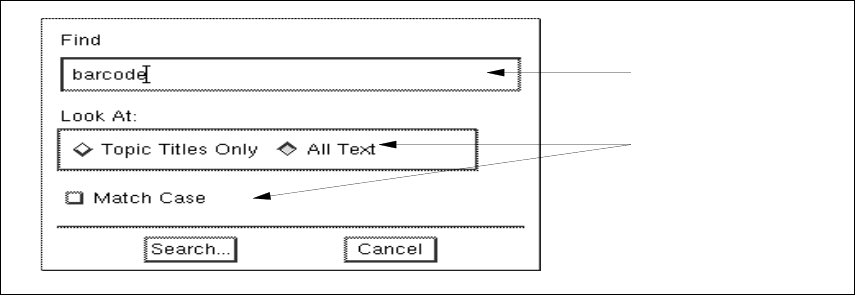
The window for entering a search text is opened.
● Click on the Text Search button.
The following window is opened.
● Enter the search text in the editing field.
● Activate the button(s) for the search criterion by clicking on it.
The window is closed.
● Click on the Search... button.
The number of matches found are added up and displayed in a box.
Once the search is complete, the box is closed and all topics containing the search text are listed
in a separate window.
If no match of the search text has been found, a message box will be displayed informing you of
this.
editing field
search criteria

User Manual Line Computer UNIX
Software Version 501.xx 01/99 Issue
3 - I
Contents
Page
Desktop (Root Window)
3.1 Introduction. . . . . . . . . . . . . . . . . . . . . . . . . . . . . . . . . . . . . . . . . . . . . . . . . . . . . . . . . . . . . . 3 - 1
3.1.1 Layout of the Desktop. . . . . . . . . . . . . . . . . . . . . . . . . . . . . . . . . . . . . . . . . . . . . . . . . . . . . . .3 - 1
3.2 Desktop User Interface . . . . . . . . . . . . . . . . . . . . . . . . . . . . . . . . . . . . . . . . . . . . . . . . . . . .3 - 7
3.2.1 Desktop Menu Bar . . . . . . . . . . . . . . . . . . . . . . . . . . . . . . . . . . . . . . . . . . . . . . . . . . . . . . . . .3 - 7
3.2.1.1 FILE Menu . . . . . . . . . . . . . . . . . . . . . . . . . . . . . . . . . . . . . . . . . . . . . . . . . . . . . . . . . . . . . . .3 - 7
3.2.1.2 OPTIONS Menu . . . . . . . . . . . . . . . . . . . . . . . . . . . . . . . . . . . . . . . . . . . . . . . . . . . . . . . . . . . 3 - 8
3.2.1.3 SERVICES Menu . . . . . . . . . . . . . . . . . . . . . . . . . . . . . . . . . . . . . . . . . . . . . . . . . . . . . . . . . 3 - 22
3.2.1.4 PRODUCT Menu . . . . . . . . . . . . . . . . . . . . . . . . . . . . . . . . . . . . . . . . . . . . . . . . . . . . . . . . . 3 - 34
3.2.1.5 PRODUCTION TOOLS Menu . . . . . . . . . . . . . . . . . . . . . . . . . . . . . . . . . . . . . . . . . . . . . . . 3 - 35
3.2.2 Main Groups. . . . . . . . . . . . . . . . . . . . . . . . . . . . . . . . . . . . . . . . . . . . . . . . . . . . . . . . . . . . . 3 - 35
3.2.2.1 "Control" Group . . . . . . . . . . . . . . . . . . . . . . . . . . . . . . . . . . . . . . . . . . . . . . . . . . . . . . . . . . 3 - 36
3.2.3 Line Selection Button and Display Area . . . . . . . . . . . . . . . . . . . . . . . . . . . . . . . . . . . . . . . . 3 - 37
3.2.3.1 Line Selection Button . . . . . . . . . . . . . . . . . . . . . . . . . . . . . . . . . . . . . . . . . . . . . . . . . . . . . . 3 - 37
3.2.3.2 View Area . . . . . . . . . . . . . . . . . . . . . . . . . . . . . . . . . . . . . . . . . . . . . . . . . . . . . . . . . . . . . . . 3 - 38
3.2.4 Main Menu . . . . . . . . . . . . . . . . . . . . . . . . . . . . . . . . . . . . . . . . . . . . . . . . . . . . . . . . . . . . . . 3 - 38
User Manual Line Computer UNIX
Software Version 501.xx 01/99 Issue
3 - II