00193906-05.pdf - 第16页
Software Installation Manual Windows 2000 Professional for SIPLACE Computer Edition 03/2006 US + DE 16 5.2 Default settings and final administration t asks for the SIPLACE Pro computer 5.2.1 Default Settings - Screen are…
Software Installation Manual Windows 2000 Professional for SIPLACE Computer Edition 03/2006 US + DE
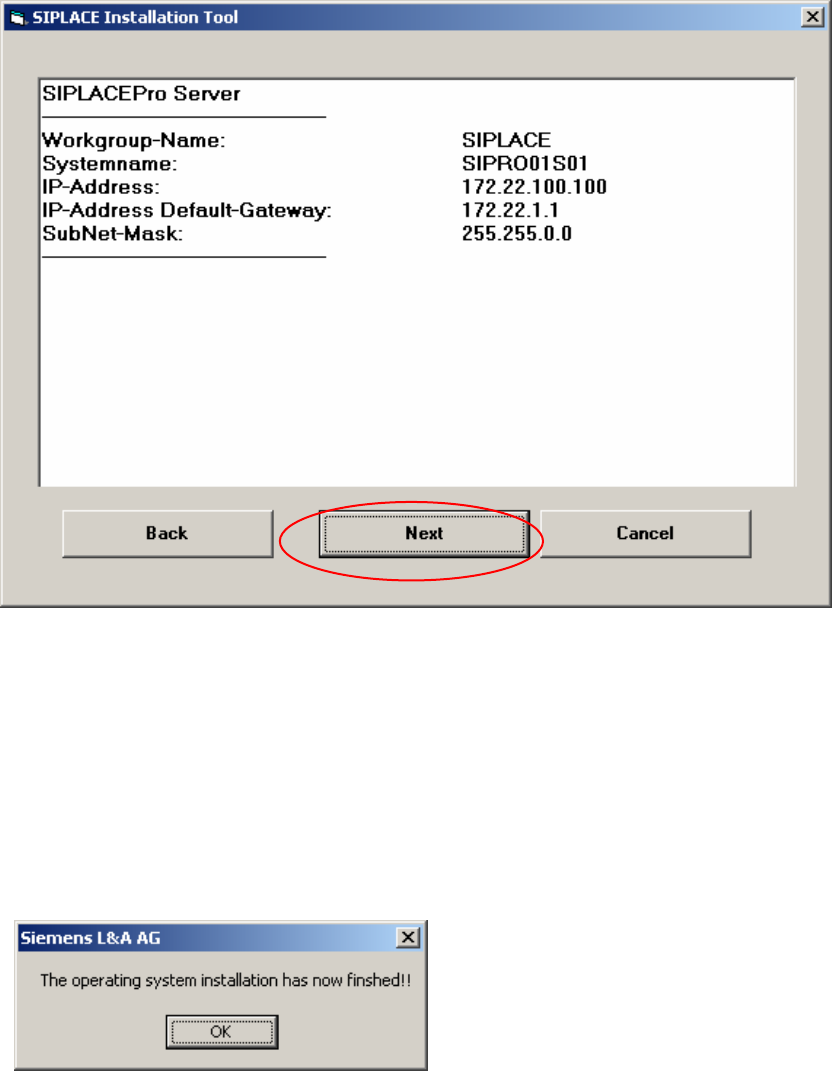
5.1.9 Display of the configured information
Here you will find a display with all configured network parameters (check display). You can change
the data if necessary by clicking the Back button
Fig. 5-8: Configurations
→ Check the information.
→ Click the Next button.
5.1.10 Completion Message
The installation takes 30 to 45 minutes. When it is complete, you see the following message:
Fig. 5-9: Finish message
15
Software Installation Manual Windows 2000 Professional for SIPLACE Computer Edition 03/2006 US + DE
16
5.2 Default settings and final administration tasks for the SIPLACE Pro
computer
5.2.1 Default Settings
- Screen area: 1024 x 786, 16777216 Colors, 72 Hz Refresh Frequency
- Time Zone: GMT (London, Edinburgh, Lissabon)
- Keyboard-Layout: English
- Network Protocol: TCP/IP
- In addition to the default user groups of Windows 2000 Professional, the following users and user
groups will be configured:
- User: plr, SIPLACEServices, SIPLACEAdmin
5.2.2 Passwords
5.2.2.1 Administrator
After the unattended setup, the default password for the local administrator is MS128. Please assign a
new password for your administrator!
5.2.2.2 plr
The default user „plr“ has the default password plr.
5.2.2.3 SIPLACEServices
The user „SIPLACEServices” is created for the COM+ Components. Please don’t change the
password. Otherwise the necessary rights of the SIPLACEPro Components will be lost!
The password is chephren.
5.2.2.4 Administrator group
The local administrator group also has the user „SIPLACEAdmin“. Don’t remove this user from the
group. Otherwise the Siemens Personnel can’t perform any maintenance. The SIPLACE Service
Personnel knows the password. Don’t change the password.

Software Installation Manual Windows 2000 Professional for SIPLACE Computer Edition 03/2006 US + DE
1 Allgemeines
1.1 Lizenzbestimmung
Warnung:
Dieses Betriebssystem ist nur für den Einsatz auf SIPLACE Pro- Rechner zulässig.
Diese CD-ROM enthält eine vorkonfigurierte Software mit der ein voreingestelltes Betriebssystem auf
Ihren Rechner der SIPLACE Familie installiert wird.
Die Ausführung dieser Software liegt allein in der Verantwortung der Siemens A&D AG
Die Betreuung für dieses Produkt wird bereitgestellt von der Siemens A&D AG.
1.2 Prozessablauf
Die vorliegende Anleitung beschreibt und erläutert den Einsatz des unattended Windows 2000
Professional Setup für SIPLACE Pro-Rechner.
Das Verfahren wurde entwickelt, um eine möglichst schnelle, vollständige und anforderungsgerechte
Installation von Windows 2000 Professional auf Rechnern der SIPLACE Familie durchzuführen. Das
Verfahren kann auf allen PC-Systemen eingesetzt werden, die im Kapitel
Voraussetzungen
genannten Voraussetzungen erfüllen und stellt eine schnelle und zuverlässige Alternative zum
Standard-Setup der Firma Microsoft dar. Das Verfahren unterstützt nur die englische (amerikanische)
Sprachversion von Windows 2000 Professional und wird auf einer bootfähigen CD-ROM geliefert, so
dass nach dem Systemstart automatisch mit der Ausführung des Setup-Verfahrens begonnen wird.
Warnung:
Alle auf der primären Festplatte eines Systems gespeicherten Daten werden durch den
Einsatz des Verfahrens vernichtet. Deshalb ist vor der Durchführung des Setup unbedingt
eine Datensicherung vorzunehmen, wenn diese Daten weiterhin benötigt werden.
Die Benutzerführung durch das Verfahren erfolgt in englischer Sprache. Die entsprechenden
Bildschirmmeldungen sind in den folgenden Abschnitten jeweils abgebildet, beschrieben und
kommentiert.
Während der Installation werden vom Benutzer Eingaben zur Systemkonfiguration verlangt (siehe
Abschnitt „Erforderliche Parameter“
17