00193906-05.pdf - 第20页
Software Installation Manual Windows 2000 Professional for SIPLACE Computer Edition 03/2006 US + DE 5 Inst allation 5.1 Inst allation Schritte 5.1.1 Hinweise Hinw eis: Im allgemeinen Teil der Installation müssen Sie eini…

Software Installation Manual Windows 2000 Professional for SIPLACE Computer Edition 03/2006 US + DE
19
3.2 Erforderliche Konfigurationsparameter
Für die Setup-Prozedur sind folgende Angaben bereitzuhalten:
Nr. Angaben
1 Benutzername (evtl. Ihr Name)
2 Firmenname
3 IP-Adresse des Programmiersystems (Standard: 172.22.100.100)
4 IP-Adresse des Standard-Gateways (optional, sollte leer bleiben, wenn kein Remote Support
vorhanden ist. Standard: leer)
5 Subnetz-Maske des lokalen IP-Netzwerks
Tabelle 1: Erforderliche Konfigurationsparameter
→ Falls Ihnen die benötigten Angaben nicht bekannt sind, kann Ihnen Ihr zuständiger SIPLACE-
oder Netzwerk - Administrator die entsprechenden Auskünfte erteilen.
4 Fehlerbehebungen
4.1 Hotfixes für das Betriebssystem
SP4
KB823182 KB824146 KB824151 KB825119 KB826232 KB828035
KB828741 KB828749 KB830352 KB835732 KB837001 KB839645
KB840315 KB840987 KB841356 KB841533 KB841872 KB841873
KB842526 KB870669 KB870763 KB871250 KB873339 KB883935
KB885835 KB885836 KB890175 KB891711 Q832483 Q832894
4.2 Hotfixes für den Internet Explorer
SP1
Q832894 Q867801 KB889293

Software Installation Manual Windows 2000 Professional for SIPLACE Computer Edition 03/2006 US + DE
5 Installation
5.1 Installation Schritte
5.1.1 Hinweise
Hinweis:
Im allgemeinen Teil der Installation müssen Sie einige Fragen mit „Yes“ oder „No“
beantworten.
Im zweiten Teil können Sie mit „Next“ oder „Back“ zwischen den einzelnen
Eingabemasken wechseln.
Mit der „Cancel“ Schaltfläche kommt es zu einem Abbruch des gesamten
Installationsroutine.
5.1.2 Installationsablauf
→ Um das automatische Setup zu starten, legen Sie die entsprechende BOOT CD-ROM in das CD-
ROM Laufwerk ein:
- Boot CDROM for Windows 2000 Professional
→ Führen einen Neustart durch.
→ Falls das System die CD-ROM nicht als Bootmedium akzeptiert, dann ändern Sie bitte im BIOS
die Reihenfolge der Bootdevices.
20
Software Installation Manual Windows 2000 Professional for SIPLACE Computer Edition 03/2006 US + DE
5.1.3 Vorbereitung für die automatisierte Windows 2000 Installation
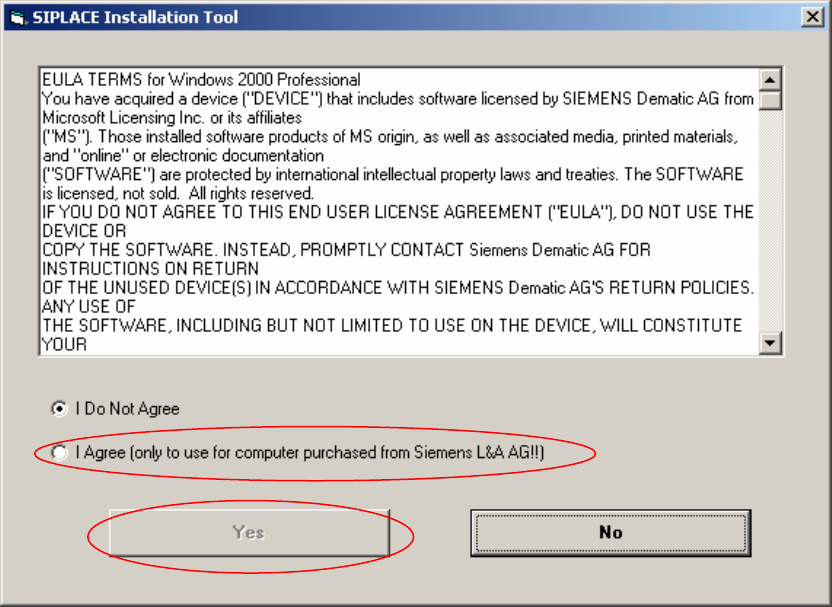
Abb. 5-1: Lizenzvereinbarung
→ Wählen Sie “I Agree” und klicken Sie dann auf “Yes”, um fort zufahren.
21