00195941-03-UM SiplaceCA-EN.pdf - 第398页
6 Component and Die Handling User Manual SIPLACE CA 6.1 X Feeder Modules for the Component Trolley from the SIPLACE X Series Edition 0 8/2011 EN 398 6.1.5.1 T echnical Dat a 6 6 6.1.5.2 Number of W affle Pack T rays per …
User Manual SIPLACE CA 6 Component and Die Handling
Edition 08/2011 EN 6.1 X Feeder Modules for the Component Trolley from the SIPLACE X Series
397
6.1.5 Waffle Pack Tray Holder for SIPLACE X Series Component Trolleys
[00141285-xx] Waffle pack tray holder for X series
6
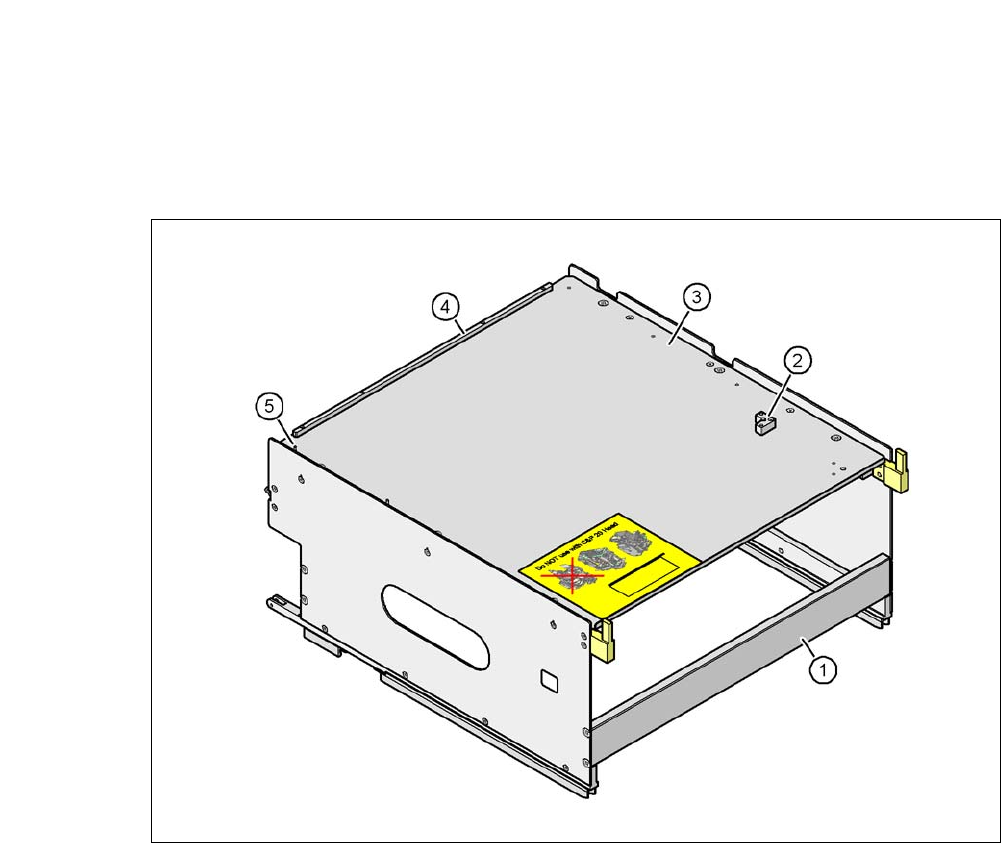
Fig. 6.1 - 17 Waffle-pack tray holder
(1) Waffle-pack tray holder from the SIPLACE X-series
(2) Bracket for 2nd JEDEC magazines
(3) Waffle tray carrier
(4) Stop bars for JEDEC waffle pack tray
(5) Aligning pin - zero point of JEDEC waffle pack tray
6
Individually fitted JEDEC waffle-pack trays or waffle-pack magazines can be fixed to the waffle-
pack tray carrier using magnets. If two JEDEC waffle-pack trays are fitted, you must fix them with
locking and retaining rails, as used for the waffle-pack tray carrier on the MTC2.
Parts:
Magnet [00316593-xx]
Locking and holding rail for JEDEC magazines [00372615-xx]
6 Component and Die Handling User Manual SIPLACE CA
6.1 X Feeder Modules for the Component Trolley from the SIPLACE X Series Edition 08/2011 EN
398
6.1.5.1 Technical Data
6
6
6.1.5.2 Number of Waffle Pack Trays per Location and Machine
NOTE 6
Due to the restricted working area only a small waffle pack tray can be used at location 1.
It is not possible to combine C&P20CA heads and waffle pack trays.
Dimensions L x W x H 429 mm x 376 mm x 200 mm
Location filled on the component table 32 locations
a
a) X feeder modules can be positioned at the remaining 8 locations. If locking and retaining rails are used, how-
ever, the fixing lever projecting at the side reduces the available locations to 6.
Installation options at X/CA series machines
At locations 2 and 4,
not in combination with the
C&P20 CA placement head
Software
Station software from 605.03
Programming system SIPLACE Pro 8.0 or later
Range of placement heads TwinHead, C&P6 CA, C&P12 CA, C&P20
Placement machin Location 2 Location 4
CA4 1 1
CA3 2 1

User Manual SIPLACE CA 6 Component and Die Handling
Edition 08/2011 EN 6.1 X Feeder Modules for the Component Trolley from the SIPLACE X Series
399
6.1.5.3 Fitting the Waffle Pack Tray Holder in X Series Component Trolleys
Position both front guiding slides (item 1 in fig. 6.1 - 18, page 400) onto the holder of the in-
sertion aid (item 6) .
Push the holder forward along the guide profiles (item 7). The holder will slide with its front
(item 1) and rear slider guides (item 2) on the guide profiles.
Carefully push the holder further until the two "front" centering pins (item 4) disappear into the
centering holes (item 10).
Watch the two "back" centering pins (item 3) on the holder. They must slide easily into the
recesses (item 8) on the centering bar.
When the holder is at the stop position, the locking tabs (item 9) engage on the locking rollers
(item 5) on the holder.
6
The waffle-pack tray holder can be locked and released via the user interface. It is therefore pos-
sible to change the holder while placement is in progress.
WARNING 6
Observe the safety instructions for assignment of locations in section 2.8.5, page 97.