KE-2030使用说明书 - 第183页
4 – 84 ⑨ Laser algorithm Select the alg orithm f or laser recognit ion with the combo box Laser algor ithm 0: Rot ates a component f rom the pick -up position by the placement ang le, then places it. (f or a component wh…
4 – 83
③ Pick Z up
Using this combo box, set the acceleration (for preventing the components from
dropping) of Z-axis up movement at the pick position.
You can select any of the same choices as those displayed in the "XY" combo
box.
Specify "Med." or "Slow" if the surface area of a component is large, so its air
resistance is high, or if a component is heavy.
④ Place Z down
Using this combo box, set the acceleration (for adjusting the stress placed on a
component) of Z-axis down movement at the placement position.
You can select any of the same choices as those displayed in the "XY" combo
box.
Specify "Med." or "Slow" if a very small component is fed with a tape feeder and it
can be placed unstably.
This selection is useful to adjust the vertical stress imposed on a component also.
⑤ Place Z up
Using this combo box, set the acceleration (for placing components stably) of
Z-axis up movement at the placement position.
You can select any of the same choices as those displayed in the "XY" combo
box.
⑥ Theta
Using the combo box, set the θ rotation speed.
− test 1 (When measuring)
Set the acceleration of the theta axis to be applied when a component is
recognized with laser.
− test 2 (When not measure)
Set the acceleration of the theta axis to be applied not when a component is
recognized with laser.
You can select any of the same choices as those displayed in the "XY" combo
box.
⑦ Place Offset
Enter the placement offset for unsymmetric components.
⑧ Laser
Enter the offset from the surface of the component to the laser.
This item is enabled only when an LA/LAHD head or MNLA/FMLA head is used.
4 – 84
⑨ Laser algorithm
Select the algorithm for laser recognition with the combo box
Laser algorithm 0: Rotates a component from the pick-up position by the
placement angle, then places it.
(for a component which cannot be recognized with laser, but
you want to place on a board.)
Laser algorithm 1: Finds a side whose shade width is the narrowest (first
smallest shade A), then rotates a component from this side to
the + 90 degrees position. Next, detect the narrowest side
(second smallest shade B) to correct a positioning error
and/or angle error, then places the component.
(for a chip component)
Laser algorithm 2: Finds a side whose shade width is the narrowest (first
smallest shade A), then rotates a component from this side in
the positive direction while aligning it with laser. Next, detect
the narrowest side (second smallest shade B) to correct a
positioning error and/or angle error, then places the
component.
(for a component which has a lead(s) such as an SOP)
Laser algorithm 3: Detects the shade of a component which is ready for
pick-up (first smallest shade A), then rotates the component
from the detected side to the + 90 degrees position. Next,
detect the narrowest width (second smallest shade B) to
correct a positioning error, then places the component.
(for a cylindrical-shaped component)
⑩ Pre-rotate
Set how much a laser recognition component which is picked up shall be rotated
(pre-rotate angle) before it is centered. Enter the pre-rotate angle in the edit
field When you enter the dimensions for the first time, the default value is set
here. When you change them, the default value is not set.
4 – 85
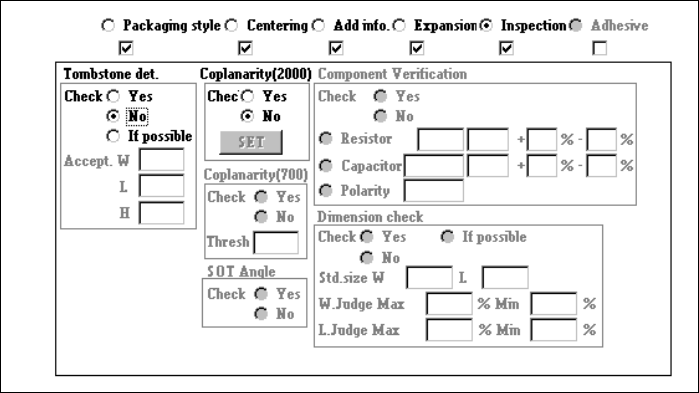
4.7.7 Tack control section (Inspection page)
① Tombstone det.
Using the radio button, select whether to use the chip rise detecting option.
When you select “Yes” or “If possible”, enter values at the items “Accept. W”, “L”
and “H” also as the reference value. If you select “If possible”, the machine
detects a chip rise error when the chip rise detecting unit is installed on the
machine.
② Coplanarity (
((
(featured in KE-2020 / 2040 only)
))
)
Specify whether to check if a lead of a component floats or not with using the
radio button.
When you check the radio button “YES”, the <Set> button is enabled.
Enter the coplanarity check data.