KE-2030使用说明书 - 第428页
6 − 82 6.4.15.1 Process before production st arts The content s of t he screen displayed as “Processing bef ore product ion begins” dialog box vary depending on the condition: ( a) “if there is a cont inuous production f…
6 − 81
6.4.15 PWB production without transporting a board
Conventionally, a machine has to remove a board before production if it is located on
the PWB transport path at start of production. However, this function allows the
machine to fix (clamp) a board again if it is on the PWB transport path at start of
production, so the machine can start production without loading any board into the
machine.
◇ Normally a board remains on the PWB transport path in the following conditions:
Production is aborted (due to an asynchronous event and so on), or
An operator stops production forcibly.
Use this function to recover the system from the conditions described above.
To execute this function, clamp a board again on the “Processing before
production begins” dialog box, and then start production.
①
If you load a production file to the system and quit the “Production”
screen before starting production, this function cannot obtain the
condition of the PWB transport path when production is interrupted.
Therefore, it may cause some component(s) not to be placed on a board
or to be placed at a wrong position of a board. Be careful to use this
function.
②
If a board size is extremely large or a board is very heavy when the
system performs PWB production without transporting a board, the
system may fail to clamp it.
L
6 − 82
6.4.15.1 Process before production starts
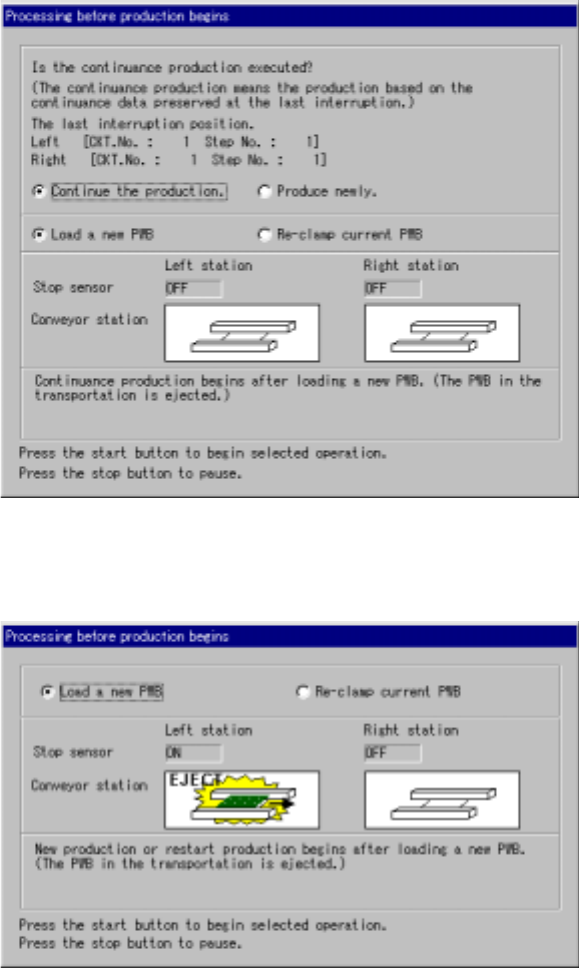
The contents of the screen displayed as “Processing before production begins”
dialog box vary depending on the condition: (a) “if there is a continuous production
file” or (b) “if there is no continuous production file” as shown below.
Figure 6.4.15(a) If there is a continuous production file
Figure 6.4.15(b) If there is no continuous production file
• When you press the <START> switch on this dialog box, the system starts the
selected operation.
• When you press the <STOP> switch on this dialog box, the system enters
Production Idle mode again.
6 − 83
(1) Detailed explanations of the “Processing before production begins” dialog box
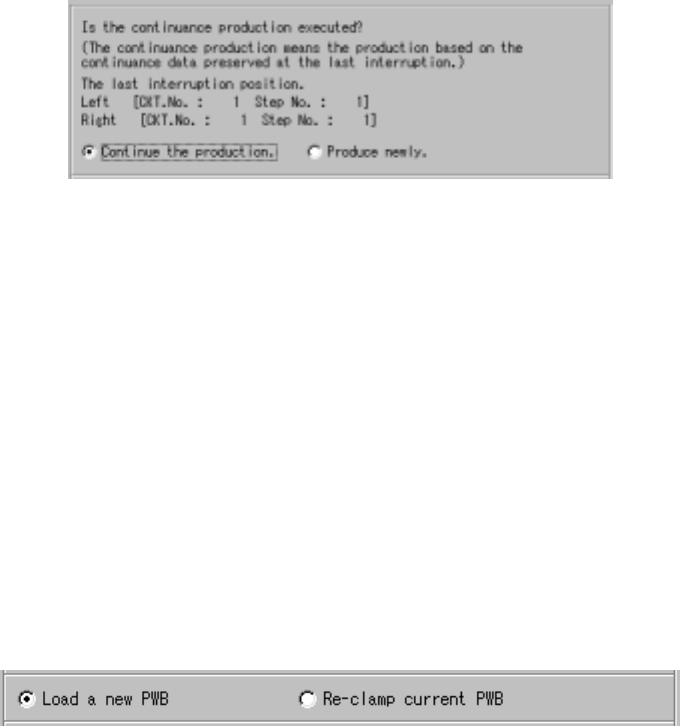
① Continuous production information
When there is a continuous production file, the “continuous production
information” and the radio buttons; “Continue the production.” and “Produce
newly.” are displayed on the “Processing before production begins” dialog
box as shown below.
Figure 6.4.15.1.1 Continuous production information
◇ When you select the radio button “Continue the production.” , the system
resumes the production.
◇ When you select the radio button “Produce newly”, the system starts new
production at the position specified at the menu item “Starting pos.” on the
“Production conditions” screen.
(However, if “0” is entered at either the “Circuit” or “Step No” column of the
menu item “Starting pos.”, the system starts production from the beginning
of the first circuit.)
② Production operation
Regardless of whether there is a continuous production file, the “Processing
before production begins” dialog box displays the radio buttons specifying
whether the system will start production after load a new PWB or after
re-clamp current PWB.
Figure 6.4.15.1.2 Choice whether the Load a new PWB or Re-clamp current PWB
◇ When you select the radio button “Load a new PWB”, the system ejects a board if
any board is located on the PWB transport path, and produces a PWB after
loading a board at start of production.
◇ When you select the radio button “Re-clamp current PWB”, the system clamps a
board located on the PWB transport path, and starts PWB production without
loading any board at start of production.