KE-2030使用说明书 - 第506页
7 − 12 ② Noz. k ind − Set the type of a nozzle to be mounted. ◆ A nozzle ty pe in the com bo box at which the input focus is locat ed can be set. Select t he type fr om the list displayed in the com bo box, then validate…
7 − 11
7.2.2.1 ATC nozzle setup
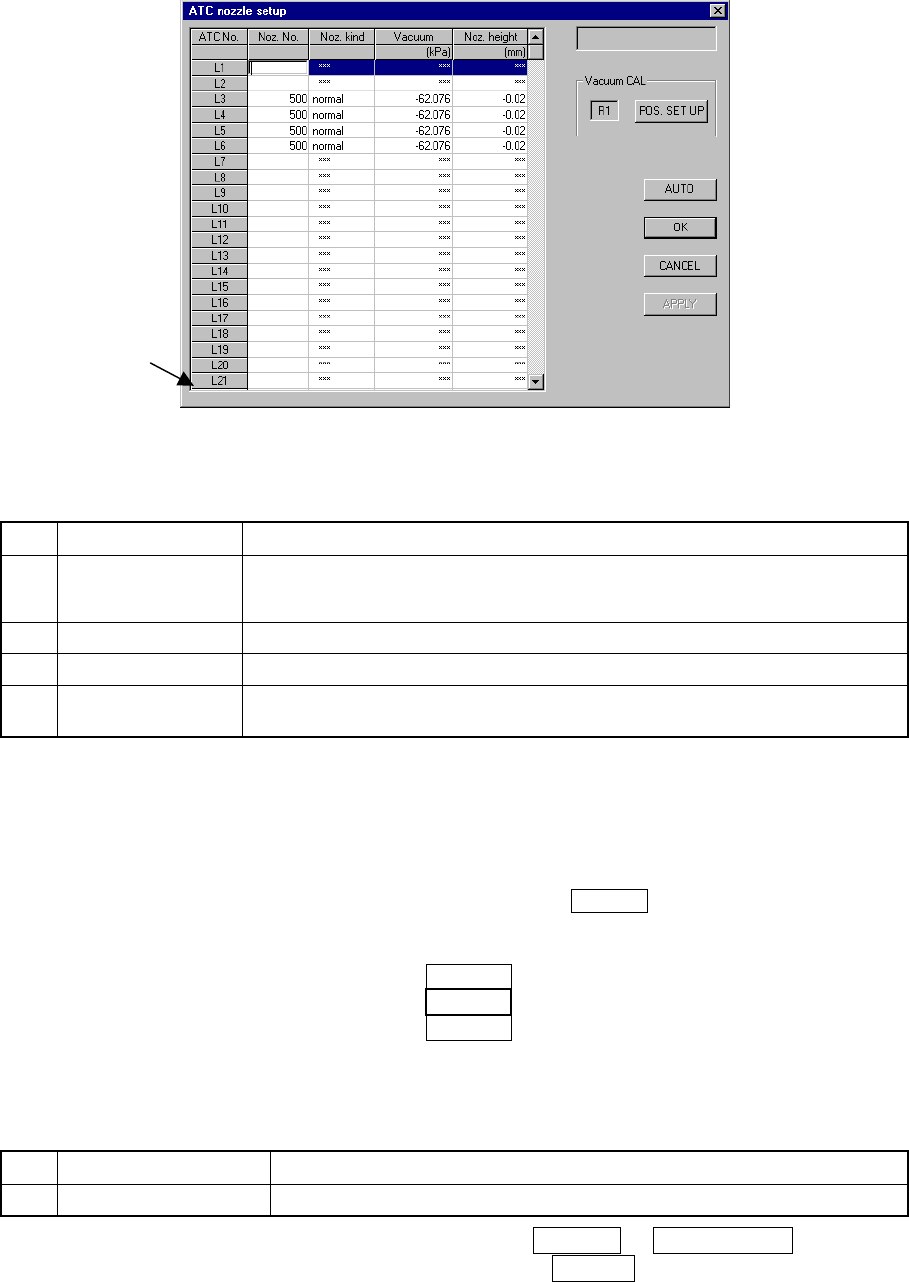
When [ATC nozzle setup] is selected from the [Setting Group] menu, the dialog box
shown in Figure 7.2.2.1.1 “ATC nozzle setup” appears.
Figure 7.2.2.1.1 ATC nozzle setup dialog box
(Screen example when a KE-2020 is used)
(1) Setting items
No. Item Description
1 Nozzle No.
Nozzle number to be allocated to an ATC
*1 The displayed available ATC numbers vary depending on the model you use
(see No. 1 “ATC nozzle setup” of Table 7.1.1).
2 Noz. kind Nozzle type to be allocated to an ATC
3 Vacuum Vacuum value with the nozzle attached (for automatic operation only)
4 Noz. height Offset of length with respect to the reference nozzle (for automatic operation
only)
(2) How to set
① Setting the Nozzle No.
− A number is assigned to an ATC. Define a nozzle for each ATC by
using the nozzle number.
− The nozzle number at which the input focus is located can be set. The
numbers entered are validated by the ENTER key or the field selection
key.
Example: (KE-2020)
L1 501
L2 502 The ATC number "L2" can be set.
L3 503
− The nozzle number within the range shown in the table below can be
entered.
Table 7.2.2.1.1 Setting range of the nozzle number
No. Input item Setting range
1 Nozzle No. 500 to 999 and Space (for no assignment)
− If a number entered is erased by the DELETE or BACK SPACE key, then
that action is validated by pressing the ENTER or field selection key, the
assigned number is canceled and all the setting values shown disappear.
*1
7 − 12
② Noz. kind
− Set the type of a nozzle to be mounted.
◆ A nozzle type in the combo box at which the input focus is located can
be set. Select the type from the list displayed in the combo box, then
validate it with the ENTER key or field selection key.
Note that only the ATC numbers from R1 to R4 can be set when you
select “VacUnit” as the nozzle type (for the KE-2030).
− When you do not enter the nozzle number, you cannot set any nozzle
type.
Click the <Auto> button to set each value, then change the nozzle type
automatically set.
− To change the setting "VacUnit" of an ATC to one of "normal", "T-type"
and "Gripper", change it to "Reset" first. Then, set the desired one.
<Earlier than Version 1.12>
◆ This item is set automatically with the machine only.
However, you have to set the setting item “VacUnit” on the “Vacuum
CAL unit position” dialog box as shown at ⑤ below.
<Version 1.12 or higher>
● Available nozzle types are shown in the table below:
Table 7.2.2.1.2 Available nozzle types
No. Setting item Description
1 normal Normal nozzle
2 T-type Cleaner type nozzle
3 Gripper Gripper nozzle
4 VacUnit Vacuum calibration unit
③ Setting the vacuum value: Vacuum
− Set the vacuum value when a nozzle is mounted.
− Only automatic setting is available.
④ Setting the nozzle height: Noz. height
− Set the offset value of the mounted nozzle with respect to the reference
nozzle.
− Only automatic setting is available.
⑤ Vacuum calibration unit position (VacUnit)
− Set the vacuum calibration post position attached on the ATC.
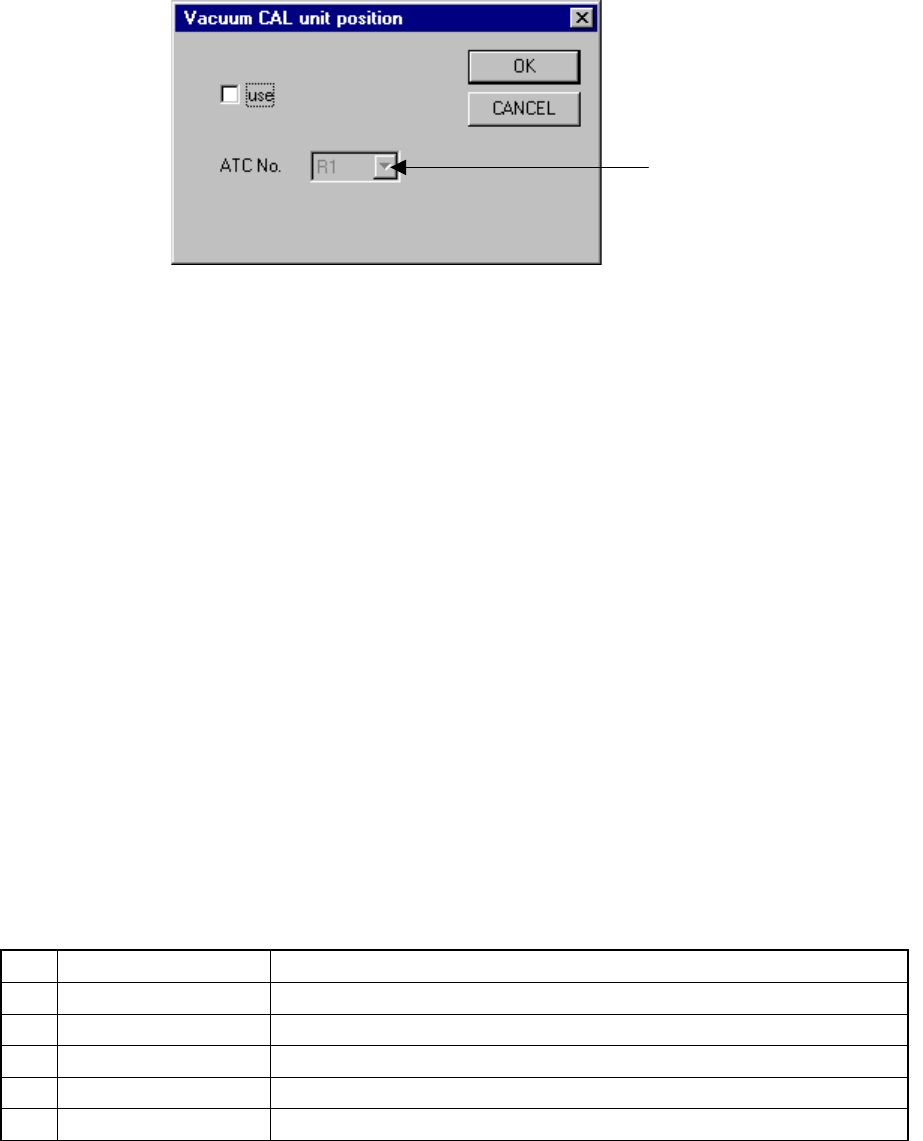
− When you click the button for setting the vacuum calibration position,
the “Vacuum CAL unit position” dialog box appears on the screen as
shown in Figure 7.2.2.1.1 (1).
− The number displayed left to the button indicates the ATC number
currently set. If any number is not set, “***” is displayed.
7 − 13
Figure 7.2.2.1.1 (1) “Vacuum CAL unit position” dialog box
− Check or uncheck the check box “use” to specify whether to use the
vacuum calibration unit or not. This check box is not checked as
default.
− If this check box is not checked, you cannot select any ATC number.
− If this check box is checked, select the ATC number on which the
vacuum calibration unit is attached from the ATC number selection list
box.
When this dialog box appears for the first time, the default number
unique to the model appears as the ATC number. If the vacuum
calibration unit cannot be attached at this default position, the machine
displays the smallest ATC number on which the unit can be attached.
● You cannot select the ATC numbers shown below:
The table below indicates the ATC positions on which you cannot attach a
vacuum calibration unit physically. These unavailable positions vary
depending on the model you use.
The ATC number selection list box does not display these positions.
Table 7.2.2.1.3 ATC numbers you cannot select
No. Model Unavailable positions
1 2010 4, 5, 11, 12, 16, 17, 23, 24
2 2020 1, 2, 10, 11, 16, 17 , 25, 26, A, B,
3 2030 L1 ~ L21, R5 ~ R21
4 2040 4, 5, 11, 12, B
5 2020S 1, 7, 8, 11, 17, 18, 21, 27, 28, B
− You can select ATC numbers that are not validated although you
assigned a nozzle to them already. In the same manner, you cannot
select an ATC number whose nozzle assignment is canceled unless the
cancel operation is validated.
− Even though you change the vacuum calibration unit position on the
dialog box above, it cannot be effective unless you click the <OK> or
<Apply> button on the dialog box above.
ATC number selection list box