00198503-02_IM_SIPLACE_Pro_15.1_R18-1_EN - 第34页
SIPLACE Pro 15.1 (R18 - 1) / Installat ion Manual 05/2018 Edition 34 In the next dialog y ou can change the e xecution time for defined maintena nce job(s) for t he SIPLACE Pro Datab ase. Figure 6-30: Changing execution …
SIPLACE Pro 15.1 (R18-1) / Installation Manual 05/2018 Edition
33
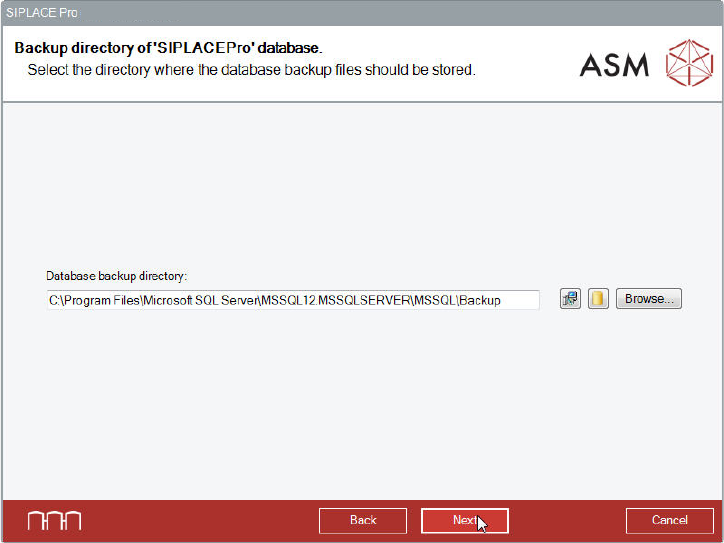
6.2.4.3 Selecting the Backup Directory
The following dialog is displayed in which you can select the backup directory for the SIPLACE Pro
Database. The current backup directory is displayed as default value.
Figure 6-29: Selecting backup directory
► Click the Next button if the database backup files shall be stored in the currently set backup
directory.
Or
► Click the Browse… button to search and set another directory in which the database backup
files shall be stored.
Or
► Switch between different suggestions for the directories of the database backups by clicking
one of the two buttons between the text field and the Browse... button. The left button suggests
the default backup directory as given by the setup. The right button suggests the default
backup directory for databases as defined in your SQL installation.
► Click the Next button.
SIPLACE Pro 15.1 (R18-1) / Installation Manual 05/2018 Edition
34
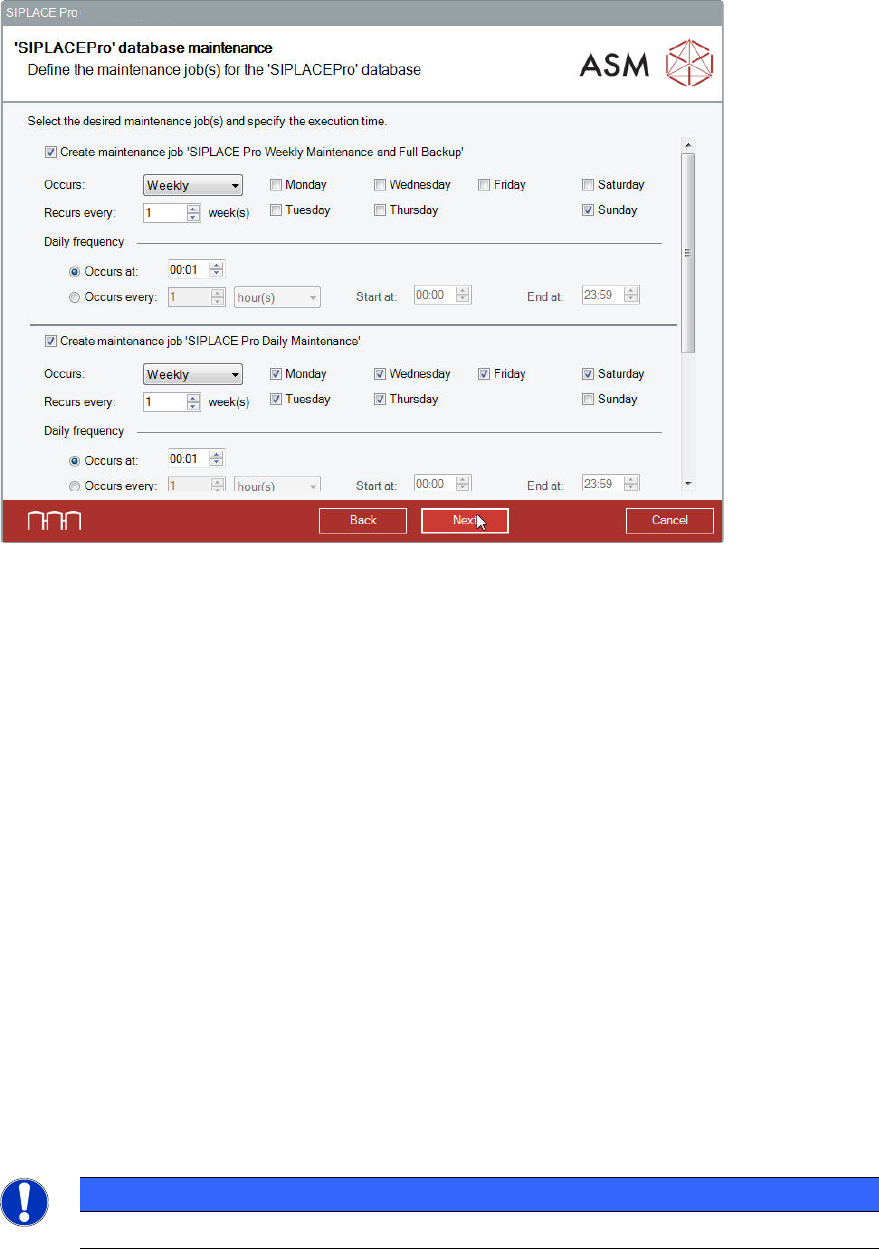
In the next dialog you can change the execution time for defined maintenance job(s) for the
SIPLACE Pro Database.
Figure 6-30: Changing execution time for maintenance job(s)
► Perform the changes you want to make for the maintenance jobs.
► Click the Next button.
Database Maintenance Tasks
Depending on the Recovery Model of your database, the following maintenance tasks will be
created.
On SQL Server Editions, these tasks are SQL Agent tasks. On SQL Express Editions, these tasks
are Windows Scheduled Tasks.
Simple Recovery Model (default)
Weekly Backup: Full backup; backups will be archived for 4 weeks.
Daily Backup: Delta backup, if possible. If not possible, (for example, if previously created backups
are missing) full backup; backups will be archived for 4 weeks.
Full Recovery Model
Weekly Backup: Full backup; backups will be archived for 4 weeks.
Daily Backup: Transactionlog backup, if possible. If not possible, (for example, if previously created
backups are missing) full backup; backups will be archived for 4 weeks.
NOTICE
The Full Recovery Model can be changed in SQL Management Studio.
SIPLACE Pro 15.1 (R18-1) / Installation Manual 05/2018 Edition
35
6.2.5 Installing Database on a Remote Computer
Optionally, the SIPLACE Pro database can be installed on another computer as SIPLACE Pro
Server. In this case the following requirements must be met.
Requirements:
– Only one SIPLACE Pro Server per SIPLACE Pro database is allowed.
– The SQL installation on the remote computer must be an SQL Server edition. SQL Express
editions are not supported.
– The installation has to be performed from the computer on which SIPLACE Pro Server is
installed.
– After SIPLACE Pro database has been installed, Support Media has to be executed on the
remote computer with the ASM Net – SQL Server Prerequisites – Apply ASM SQL settings
profile.
– The directories in which the database files shall be stored must exist on the remote computer.
► Start the installation as described in section 6.2 and follow the instructions until the Packages
and Features dialog is displayed.
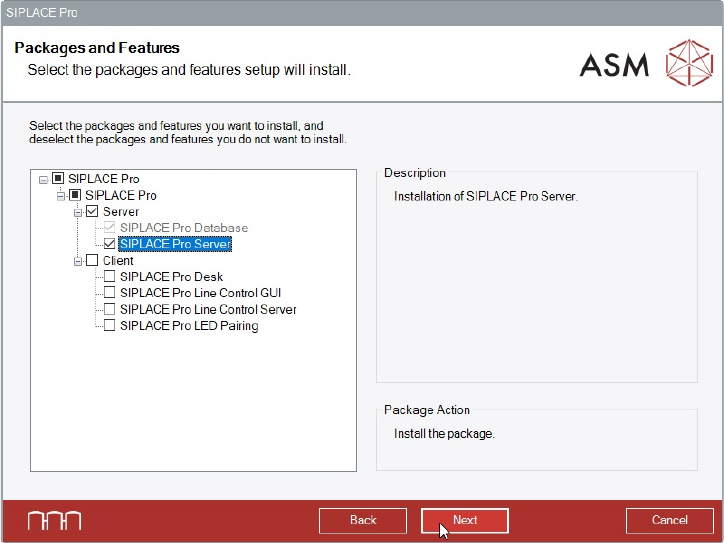
Figure 6-31: Selecting SIPLACE Pro Server feature
► Select the SIPLACE Pro Server feature.
The SIPLACE Pro Database feature is then automatically selected by the setup.
► Click the Next button.