Host Computer System.pdf - 第31页
AVK3 HOST COMPUTER SYSTEM 2.3 Downloadi ng P. C.B. Dat a D77HEC-52- 030-A1 2.3- 2 Protocol Condition Aut o m ati c width contr ol can be used v alidly. Vali d i n O NLINE m ode only . T he data becomes v alid w…
AVK3
HOST COMPUTER SYSTEM
2.3 Downloading P.C.B. Data
D77HEC-52-030-A1
2.3-1
2.3. Downloading P.C.B. Data
D77HEC-52-030-A1
2.3.1 Downloading P.C.B. Data
Data details
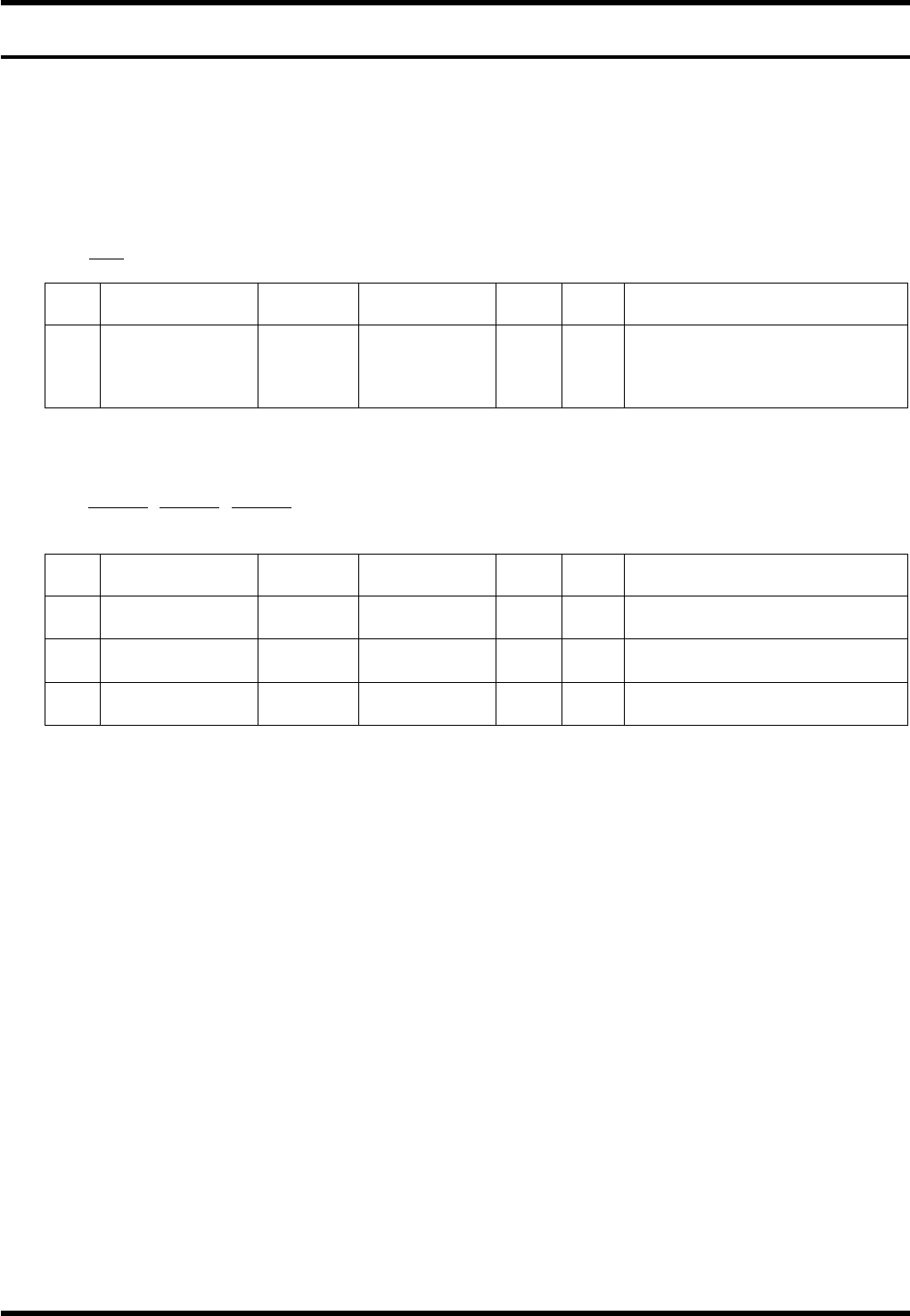
1) – 1
C0C∗ - ∗
1
No. Data name
Max.
digits
Input range
Sup-
press
Vari-
able
Remarks
1 Program name 15
‘0’ to ‘9’
‘A’ to ‘Z’
Special
character
×
If other than the valid
character, A4E01 is returned.
1) – 2
D0XnnnnnnYnnnnnnHnnnnnn
1 2 3
No. Data name
Max.
digits
Input range
Sup-
press
Vari-
able
Remarks
1
PCB dimension
X
6 0 to 999999
Only + direction
µm
2
PCB dimension
Y
6 0 to 999999
Only + direction
µm
3
Reference hole
pitch
6 0 to 999999
Only + direction
µm
=REMARKS=
If the data is omitted, the last data remains.
If exceeding the max. digit number, the data of the max. digits from the end becomes valid.
If a character cannot be identified, the following numeric values will also be ignored.
AVK3
HOST COMPUTER SYSTEM
2.3 Downloading P.C.B. Data
D77HEC-52-030-A1
2.3-2
Protocol
Condition
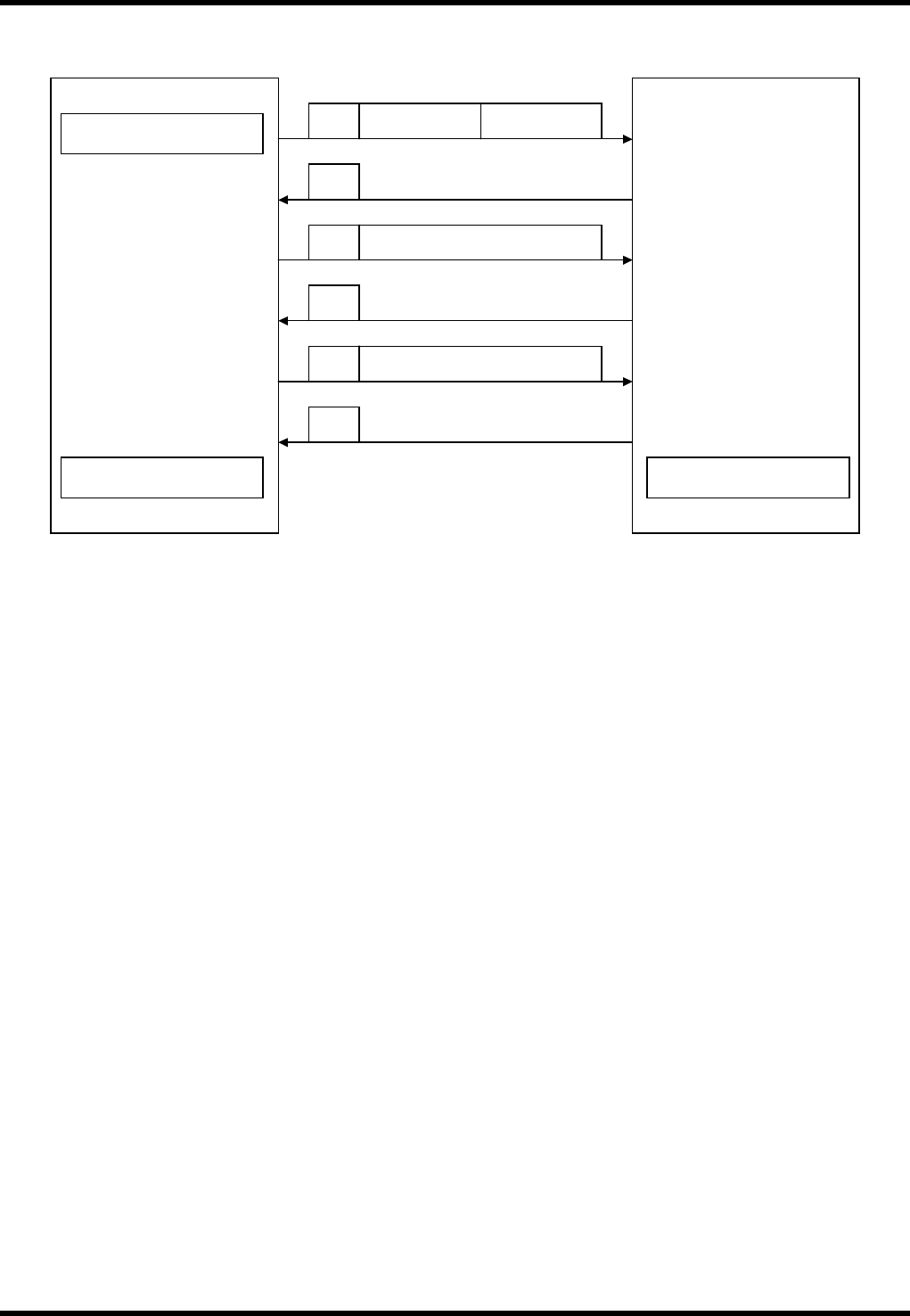
Automatic width control can be used validly.
Valid in ONLINE mode only.
The data becomes valid when EOP (∗) is received and the processing normally ends down to A2.
(If the processing ends abnormally in downloading, the data will be cleared.)
If the same program as the one in the memory is specified and the processing ends abnormally, the
program in the memory is deleted.
If the program currently being executed is downloaded during operation, ‘A4E00’ is returned.
Start of download
Host computer
Requests next data.
AVK3
D 0 PCB data
A 0
C0C
Control No.:
3 digits
Program name (Up
to 12 characters)
D 0
∗
Transfers NC data.
A 0
Transfers NC data.
Requests next data.
End of transmission
End of reception
A 0
Creates a directory.
Stores the received NC
data in RAM.
AVK3
HOST COMPUTER SYSTEM
2.4 Downloading Individual Machine Data
D77HEC-52-050A0
2.4-1
2.4. Downloading Individual Machine Data
D77HEC-52-050A0
2.4.1 Downloading Individual Machine Data
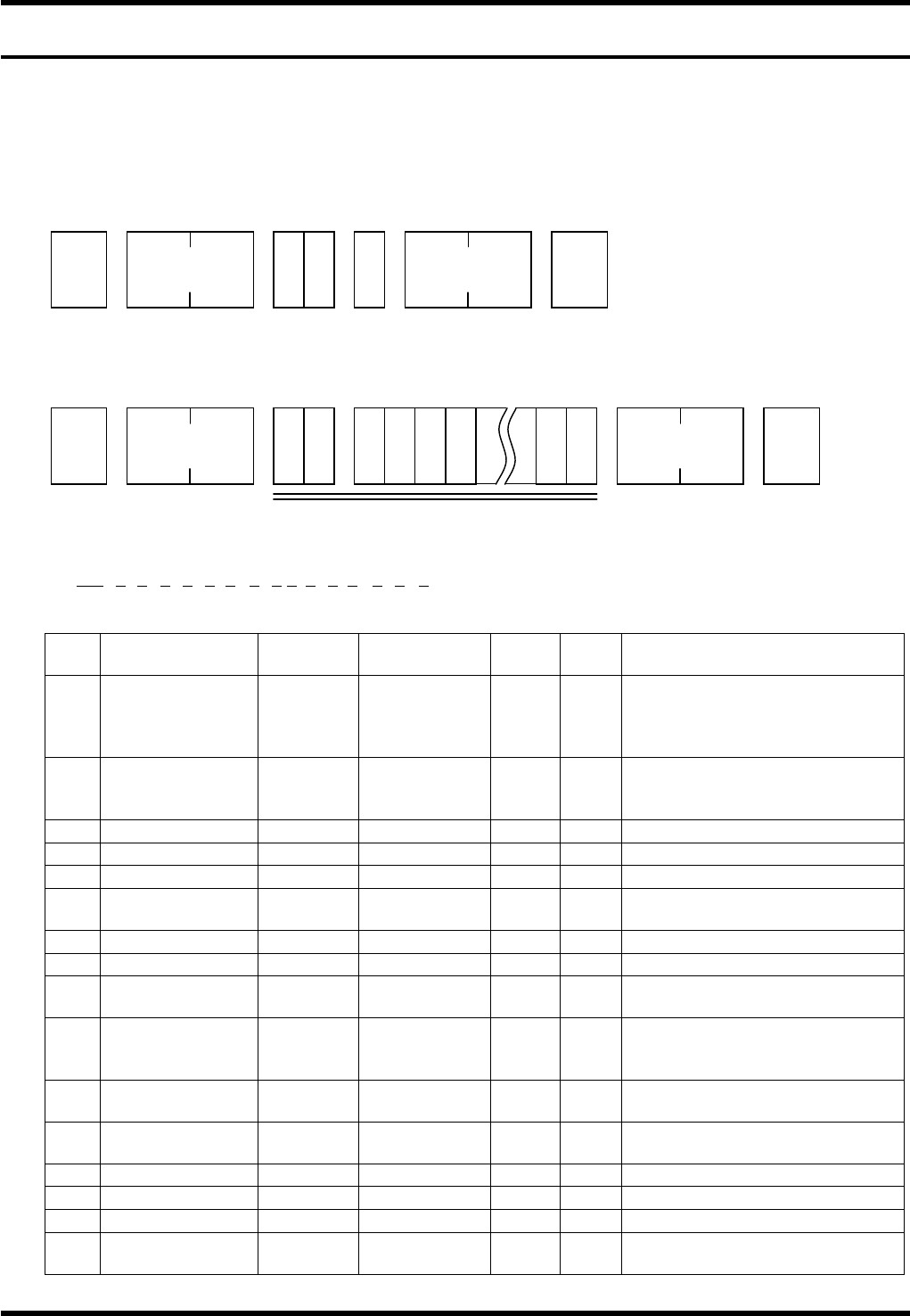
From AVK3, when the host computer sends C0 command to the individual machine data in AVK3, the AVK3
goes into receiving mode, and as a result, can read the individual machine data (C0 command is used) sent
to it.
Data details
When the machine receives the C0 command, an A0 command is returned as acknowledgment.
The host computer receives this A0 command, and using D command (Data transfer command) sends
leading group (one group) of individual machine data to the AVK3.
1) – 1
D0OCAnBnCnDnEnFnGnHnInJnKnLnMnNnOn
1 2 3 4 5 6 7 8 9 10111213 14 15 16
No. Data name
Max.
digits
Input range
Sup-
press
Vari-
able
Remarks
1
Operation
condition
command
2
× ×
Acknowledges as the set data
of movement condition.
When it is omitted, the
following data will be ignored.
2 Z mode 1 0 to 3
×
0 = Priority, 1 = Exchange,
2 = Preparation, 3 =
Connection
3 Priority Z axis 1 0 to 1
×
0 = ZL, 1 = ZR
4 Transfer 1 0 to 2
×
0 = Yes, 1 = No, 2 = Pass
5 Parts prefetch 1 0 to 1
×
0 = Yes, 1 = No
6
In recognition
error
1 0 to 1
×
0 = Continue, 1 = Stop
7 Recovery end 1 0 to 1
×
0 = Continue, 1 = Stop
8 All holes offset 1 0 to 1
×
0 = Yes, 1 = No
9
Optional hole
offset
1 0 to 1
×
0 = Yes, 1 = No
10
PCB
displacement
offset
1 0 to 1
×
0 = Yes, 1 = No
11
PCB inclination
offset
1 0 to 1
×
0 = Yes, 1 = No
12
Modification
offset
1 0 to 1
×
0 = Yes, 1 = No
13
θ axis offset
1 0 to 1
×
0 = Yes, 1 = No
14 Pitch offset 1 0 to 1
×
0 = Yes, 1 = No
15 1st hole offset 1 0 to 1
×
0 = Yes, 1 = No
16
Exchange
connection
1 0 to 1
×
0 = Yes, 1 = No
STX
C 0 G
No. of
characters
ETX
Check sum
STX
D 0
No. of
characters
ETX Check sum
1) -1 to 33