Host Computer System.pdf - 第33页
AVK3 HOST COMPUTER SYSTEM 2.4 Downloadi ng Indiv idual M achi ne Dat a D77HEC-52- 050A0 2.4- 2 = R E M A R K S = If the data of 2 to 16 is out of the eff ective r ange, ‘A4E01’ is ret urned. 1) – 2 D0AG AnBn Cn 1 2 3…
AVK3
HOST COMPUTER SYSTEM
2.4 Downloading Individual Machine Data
D77HEC-52-050A0
2.4-1
2.4. Downloading Individual Machine Data
D77HEC-52-050A0
2.4.1 Downloading Individual Machine Data
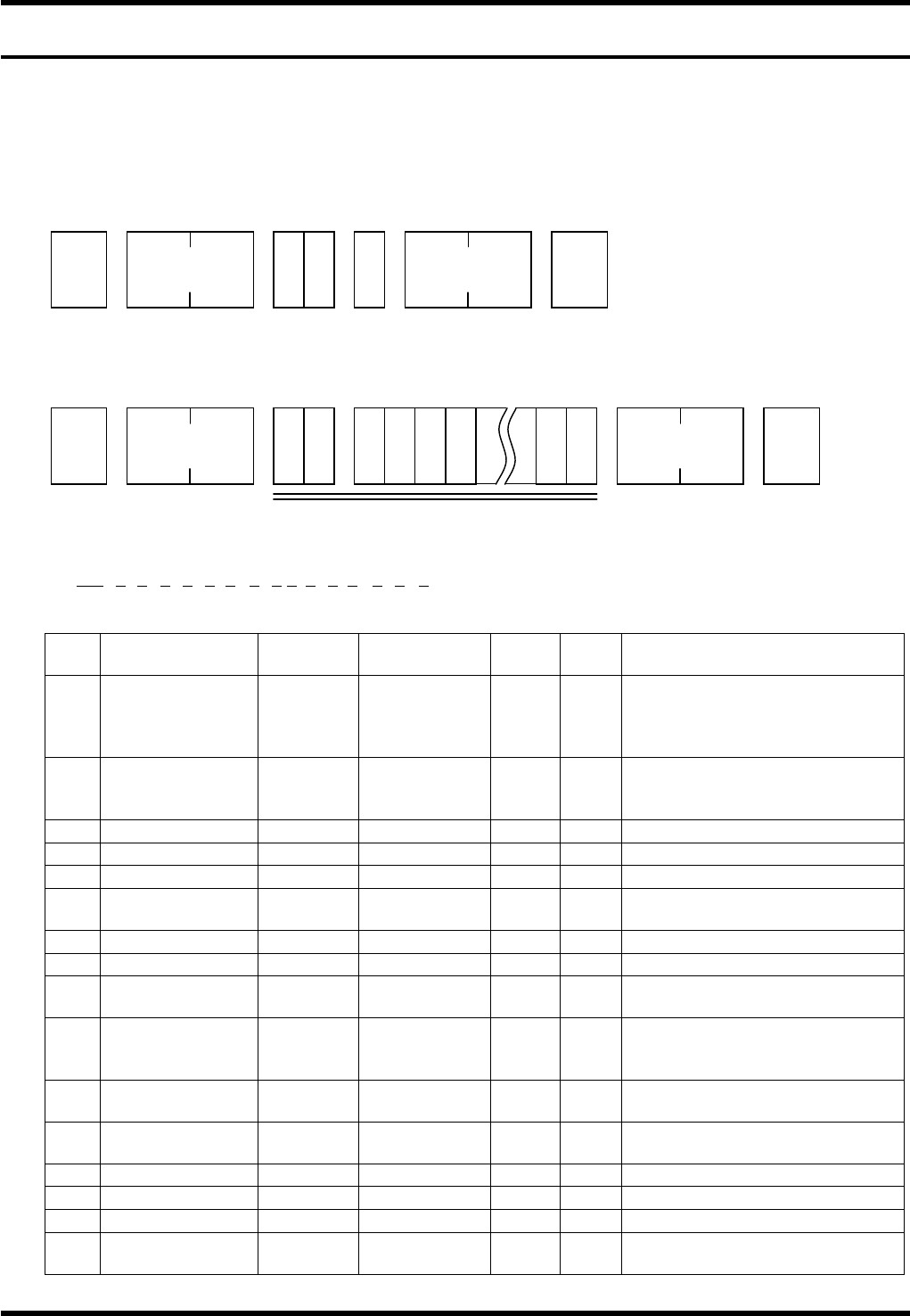
From AVK3, when the host computer sends C0 command to the individual machine data in AVK3, the AVK3
goes into receiving mode, and as a result, can read the individual machine data (C0 command is used) sent
to it.
Data details
When the machine receives the C0 command, an A0 command is returned as acknowledgment.
The host computer receives this A0 command, and using D command (Data transfer command) sends
leading group (one group) of individual machine data to the AVK3.
1) – 1
D0OCAnBnCnDnEnFnGnHnInJnKnLnMnNnOn
1 2 3 4 5 6 7 8 9 10111213 14 15 16
No. Data name
Max.
digits
Input range
Sup-
press
Vari-
able
Remarks
1
Operation
condition
command
2
× ×
Acknowledges as the set data
of movement condition.
When it is omitted, the
following data will be ignored.
2 Z mode 1 0 to 3
×
0 = Priority, 1 = Exchange,
2 = Preparation, 3 =
Connection
3 Priority Z axis 1 0 to 1
×
0 = ZL, 1 = ZR
4 Transfer 1 0 to 2
×
0 = Yes, 1 = No, 2 = Pass
5 Parts prefetch 1 0 to 1
×
0 = Yes, 1 = No
6
In recognition
error
1 0 to 1
×
0 = Continue, 1 = Stop
7 Recovery end 1 0 to 1
×
0 = Continue, 1 = Stop
8 All holes offset 1 0 to 1
×
0 = Yes, 1 = No
9
Optional hole
offset
1 0 to 1
×
0 = Yes, 1 = No
10
PCB
displacement
offset
1 0 to 1
×
0 = Yes, 1 = No
11
PCB inclination
offset
1 0 to 1
×
0 = Yes, 1 = No
12
Modification
offset
1 0 to 1
×
0 = Yes, 1 = No
13
θ axis offset
1 0 to 1
×
0 = Yes, 1 = No
14 Pitch offset 1 0 to 1
×
0 = Yes, 1 = No
15 1st hole offset 1 0 to 1
×
0 = Yes, 1 = No
16
Exchange
connection
1 0 to 1
×
0 = Yes, 1 = No
STX
C 0 G
No. of
characters
ETX
Check sum
STX
D 0
No. of
characters
ETX Check sum
1) -1 to 33

AVK3
HOST COMPUTER SYSTEM
2.4 Downloading Individual Machine Data
D77HEC-52-050A0
2.4-2
=REMARKS=
If the data of 2 to 16 is out of the effective range, ‘A4E01’ is returned.
1) – 2
D0AGAnBnCn
1 2 3 4
No. Data name
Max.
digits
Input range
Sup-
press
Vari-
able
Remarks
1 Aging command 2
× ×
Acknowledges as the set data
of aging.
When it is omitted, the
following data will be ignored.
2 Aging mode 1 0 to 1
×
Aging mode
0 = Valid, 1 = Invalid
3 Anvil short 1 0 to 1
×
Anvil short
0 = Valid, 1 = Invalid
4 Parts detection 1 0 to 1
×
Parts detection
0 = Valid, 1 = Invalid
=REMARKS=
If the data of 2 to 4 is out of the effective range, ‘A4E01’ is returned.
1) - 3
D0PRAnBn
1 2 3
No. Data name
Max.
digits
Input range
Sup-
press
Vari-
able
Remarks
1
Parts remove
support
command
2
× ×
Acknowledges as the set data
of parts remove support
command.
When it is omitted, the
following data will be ignored.
2
Parts remove
support
1 0 to 1
×
Parts remove support
0 = Invalid, 1 = Valid
3 Support position 1 0 to 1
×
Support position
0 = Bottom of camera,
1 = Table origin
1) - 4
D0ECAnBnn
1 2 3
No. Data name
Max.
digits
Input range
Sup-
press
Vari-
able
Remarks
1
Parts exhaust
retry command
2
× ×
Acknowledges as the set data
of parts exhaust retry
command.
When it is omitted, the
following data will be ignored.
2 Retry setting 1 0 to 1
× ×
Retry setting
0 = Invalid, 1 = Valid
3 Retry count 2 0 to 99
×
Retry count

AVK3
HOST COMPUTER SYSTEM
2.4 Downloading Individual Machine Data
D77HEC-52-050A0
2.4-3
1) -5
D0ERFn
1 2
No. Data name
Max.
digits
Input range
Sup-
press
Vari-
able
Remarks
1
EOP recovery
command
2
× ×
Acknowledges as the EOP
recovery command.
When it is omitted, the
following data will be ignored.
2
EOP recovery
setting
1 0 to 1
× ×
EOP recovery setting
0 = Not used, 1 = Used
1) - 6
D0RSFn
1 2
No. Data name
Max.
digits
Input range
Sup-
press
Vari-
able
Remarks
1
Insertion error
non-clear
command
2
× ×
Acknowledges as the insertion
error non-clear command.
When it is omitted, the
following data will be ignored.
2
Insertion error
non-clear
setting
1 0 to 1
× ×
Insertion error non-clear
setting
0 = Can be cleared with
“RESET”.
1 = Cannot be cleared with
“RESET”.
1) - 7
D0JWFn
1 2
No. Data name
Max.
digits
Input range
Sup-
press
Vari-
able
Remarks
1
Jumper wire
waste reduction
command
2
× ×
Acknowledges as the jumper
wire waste reduction
command.
When it is omitted, the
following data will be ignored.
2
Jumper wire
waste reduction
function setting
1 0 to 1
× ×
Jumper wire waste reduction
function setting
0 = Invalid, 1 = Valid
1) - 8
D0RPnn
1 2
No. Data name
Max.
digits
Input range
Sup-
press
Vari-
able
Remarks
1
Command by
production count
2
× ×
Acknowledges as the set data
of production count.
When it is omitted, the
following data will be ignored.
2 Count 2 0 to 99
× ×
Count