Host Computer System.pdf - 第62页
AVK3 HOST COMPUTER SYSTEM 3.4 Upl oading Indivi dual Machine Dat a D77HEC-53- 050-A0 3.4- 1 3.4. Uploading Individua l Machin e Data D77HEC - 53-050-A 0 3.4. 1 Uploading I ndividual M achine Data W ith A VK3, if host com…
AVK3
HOST COMPUTER SYSTEM
3.3 Uploading P.C.B. Data
D77HEC-53-030-A1
3.3-2
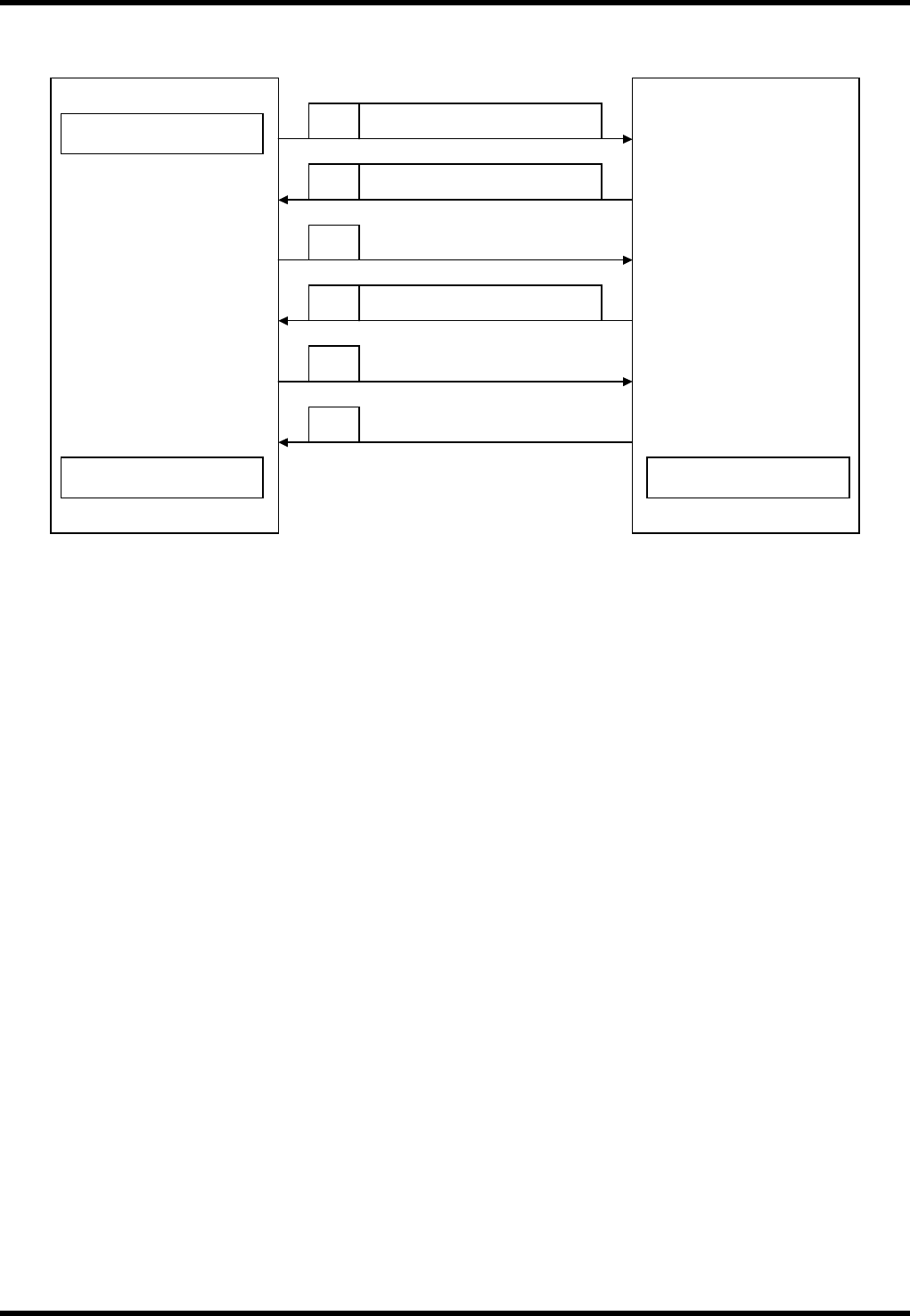
Protocol
Condition
Valid in ONLINE mode only.
If a program which does not exist in the memory is specified, ‘A3’ is returned.
After receiving ‘A2’ from HOST, the processing ends.
Start of upload
Host computer
Sends out PCB data.
AVK3
D 0 PCB data
A 0
C1C Program name
D 0
∗
Requests next data.
A 0
Sends out EOP data.
A 2
End of transmission
End of reception
AVK3
HOST COMPUTER SYSTEM
3.4 Uploading Individual Machine Data
D77HEC-53-050-A0
3.4-1
3.4. Uploading Individual Machine Data
D77HEC-53-050-A0
3.4.1 Uploading Individual Machine Data
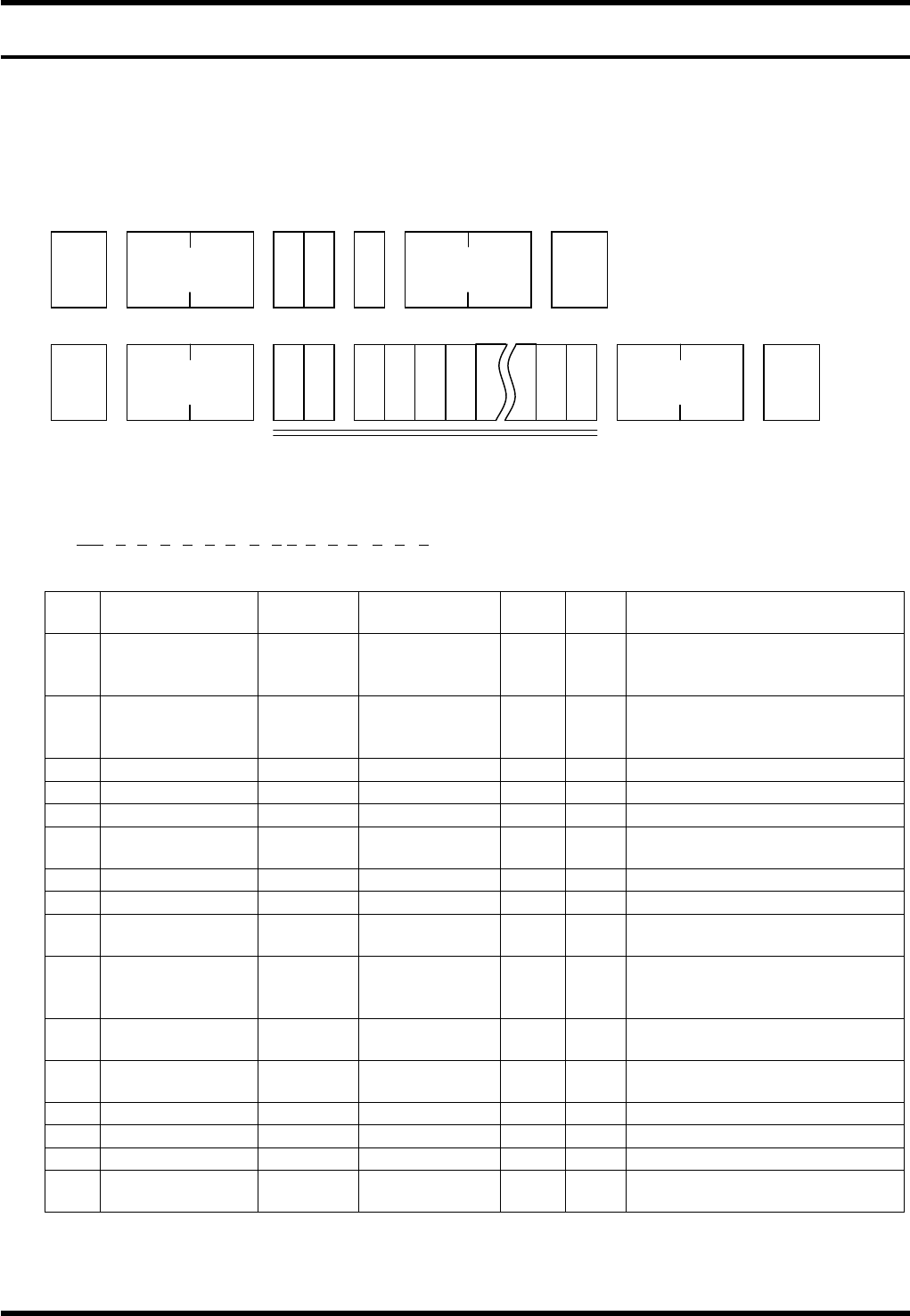
With AVK3, if host computer gives C1 command to AVK3, the AVK3 becomes the receiving mode of the
internal individual machine data and then can send leading block (one block) of individual machine data to
AVK3.
Data details
AVK3 → Host computer
1) -1
D0OCAnBnCnDnEnFnGnHnInJnKnLnMnNnOn
1 2 3 4 5 6 7 8 9 10111213 14 15 16
No. Data name
Max.
digits
Output range
Sup-
press
Fix Remarks
1
Operation
condition
command
2
×
Output command for the
operation condition
2 Z mode 1 0 to 3
×
0 = Priority, 1 = Exchange,
2 = Preparation, 3 =
Connection
3 Priority Z axis 1 0 to 1
×
0 = ZL, 1 = ZR
4 Transfer 1 0 to 2
×
0 = Yes, 1 = No, 2 = Pass
5 Parts prefetch 1 0 to 1
×
0 = Yes, 1 = No
6
In recognition
error
1 0 to 1
×
0 = Continue, 1 = Stop
7 Recovery end 1 0 to 1
×
0 = Continue, 1 = Stop
8 All holes offset 1 0 to 1
×
0 = Yes, 1 = No
9
Optional hole
offset
1 0 to 1
×
0 = Yes, 1 = No
10
PCB
displacement
offset
1 0 to 1
×
0 = Yes, 1 = No
11
PCB inclination
offset
1 0 to 1
×
0 = Yes, 1 = No
12
Modification
offset
1 0 to 1
×
0 = Yes, 1 = No
13
θ axis offset
1 0 to 1
×
0 = Yes, 1 = No
14 Pitch offset 1 0 to 1
×
0 = Yes, 1 = No
15 1st hole offset 1 0 to 1
×
0 = Yes, 1 = No
16
Exchange
connection
1 0 to 1
×
0 = Yes, 1 = No
STX
C 1 G
No. of
characters
ETX
Check sum
STX
D 0
No. of
characters
ETX Check sum
1) -1 to 37

AVK3
HOST COMPUTER SYSTEM
3.4 Uploading Individual Machine Data
D77HEC-53-050-A0
3.4-2
1) -2
D0AGAnBnCn
1 2 3 4
No. Data name
Max.
digits
Output range
Sup-
press
Fix Remarks
1 Aging command 2
×
Output command for the aging
2 Aging mode 1 0 to 1
×
Aging mode
0 = Valid, 1 = Invalid
3 Anvil short 1 0 to 1
×
Anvil short
0 = Valid, 1 = Invalid
4 Parts detection 1 0 to 1
×
Parts detection
0 = Valid, 1 = Invalid
1) -3
D0PRAnBn
1 2 3
No. Data name
Max.
digits
Output range
Sup-
press
Fix Remarks
1
Parts remove
support
command
2
×
Output command for the parts
remove support
2
Parts remove
support
1 0 to 1
×
Parts remove support
0 = Valid, 1 = Invalid
3 Support position 1 0 to 1
×
Support position
0 = Bottom of camera,
1 = Table origin
1) -4
D0ECAnBnn
1 2 3
No. Data name
Max.
digits
Input range
Sup-
press
Fix Remarks
1
Parts exhaust
retry command
2
×
Command for the parts
exhaust retry
2 Retry setting 1 0 to 1
×
Retry setting
0 = Invalid, 1 = Valid
3 Retry count 2 0 to 99
×
Retry count
1) -5
D0ER Fn
1 2
No. Data name
Max.
digits
Input range
Sup-
press
Fix Remarks
1
EOP recovery
command
2
×
Command for the EOP
recovery
2
EOP recovery
setting
1 0 to 1
×
EOP recovery
0 = Invalid, 1 = Valid