STM1-S_SDV_Maintenance(Eng_Ver1).pdf - 第10页
Chap ter 1 This Chapter describes the work environment and working tools for the maintenance of the machine. Conditions fo r Main t e nanc e Multi -Func tional Placer ST M1-S M ain ten an ce Ha nd bo ok 1-1 Common W orki…

STM1-S Maintenance Handbook
Chapter 6
Yearly Inspection and Appendix
Cleaning The Ionizer Nozzle ..................................... 6-1
Replacing the Fuse ....................................................6-3
Consumable Parts List ............................................... 6-5
Chapter 5
Monthly Inspection
Cleaning the Head Spindle ....................................... 5-1
Inspection and cleaning conveyor sensor .................5-3
Checking and cleaning cover cooling fan ................5-5
Checking and replacing the cover cooling fan filter 5-6
Cleaning and apply grease the Head LM Guide, Ball Spline
5-7
Cleaning and Lubricating X Frame LM Guide, Ball Screw
5-8
Cleaning and Lubricating Y Frame LM Guide ..........5-9
Cleaning and Lubricating the Y Frame Ball screw ...5-11
Cleaning the Ionizer Nozzle .................................... 5-13
Cleaning the Cover ................................................. 5-15
Inspect and cleaning the Y Cable Duct Cooling Fan 5-16
Chapter 1
This Chapter describes the work environment and working tools for the maintenance of
the machine.
Conditions for Maintenance
Multi-Functional Placer
STM1-S Maintenance Handbook
1-1
Common Working Procedure before Maintenance
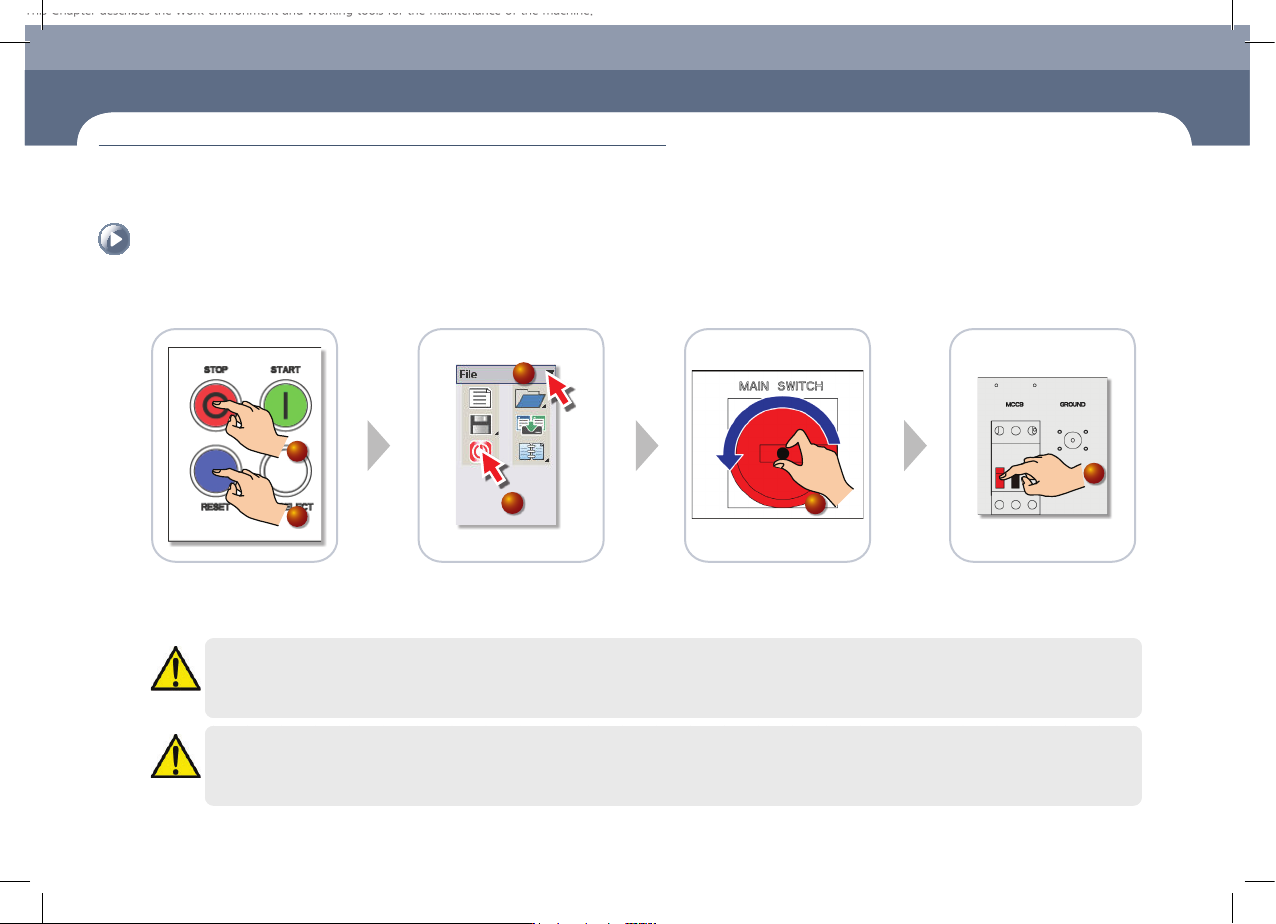
1. How to turn off the power supply
Turn off the main switch
① Press the 'STOP' button
② Press the 'RESET' button
③ Select the File Menu
④ Click the MMI 'EXIT' icon
⑤ If a message reading "You can
turn off the system power supply
now" appears on the monitor,
turn off the main switch.
⑥ Main Circuit Breaker OFF
1
2
4
3
5
6
Warning
System needs to be shut down after normally ending the MMI, otherwise, the machine might be damaged and injury could occur due to system error caused by
irregular shut down. Be sure to shut down the system after normally ending the MMI
Warning
If you do not turn off the main circuit breaker in the left lower cover of rear side before the maintenance, serious injury could happen. Must turn off the Main
Circuit Breaker before servicing. (Press the red switch.)
Chapter 1
Conditions for Maintenance
This Chapter describes the work environment and working tools for the maintenance of the machine.
Common Working Procedure before Maintenance
Chapter 1
This Chapter describes the work environment and working tools for the maintenance of
the machine.
Conditions for Maintenance
Multi-Functional Placer
STM1-S Maintenance Handbook
1-2
Common Working Procedure before Maintenance
Conditions for Maintenance
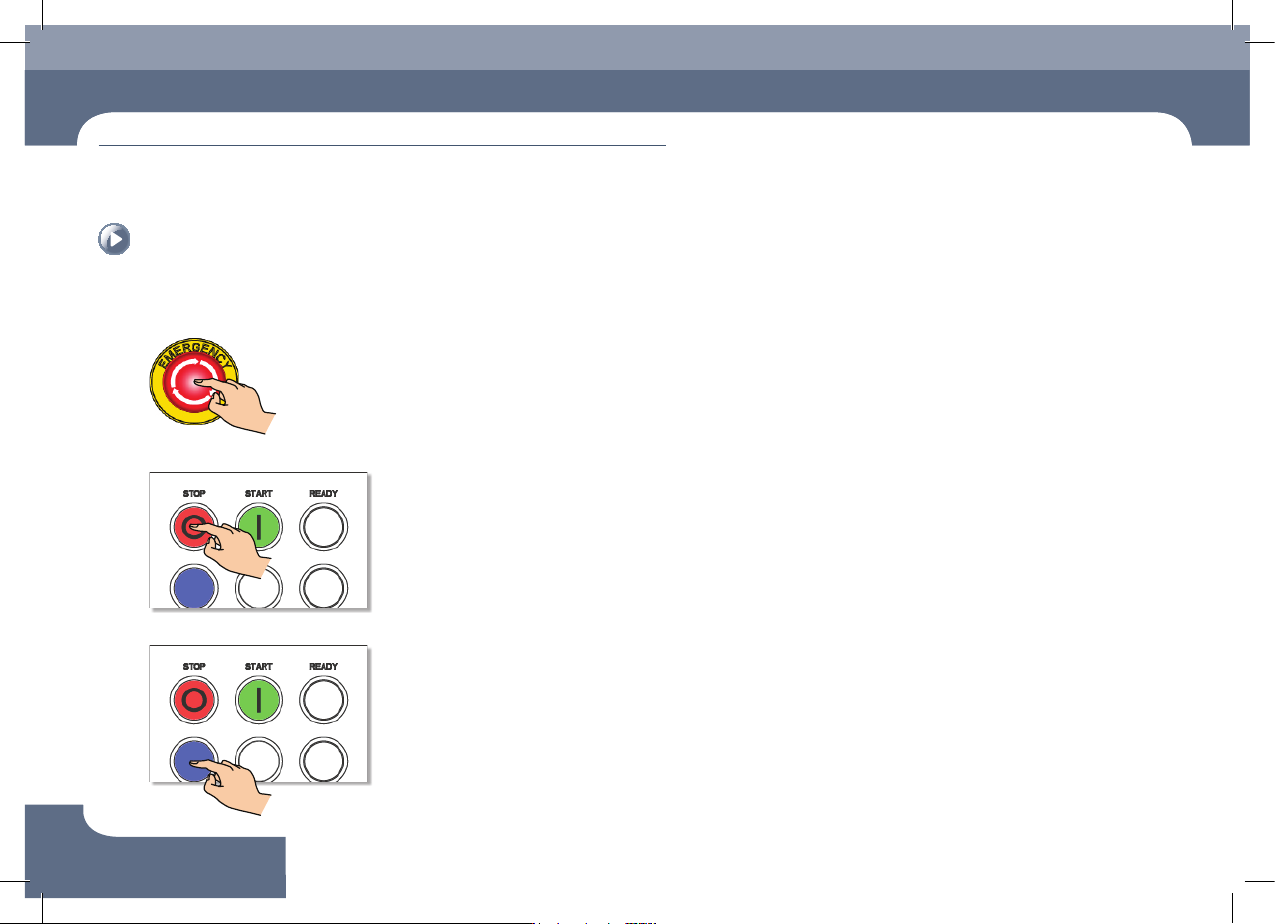
2. How to perform emergency stop
Step 1.
Press the 'EMG' switch
Step 2.
Press the 'STOP' button
Step 3.
Press the 'RESET' button