MPM UP2000印刷机中文操作手册 - 第49页
5 5. Restore Sy stem 載回備份檔案磁片 About to RESTORE system f iles from : ( 將 A 磁碟機資料備份載回到機器 A : : : :內硬碟 ) Pr ess NEXT to Continue, or EXIT to Quit. ( 按 NEXT 繼續 , 按 EXIT 離開 ) Insert bac kup disk 1 in drive A: ( 插入備份磁片到 A: 磁碟機…

4
3. 點取 OK(確定)按鈕,表示要刪除程式。
4. 點取 CANCEL(取消)按鈕,表示不要刪除程式。
4. Backup System 備份已存入檔案
About to BACKUP system files(將系統資料與程式檔案備份到 A 磁碟機)
A:
::
:
Press NEXT to Continue, or EXIT to Quit.(按 NEXT 繼續,按 EXIT 離開)
1 Disk is required for this backup. (需要一片磁片)
Press NEXT to Continue, or EXIT to Quit. (按 NEXT 繼續,按 EXIT 離開)
※
※※
※因程式檔案多寡,所需要磁片數目不同
Insert blank disk in drive A: (插入空白磁片到 A 磁碟機)
Disk 1 Disk 1 (磁片第一片)
Press NEXT to Continue, or EXIT to Quit. (按 NEXT 繼續,按 EXIT 離開)
(檢查是否為空白磁片,檢查完後開始備份系統資料與程式檔案)
Backup complete(備份磁片完成)
Press NEXT to Continue(按 NEXT 繼續)
About to BACKUP system files from:
A:
::
:
Press NEXT to Continue, or EXIT to Quit.
1 Disk is required for this backup.
Press NEXT to Continue, or EXIT to Quit.
Insert blank disk in drive A:
Disk 1 Disk 1
Press NEXT to Continue, or EXIT to Quit.
Checking disk drive
Backup complete
Press NEXT to Continue
锡膏印刷机 www.smt11.cn

5
5. Restore System 載回備份檔案磁片
About to RESTORE system files from: (將 A 磁碟機資料備份載回到機器
A:
::
:內硬碟)
Press NEXT to Continue, or EXIT to Quit. (按 NEXT 繼續,按 EXIT 離開)
Insert backup disk 1 in drive A: (插入備份磁片到 A:磁碟機)
Press NEXT to Continue, or EXIT to Quit. (按 NEXT 繼續,按 EXIT 離開)
Ready to restore system(準備開始載回備份磁片)
Press NEXT to Continue, or EXIT to Quit. (按 NEXT 繼續,按 EXIT 離開)
(檢查是否為備份磁片,檢查完後開始載回備份系統資料與程式檔案)
Restore complete(載回備份磁片完成)
Press NEXT to Continue. (按 NEXT 繼續)
About to RESTORE system files from:
A:
::
:
Press NEXT to Continue, or EXIT to Quit.
Insert backup disk 1 in drive A:
Press NEXT to Continue, or EXIT to Quit.
Restore complete
Press NEXT to Continue.
Ready to restore system
Press NEXT to Continue, or EXIT to Quit.
Checking backup
锡膏印刷机 www.smt11.cn
6
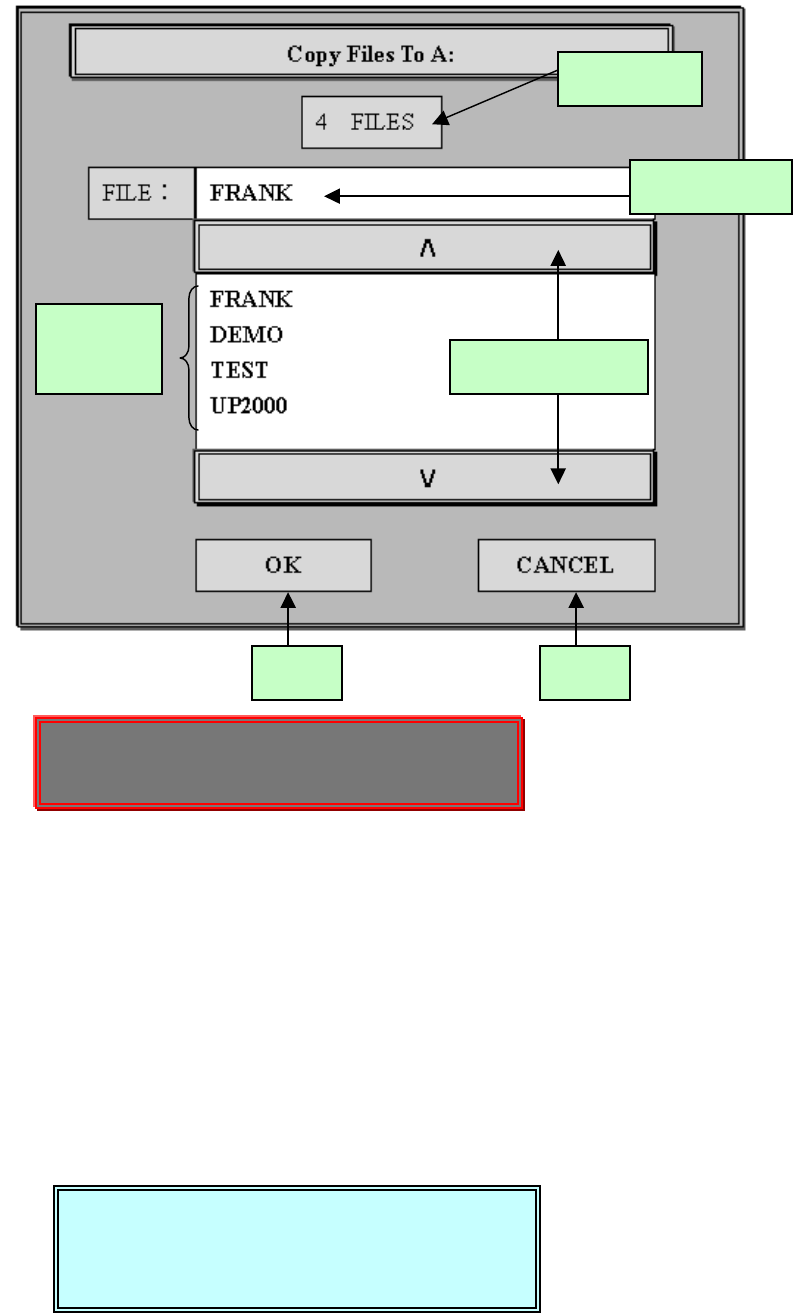
6. File Upload 將已存入程式檔案存到磁片
Press SELECT on scroll bar to go up/down. (在捲軸棒,按 SELECT 上
下捲動)
Press NEXT on scroll bar to page up/down . (在捲軸棒,按 NEXT 翻頁)
操作程序:
1.在程式顯示區找尋你所要的程式,利用捲軸棒來捲動或翻頁程式顯示區,
然後點取你所要的程式。
2.點取的程式會呈現藍色。
3.點取 OK(確定)按鈕,表示要存入磁片。
4.點取 CANCEL(取消)按鈕,表示不要存入磁片。
程式顯
示區
程式總數
所選的程式
上、下頁捲軸棒
確定 取消
Press SELECT on scroll bar to go up/down.
Press NEXT on scroll bar to page up/down .
File transfer complete.
1 files transferred
Press NEXT to Continue.
锡膏印刷机 www.smt11.cn