00193922-01.pdf - 第206页
4 Setting up and commissioning User Manual SIPLACE HF Series 4.6 Adapting the com ponent trolley to the PCB transport height Software Version S R.505.xx 05/2004 US Edition 206 4.6.3 Changing the co mponent trolley height…

User Manual SIPLACE HF Series 4 Setting up and commissioning
Software Version SR.505.xx 05/2004 US Edition 4.6 Adapting the component trolley to the PCB transport height
205
With the default PCB height of 830 mm, all the height marking pins disappear beneath the side
walls of the top part of the component trolley. The marking pins are pushed out by a pressure
spring when the top part is raised. The top part of the component trolley then lies on these marking
pins.
4.6.1 Warning instructions
WARNING
Only Siemens engineers or qualified personnel are permitted to adjust the component trolley
height.
Æ Always follow the applicable accident prevention regulations.
Æ Remove all the feeders from the component table bed if you want to adjust the height of the
component feeder table.
4.6.2 Tools and equipment
You will need the following tools and equipment to adjust the height of the component trolley:
– Flange screwdriver for M6 bolts
– Eye-bolt with M12 thread for raising the top part of the component trolley
– Lifting device for raising the top part of the component trolley, carrying capacity at least 120 kg
4 Setting up and commissioning User Manual SIPLACE HF Series
4.6 Adapting the component trolley to the PCB transport height Software Version SR.505.xx 05/2004 US Edition
206
4.6.3 Changing the component trolley height
WARNING
Lift all the feeders off the component trolley bed.
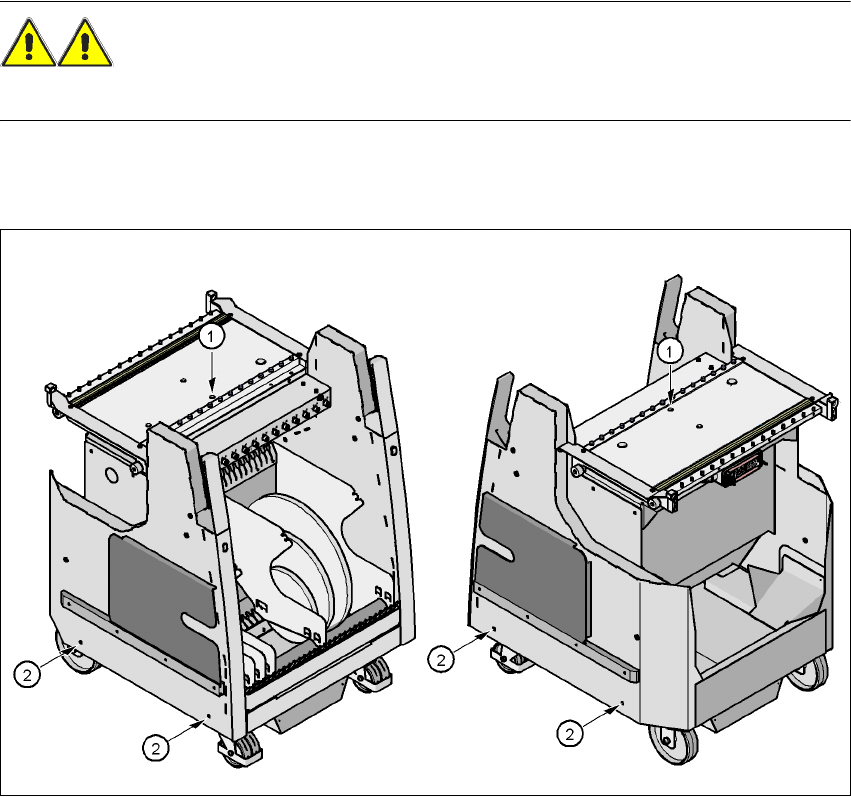
Æ Attach the hooks of the lifting device to the eye-bolt (item 1).
Æ Loosen the 4 flange bolts (item 2)
4
Fig. 4.6 - 2 Positions of the eye-bolt and flange bolts
(1) M12 hole for eye-bolt
(2) Flange bolts M6 x 12, 4x
4.6.3.1 Increasing the component trolley height
Æ Raise the component trolley top part until the pins for the desired height are pushed out.
Æ Slacken the rope of the lifting device slightly until the top part lies on the pin.
Æ Tighten the 4 flange bolts.
Æ Screw the eye-bolt into the component table surface.

User Manual SIPLACE HF Series 4 Setting up and commissioning
Software Version SR.505.xx 05/2004 US Edition 4.6 Adapting the component trolley to the PCB transport height
207
4.6.3.2 Reducing the component trolley height
For this task you will need two other people to press in the height marking pins to allow the top
part to be lowered.
WARNING
Do not use your fingers to press the marking pin back into the openings. Use a flat object, such
as a screwdriver blade or a ruler, otherwise you may hurt your fingertips.
Æ Lower the top part to the required height.
Æ Check that the top part is lying on the marking pins.
Æ Tighten the four flange bolts.
Æ Unscrew the eye-bolt from the component trolley bed.