00193922-01.pdf - 第229页
User Manual SIPLAC E HF Series 5 Tasks on the m achine Software Version SR.505.xx 05/2004 US Edition 5.10 Note operating status indicator lamp 229 5.10 Note operati ng st atus indic ator lam p The indic ator lamp is use …
5 Tasks on the machine User Manual SIPLACE HF Series
5.9 Docking the component trolley in or out Software Version SR.505.xx 05/2004 US Edition
228
5.9.4 Docking in the component trolley
CAUTION
Check that the placement head is outside the range of the component trolley.
Æ Press the two buttons on the hand guard at the same time (items 1 and 2 in Fig. 5.9 - 2, page
226
) until the trolley is fully docked in.
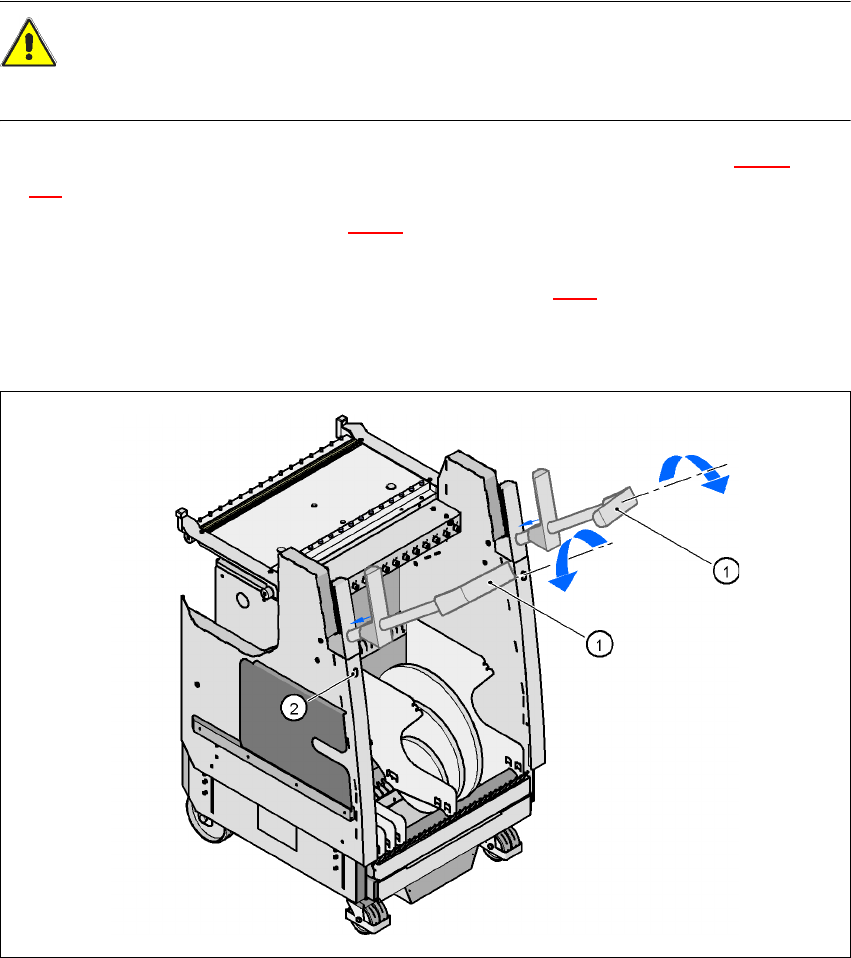
Æ Swivel the handles up (item 1 in Fig. 5.9 - 3) and allow the handles to slide into the component
trolley. They will first engage approximately 6 cm before the end position.
Æ Release the lock by pressing the push-button (item 2 in Fig. 5.9.3). The handles will then slide
into their end position.
Æ Close the protective cover.
5
Fig. 5.9 - 4 Component trolley - Sliding in the handles
(1) Turn the handles
(2) Release the lock
User Manual SIPLACE HF Series 5 Tasks on the machine
Software Version SR.505.xx 05/2004 US Edition 5.10 Note operating status indicator lamp
229
5.10 Note operating status indicator lamp
The indicator lamp is used to signal operating statuses and malfunctions of the placement system.
5.10.1 Description of the functions
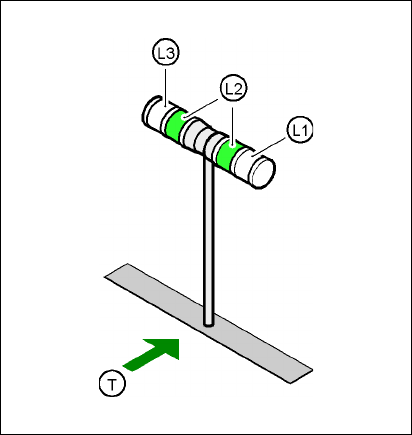
Fig. 5.10 - 1 Operating status indicator lamp
L1 Fault indicator lamp (white, right)
L2 Operating status lamp (green, both lamps switched in parallel)
L3 Fault indicator lamp (white, left)
T Direction of PCB transport
5.10.2 General operating statuses
–
Operating status lamp (green) on continuously
The placement system is in service.
–
Operating status lamp (green) flashes
The placement system is waiting for a PCB on the input belt or the placement system is waiting
until the output belt is free.
–
Right white fault indicator lamp L1 flashes
One or more tracks are empty on the right-hand side of the placement system. The placement
system continues to place any remaining components.

5 Tasks on the machine User Manual SIPLACE HF Series
5.10 Note operating status indicator lamp Software Version SR.505.xx 05/2004 US Edition
230
–
Left white fault indicator lamp L3 flashes
One or more tracks are empty on the left-hand side of the placement system. The placement
system continues to place any remaining components.
–
Right white fault indicator lamp (L1) on continuously - green operating status lamp (L2) off
An error has occurred on the right-hand side of the placement system -> the placement system
has stopped.
–
Left white fault indicator lamp (L1) on continuously - green operating status lamp (L2) off
An error has occurred on the left-hand side of the placement system -> the placement system
has stopped.
–
Both white fault indicator lamps (L1 and L3) on continuously - green operating status lamp off
An error has occurred that affects the entire placement system -> the placement system has
stopped.
5.10.3 Programmed operating status displays
The following table shows the programmed operating status displays in the standard configuration
(version as supplied) and lists their meaning on the individual lamps of the main fault indicator.
The entries in the table next to "flashes" refer to the frequency with which the relevant lamp flashes
for a given event. The entry (1, 5), for example, can be explained as follows:
– The first number in the brackets indicates the time, expressed in 100 msec intervals, for which
the fault indicator lamp is switched on, i.e. 1 x 100 msec in the above example.
– The second number in the brackets indicates the time, expressed in 100 msec intervals, for
which the fault indicator lamp is switched off, i.e. 5 x 100 msec in the above example.
5
L1 (white)
(right lamp)
L2 (green) L3 (white)
(left lamp)
Meaning
Status display
flashes (1,10) flashes (7,7) flashes (1,10) Reference run
unchanged flashes (1,5) unchanged Waiting until axes in position
unchanged flashes (7,7) unchanged Waiting for setup data
unchanged flashes (7,7) unchanged Waiting for cluster data
unchanged flashes (7,7) unchanged Load table program
unchanged flashes (7,7) unchanged Position detection
unchanged flashes (1,10) unchanged Bad fiducial detection
unchanged flashes (7,7) unchanged Nozzle configuration test
unchanged flashes (7,7) unchanged Feeder position detection
unchanged flashes (7,7) unchanged One track is empty