00193922-01.pdf - 第321页
User Manual SIPLAC E HF Series 7 Station extensions Software Version SR.505.xx 05/2004 US Edition 7.8 PCB alignment 321 7.8 PCB alig nment 7.8. 1 General PCBs t o be proc essed some tim es have a le ngth to wid th rati o…
7 Station extensions User Manual SIPLACE HF Series
7.7 Multicolor PCB camera (type 18) 21 Software Version SR.505.xx 05/2004 US Edition
320
– White lighting
This type of illumination is used for standard PCBs with tinned fiducials.
– Blue oblique lighting
In most cases, this can be used to greatly improve the contrast with bright fiducials on a light
base material, such as ceramic or CEM. Fiducials covered with solder resist can also be de-
tected better on a light background.
– Infrared lighting
This type of illumination is particularly useful for fiducials that are covered with solder resist or
for fiducials on flex materials. It is also sometimes possible to improve detection of silver/plat-
inum fiducials on ceramic. This should be tested by carrying out a test centering or placement
run.
User Manual SIPLACE HF Series 7 Station extensions
Software Version SR.505.xx 05/2004 US Edition 7.8 PCB alignment
321
7.8 PCB alignment
7.8.1 General
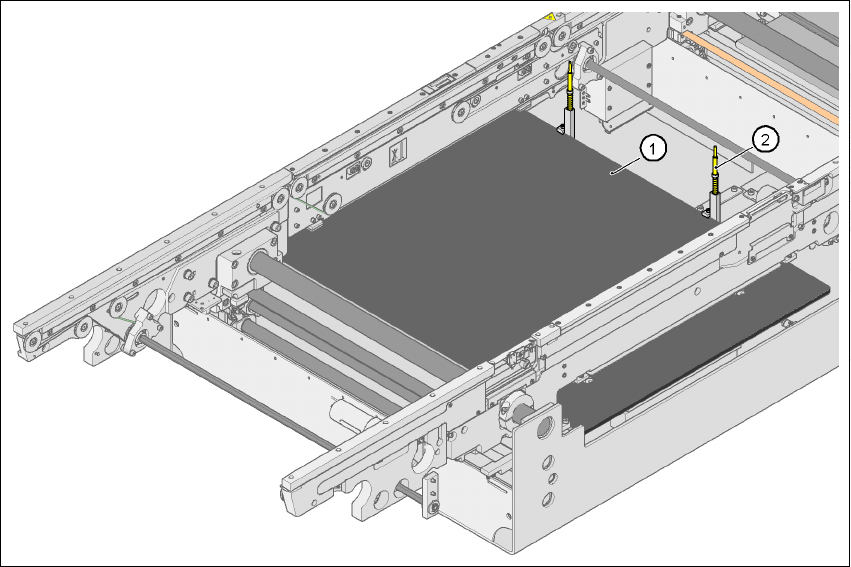
PCBs to be processed sometimes have a length to width ratio of 1:2 or worse. This means that
the shorter side of the PCB points in the direction of travel. During travel, such PCBs may twist
slightly and, as a result, the fiducials no longer lie within the PCB vision camera's search window.
In this case, the "PCB alignment" option ensures that these PCBs are realigned precisely at the
stopping position.
If PCBs with recesses in the direction of travel are processed, this may result in different process-
ing positions on machines with mechanical stoppers (HS-50, S-25 HM, F5 HM) and on machines
that monitor this position with laser light barriers (HF, HS-60, S-27 HM). The "PCB alignment" op-
tion ensures that the PCBs are stopped at the same position on all PCB conveyors. The "PCB
alignment" option is available for both single and dual conveyors.
7
Fig. 7.8 - 1 PCB alignment
(1)Lifting table
(2)PCB stop
7 Station extensions User Manual SIPLACE HF Series
7.8 PCB alignment Software Version SR.505.xx 05/2004 US Edition
322
7.8.2 Description of the functions
The PCB is transported into the placement area until the laser light barrier triggers the stop signal
for the PCB conveyor. The lifting table with the PCB stops then moves up into a position in which
the PCB is not yet clamped and can still be moved by the conveyor belts. The two PCB stops are
level with the PCB, and the PCB supports (magnetic pins) are already in contact with the PCB.
The two conveyor belts move the PCB against the PCB stops and align them at the same time.
The lifting table then moves into its top end position, clamps the PCB and releases it from the PCB
stops so as not to affect the placement process. After the placement process, the lifting table and
PCB alignment are lowered and the PCB is moved on.
7