00193922-01.pdf - 第81页
User Manual SIPLAC E HF Series 2 Operational safety Software Vers ion SR.505.xx 05/2004 US Edition 2.10 Lock out and ta g out procedure 81 – power s upply . Æ Lock ou t the machi ne. – Attach a loc k whenev er possib le,…

2 Operational safety User Manual SIPLACE HF Series
2.10 Lock out and tag out procedure Software Version SR.505.xx 05/2004 US Edition
80
2.9.2 Placement system switched off at the main power switch and disconnected
...
The automatic placement system is unpowered, apart from slight residual voltages in the power
supply unit.
2.9.3 Compressed air conditions in the machine after switching off at the main
power switch
When the system is switched off at the main power switch (item 1 in Fig. 2.9 - 1) or if the power
supply fails, the electrically-controlled main valve Y1 of the compressed air unit closes (item 1 in
Fig. 2.8 - 1
). The pressure will drop to 0 MPa (0 bar) within 5 seconds.
2.10 Lock out and tag out procedure
2.10.1 Purpose and scope
Before performing any preventive maintenance work or service work, a procedure of locking and
tagging must be followed. The procedure, when followed correctly eliminates the possibility of an
employee being injured.
PLEASE NOTE These procedures represent the minimum lock/tag out requirements. Any addi-
tional safeguards needed to complete work safely can be specified by facilities supervision, the
safety officer, the safety committee and the health department. 2
2.10.2 Description
Whenever it becomes necessary to isolate, control and release energy, the following procedure is
to be followed
Æ Notify affected employees.
Æ Shut down the equipment. Carry out all normal stopping procedures, such as
– pressing the Stop button,
– shutting down the station computer
– switching off the placement machine at the main switch
Æ Isolate the machine from all its energy sources such as
– compressed air supply and
User Manual SIPLACE HF Series 2 Operational safety
Software Version SR.505.xx 05/2004 US Edition 2.10 Lock out and tag out procedure
81
– power supply.
Æ Lock out the machine.
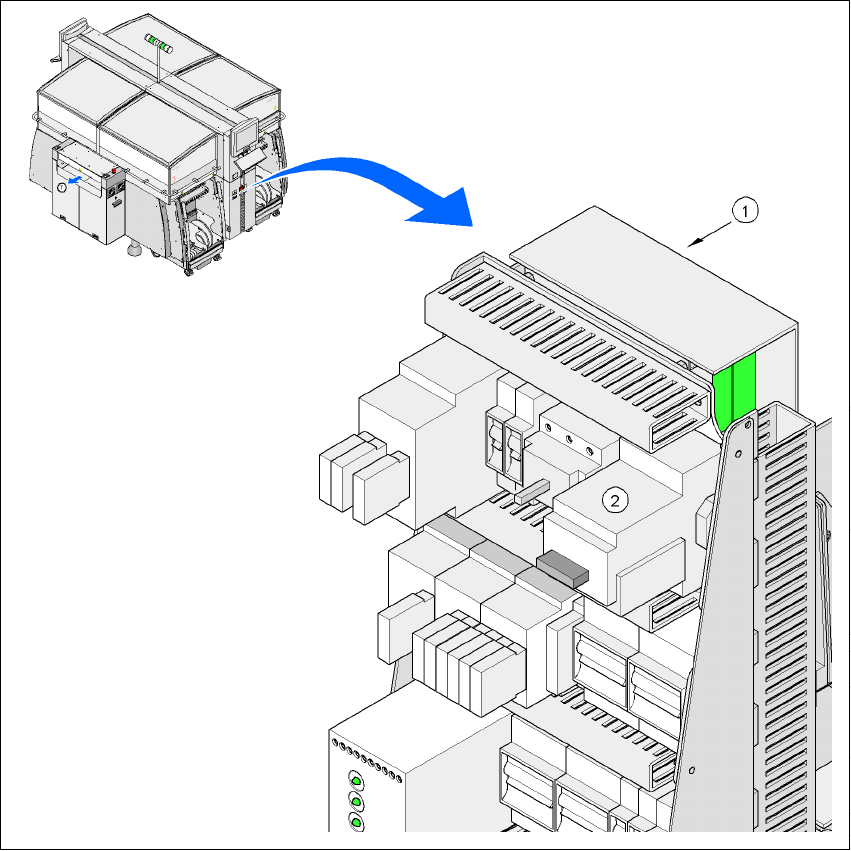
– Attach a lock whenever possible, e.g. to the motor contactor.
2
Fig. 2.10 - 1 Position of the motor contactor
2
(1)Power supply
(2)Motor contactor
(T)Direction of PCB transport
2 Operational safety User Manual SIPLACE HF Series
2.10 Lock out and tag out procedure Software Version SR.505.xx 05/2004 US Edition
82
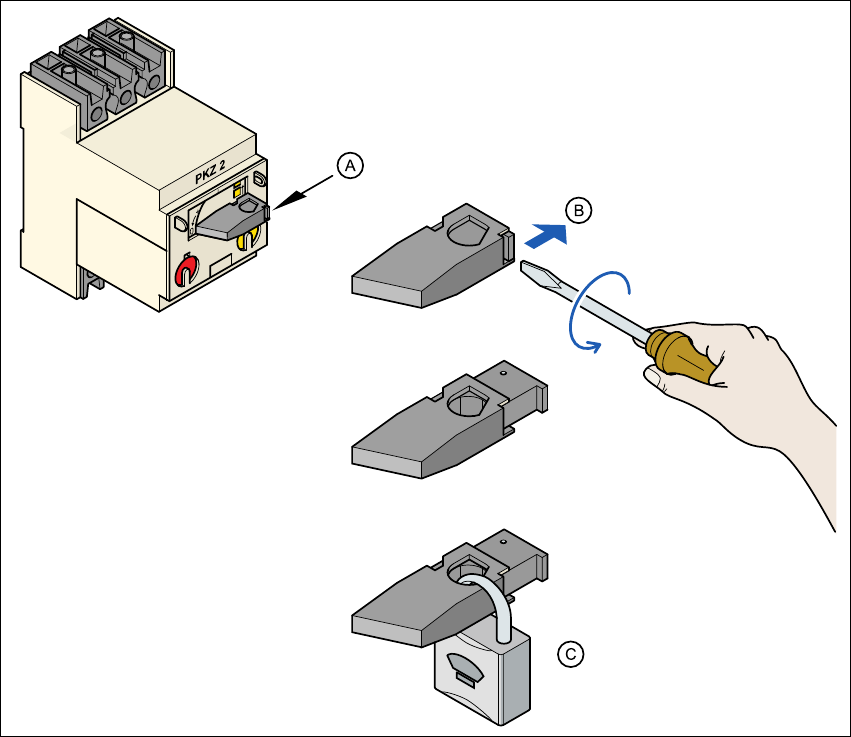
Fig. 2.10 - 2 Locking the motor contactor
2
– The tag out alternative:
If a machine can be locked out, it must be. However, there are situations where energy
isolating devices cannot accommodate locks. In these cases, the energy isolating devices
must be tagged to warn employees that the machine is de-energized for servicing. The tag
must be securely fastened, it must be placed in a position visible to all and it may only be
removed by the person who attached it. 2
Æ Release stored energy
Stored energy in the compressed air supply or electrical energy in electrolytic capacitors must
be released by appropriate means. 2
(A)Turn the operating lever counter-clockwise.
(B)Use the screwdriver to push the locking lug out of the operating lever.
(C)Secure the operating lever with a padlock.