00197551-01_MM_CPP-CP-Twin_Kunde_en.pdf - 第32页
Maintenance tasks for CPP Performing Maintenance Tasks 3.5.10 Oiling the Star Bearing 32 Maintenance Manual SIPLACE Placement Heads CPP, C&P20, Twin 3.5.10 3 . 5 . 1 0 O ilin g t h e S t a r B e a r in g Oiling the S…
Maintenance tasks for CPP
3.5.9 Replacing the Filter Disks Performing Maintenance Tasks
Maintenance Manual SIPLACE Placement Heads CPP, C&P20, Twin 31
3.5.9
3.5.9 Replacing the Filter Disks
Replacing the Filter Disks
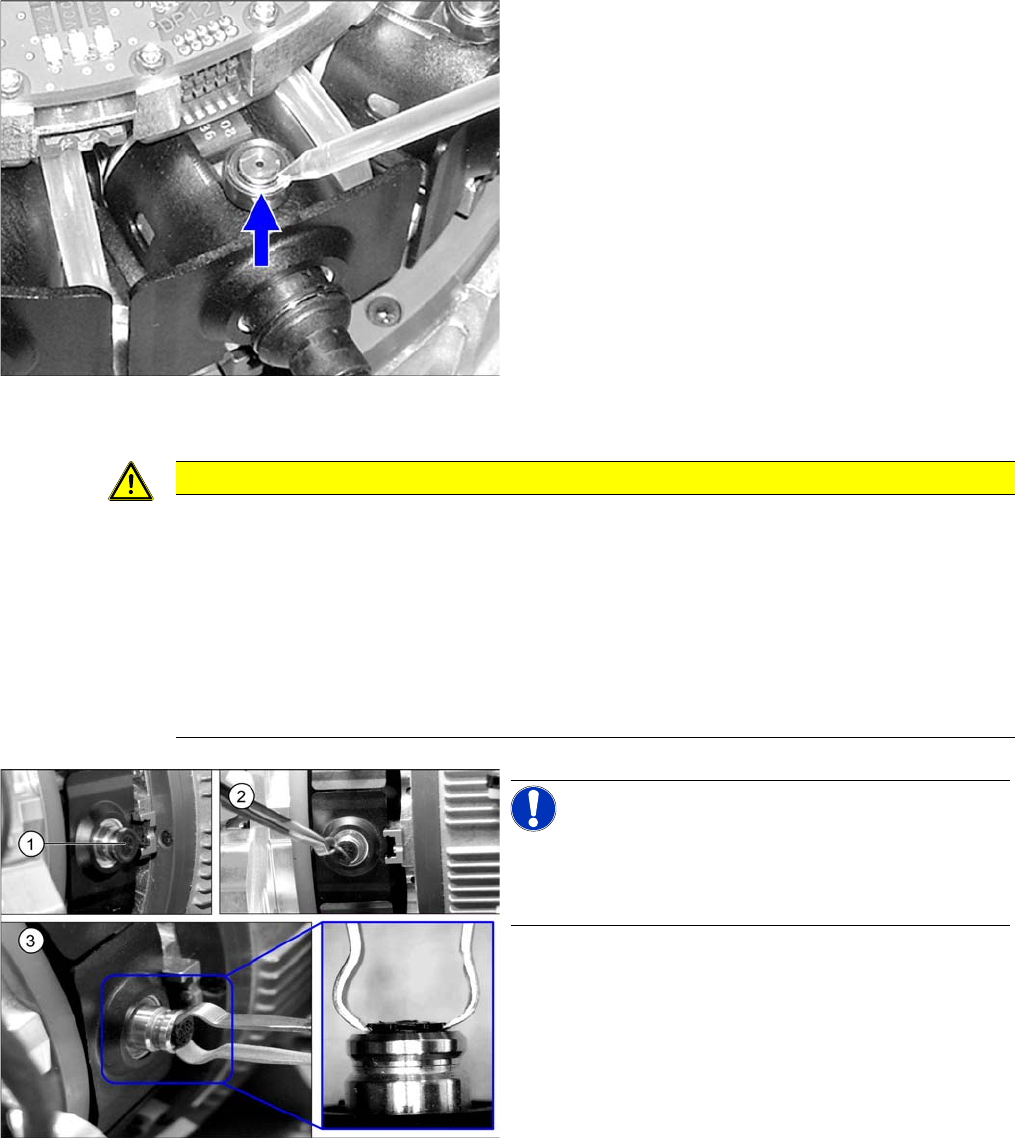
► For this maintenance task, use the black combitip
with Klüberalfa DH 3-100.
► Set the multipette to 1 µl.
► Mark the first segment by removing a nozzle.
► Position the multipette on the top edge of the locking
pin and apply 1 µl of lubricant.
► Rotate the driver bearing by one rotation.
► Oil all driver bearings as described above.
► Fit the removed nozzle back into place.
CAUTION
Avoid damage!
Even minor damage to the inside of the DP drive can lead to vacuum system leakage or to
breakage of the bellows.
► Use special tweezers [03092319-xx] to remove the filter disks.
► Do not use any sharp objects to remove the filter disks.
► Do not use any other tools (pipe cleaners, compressed air) to clean the hollow shaft of the
DP drive.
► Do not pierce the filter disks with any objects. That would damage the bellows.
NOTICE!
Recommendation
We recommend replacing all filter disks during each
maintenance cycle.
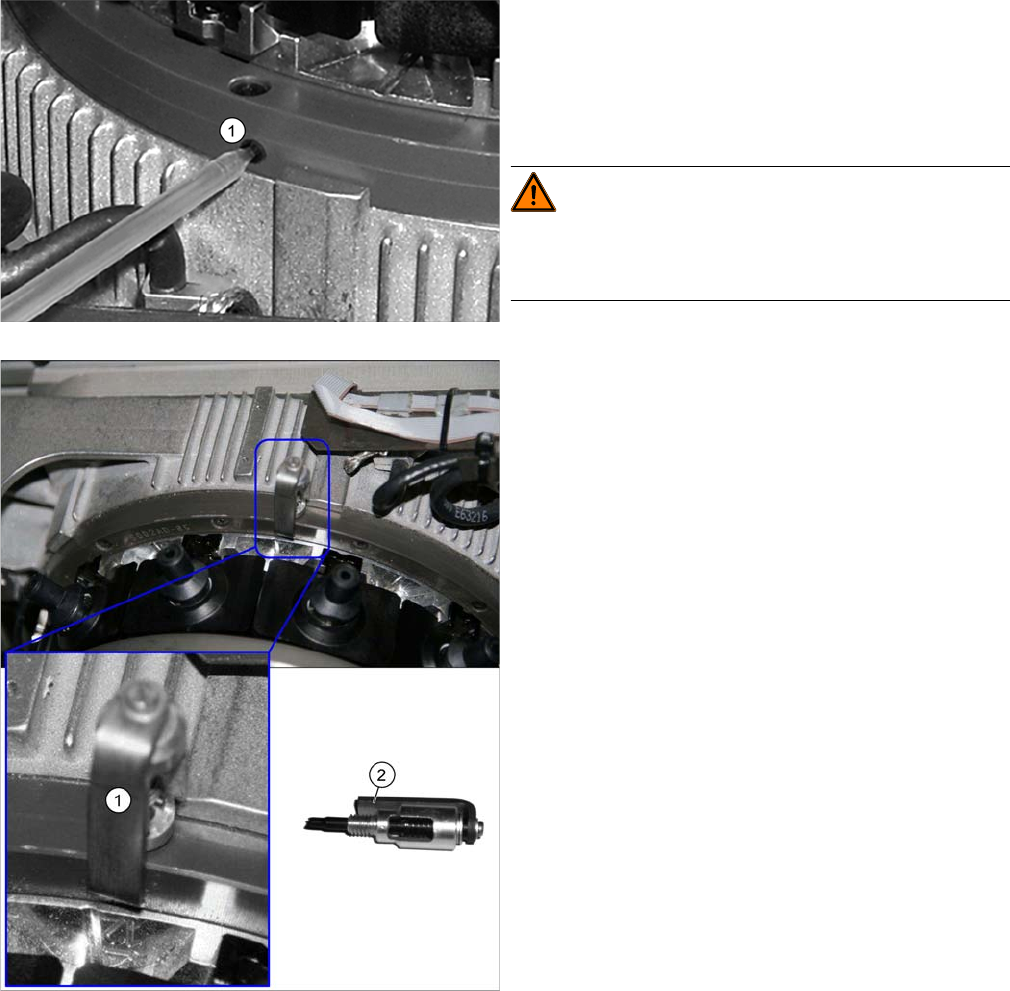
To remove and install a filter disk (1), proceed as follows:
► Pull the nozzle off the DP drive.
► (2) Remove the outer rubber lip of the filter disk. The
inner plastic section of the filter disk remains in the
DP drive.
► (3) Carefully pull the inner plastic part of the filter disk
out of the DP drive.
► Fit the new filter disk straight onto the DP drive. The
filter disk must engage audibly.
Maintenance tasks for CPP
Performing Maintenance Tasks 3.5.10 Oiling the Star Bearing
32 Maintenance Manual SIPLACE Placement Heads CPP, C&P20, Twin
3.5.10
3.5.10 Oiling the Star Bearing
Oiling the Star Bearing
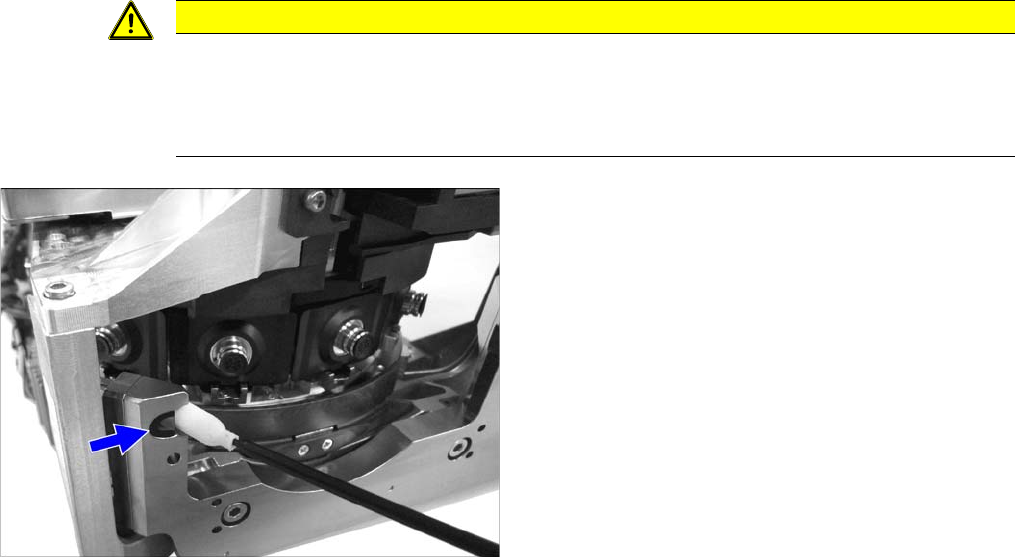
► For this maintenance task, use the green combitip with CPP Isoflex Topas NCA 5051.
► Set the multipette to 2 µl.
► Loosen the grub screw on the left side of the star bearing.
► Mark the first segment by removing a nozzle.
► Position the combitip in the opening (1) and apply 2 µl
of lubricant. Remove the multipette from the service
opening and turn the star by 30° (= one segment) on-
wards. Repeat this step 24 times so that the star
moves two full rotations. A total of 24 x 2 μl lubricant
must be applied.
WARNING!
If the star is turned on while the multipette tip is still in the
bearing, the multipette could break off and damage the
bearing.
► Screw the lubricant distributor (1) into the opening in
the star bearing as far as possible. The bracket (2)
must be placed on the side of the star bearing. This is
the only way to ensure the correct orientation of the
lubricant distributor.
The lubricant distributor is used to evenly distribute
the lubricant.
► Rotate the star three times by 360 degrees.
► Remove the lubricant distributor.
► Screw the grub screw back in.
► Fit the removed nozzle back into place.
Maintenance tasks for CPP
3.5.11 Cleaning the Component Sensor Performing Maintenance Tasks
Maintenance Manual SIPLACE Placement Heads CPP, C&P20, Twin 33
3.5.11
3.5.11 Cleaning the Component Sensor
Cleaning the Component Sensor
CAUTION
Prism, cottonwool buds
► Take care not to damage the component sensor prisms.
► Make sure that you do not use the cottonwool buds soaked in oil from cleaning the sleeves.
Always use a new cottonwool bud!
► Remove the protective cap from the component sen-
sor.
► Clean the prisms of the component sensor with a cot-
tonwool bud soaked in ethanol.
► Fit the protective cap onto the component sensor.