ServiceInstruction_Vision XP - 第103页
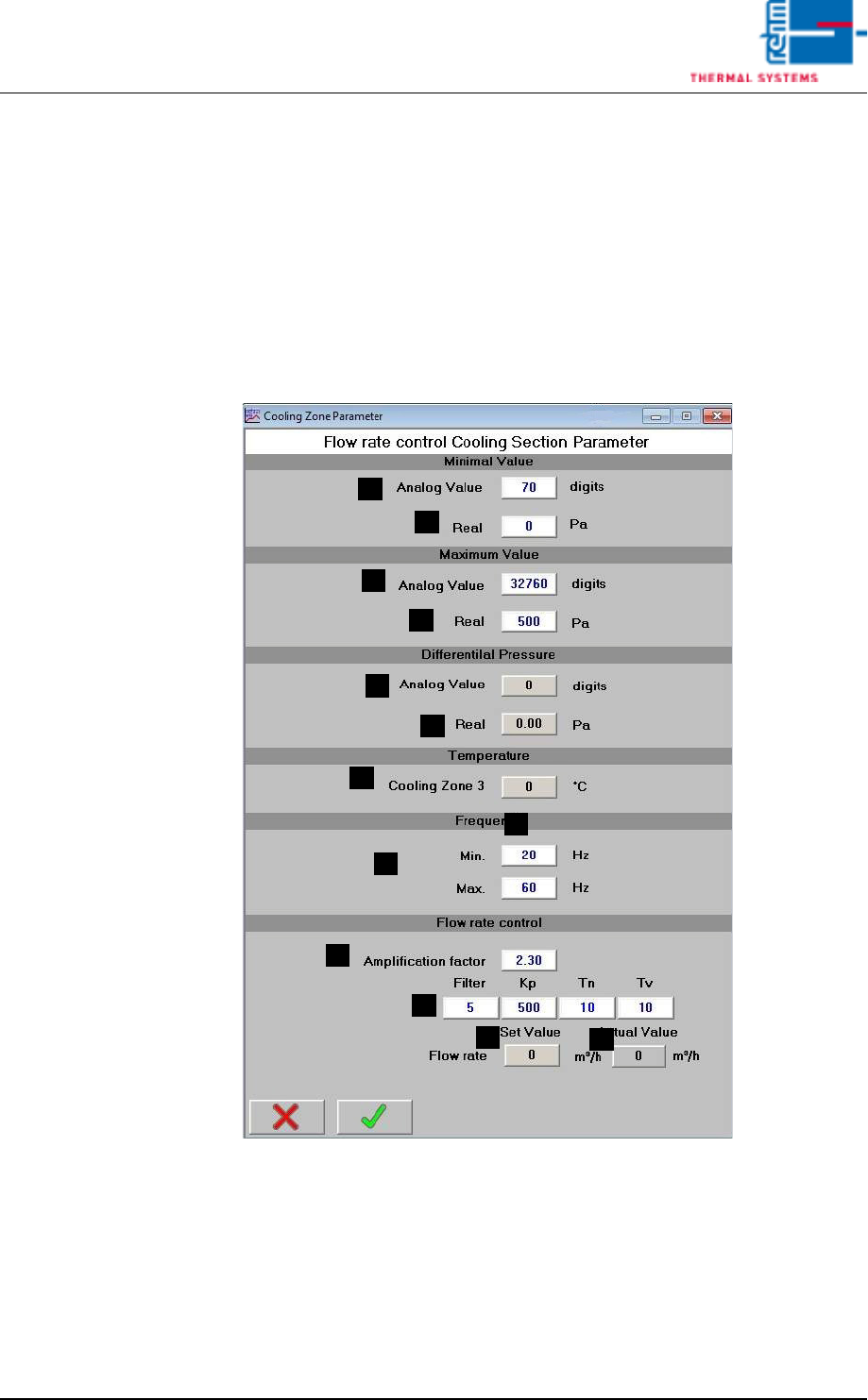
Vision XP+ V AC Page 99 3 Setup Instructions 3.10 V olume flow control, cooling section parameters Operating Instructions V ersion 1.5 Adjustment va lues for differential pressure measurem ent: Used to adjust to the diff…
Page 98 Vision XP+ VAC
3 Setup Instructions
3.10 Volume flow control, cooling section parameters
Operating Instructions
Version 1.5
I) Start
Start the filter check manually (for test purposes).
J) Filter F9 OK
Status display Filter F9
K) Filter replaced
Key button for reset of the filter status after the replacement.
3.10 Volume flow control, cooling section parameters
Fig. 3-14 Volume flow control, cooling section parameter
These parameters are set by the Rehm Thermal Systems GmbH Service
technican during commissioning.
A) Analog Value
Raw value
B) Actual
Differential pressure
A
B
A
B
A
B
C
D
I
E
F
G
H

Vision XP+ VAC Page 99
3 Setup Instructions
3.10 Volume flow control, cooling section parameters
Operating Instructions
Version 1.5
Adjustment values for differential pressure measurement: Used to adjust
to the differential pressure sensor in use.
C) Cooling zone 3
Temperature to calculate volume flow.
D) Frequency min/max control range of frequency converter for fan speeds.
E) Amplification factor
Measuring path adjustment. Measuring procedure is described separate-
ly.
F) Filter KP, Tn, Tv
Setting parameters for controller function. These should remain at the
specified values.
G) Volume flow Set-point value
Display of set-point value as set on the fan screen.
H) Volume flow Actual value
Current value.
Page 100 Vision XP+ VAC
3 Setup Instructions
3.11 Vacuum chamber service
Operating Instructions
Version 1.5
3.11 Vacuum chamber service
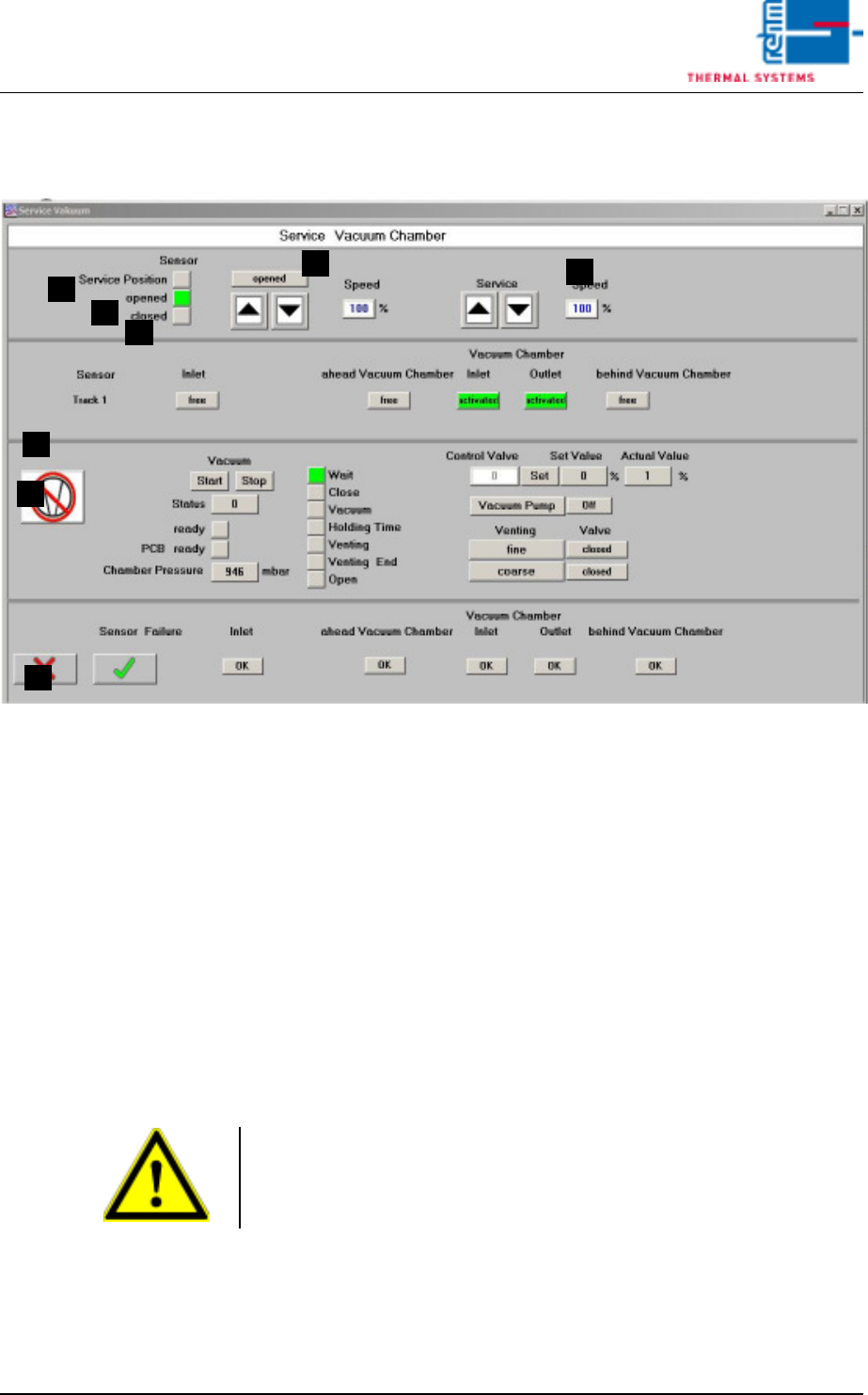
Fig. 3-15 Vacuum chamber service
These settings are set during commissioning by the service engineer of the
company Rehm Thermal Systems GmbH.
A) Displays the service position
Displays the upper end position of the vacuum chamber.
B) Displays position A
Displays the vacuum chamber as being opened.
C) Displays “down”
Displays the vacuum chamber as being closed.
D) Move the vacuum chamber manually
These buttons can be used to manually open or close the vacuum cham-
ber.
E) Vacuum chamber service mode
These buttons can be used to manually open or close the vacuum cham-
ber for servicing.
F) Input sensor
The current status of the individual sensors of the machine is displayed
here.
G) Display and control panels for servicing the vacuum process.
A
E
H
C
B
D
G
F
Note!
The oven chamber must be fully open. Only then can the button for service
mode be used to open or close the vacuum chamber.