ServiceInstruction_Vision XP - 第125页
Vision XP+ V AC Page 121 3 Setup Instructions 3.21 Checking and Adjusting Nitrogen Pressure Operating Instructions V ersion 1.5 3.21 Checkin g and Adj usting Ni trogen P ressure The compr essed air and nitrogen unit is l…
Page 120 Vision XP+ VAC
3 Setup Instructions
3.20 Regulating the Coolant Water Circuit
Operating Instructions
Version 1.5
3.20 Regulating the Coolant Water Circuit
+
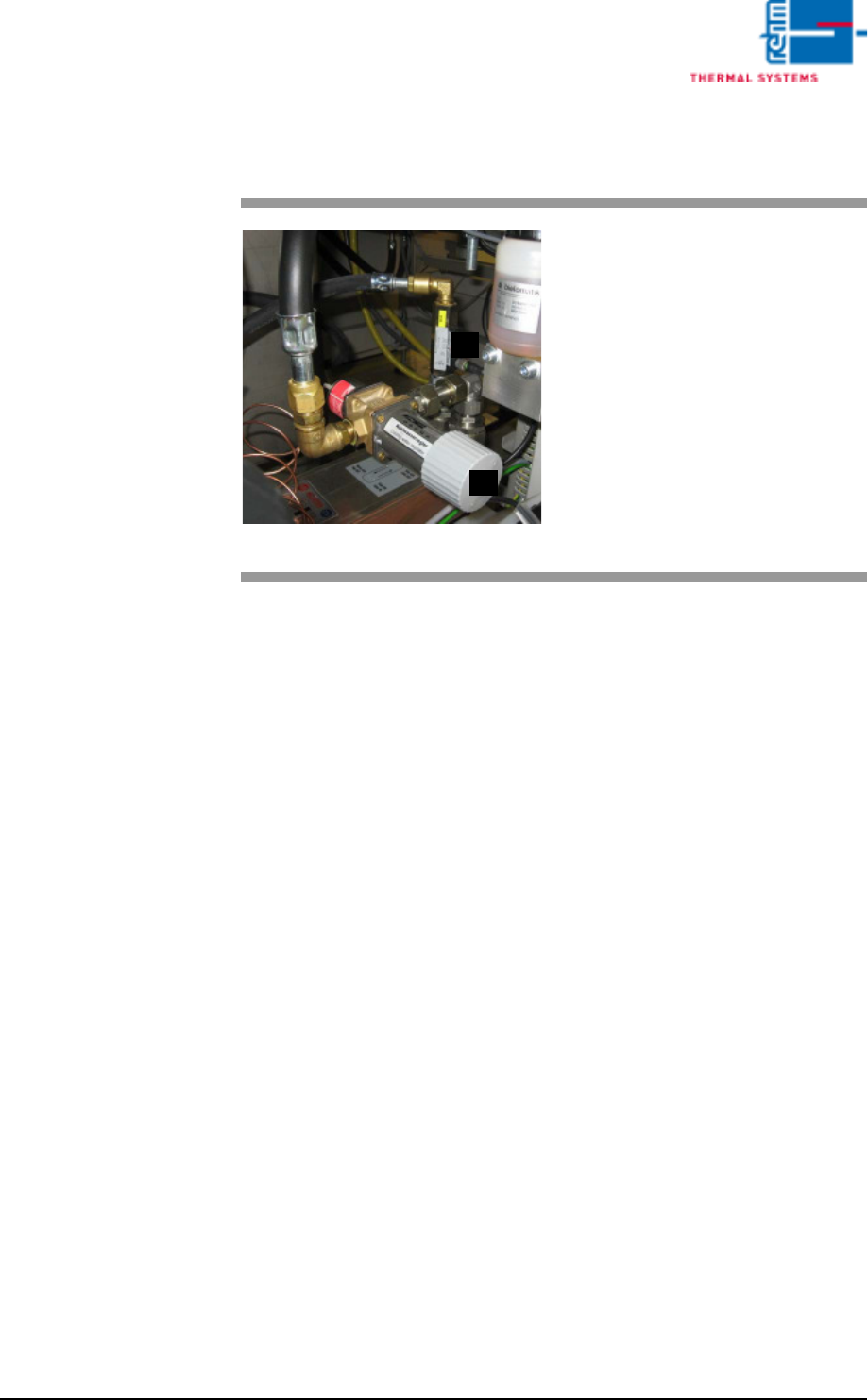
Fig. 3-31 Coolant Water Regulation
A)Coolant water regulator
The temperature of the coolant
water is regulated here.
The water flow rate is increased if
temperature needs to be
reduced, and the water flow rate
is reduced if temperature needs
to be increased.
B) Pressure controller
This controller checks the water
flow and triggers the alarm „water
pressure too low“ (if necessary).
A
B
Vision XP+ VAC Page 121
3 Setup Instructions
3.21 Checking and Adjusting Nitrogen Pressure
Operating Instructions
Version 1.5
3.21 Checking and Adjusting Nitrogen Pressure
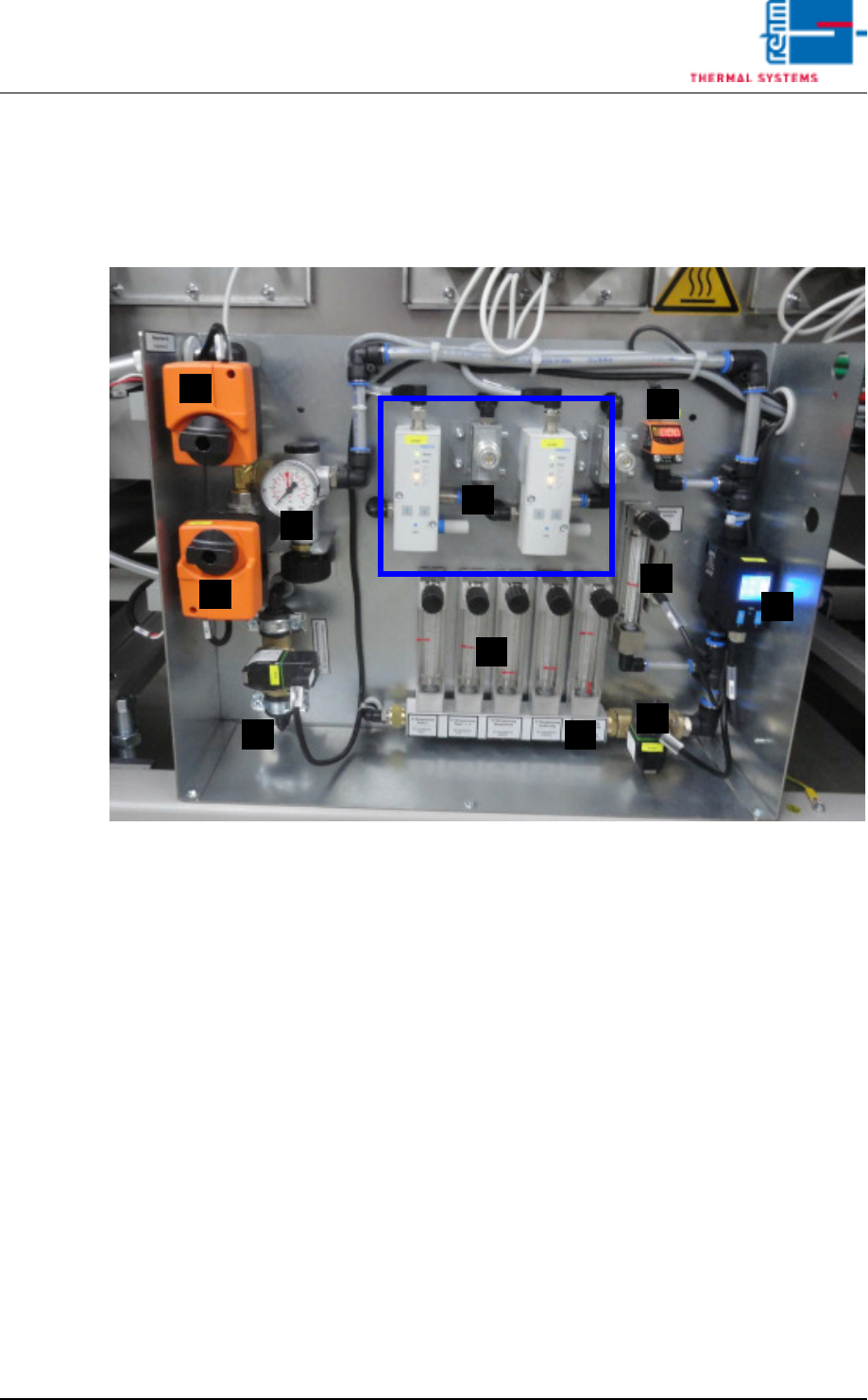
The compressed air and nitrogen unit is located at the front of the system
underneath the last cooling zone.
Fig. 3-32 Compressed Air and Nitrogen Unit
A) Pressure sensor
B) Nitrogen control
C) Isolation purge valve (pressure meter)
D) Flow meter / Pyrolysis with monitoring for venturi tube
E) Nitrogen switching (motor actuator)
F) Pressure gauge (behind the motor actuator)
G) Compressed air switching (motor actuator)
H) Nitrogen feed to process chamber (flow meter)
I) N2/O2 switch over valve
J) Purge valve process chamber
K) N2 usage indicator
F
A
E
H
G
K
D
J
C
B
I

Page 122 Vision XP+ VAC
3 Setup Instructions
3.21 Checking and Adjusting Nitrogen Pressure
Operating Instructions
Version 1.5
Prerequisites
• The system and the conveyor drive unit must be switched on.
• The heaters and nitrogen supply must be switched on.
• The plant nitrogen supply system must be connected and switched on.
• All emergency-stop buttons must be deactivated.
• It is not allowed to run a flushing phase. „The valve flushing phase“ and
„Float the insulation“ have to be switched off.
• The LED on the pressure watchdog must always be green when nitrogen
supply pressure is applied.
• If nitrogen supply fails or if there is too little pressure, the LED lights up red
and an alarm message is generated by the software.
Inspection
1. Check nitrogen pressure at the pressure gauge. (A pressure value of
5 bar is normal with activated nitrogen.)
2. Turn the regulator on the pressure gauge counterclockwise. The LED
should turn red when pressure drops below 4,5 bar. An alarm message
is generated by the software.
3. Slowly turn the regulator clockwise to 5 bar.
4. The LED is changed to green.
5. The alarm signal in the software is reset.
6. If the pressure watchdog does not indicate green even though nitrogen
pressure is correct, or if green is indicated even though there is no
pressure, the watchdog must be adjusted.
Adjustment
1. Remove the cap from the pressure watchdog with the help of a screw-
driver (see also Fig. 3-30, on page 108).
2. Loosen the lock nut with an open-end wrench.
3. When nitrogen pressure has reached a value of 5 bar, turn the adjusting
screw clockwise with a hex key until the LED lights up red.
4. Slowly turn the adjusting screw counterclockwise until the LED turns
from red to green.
5. Turn the adjusting screw an additional half revolution in order to in-
crease the tolerance range.
6. Tighten the lock nut and replace the cap.