ServiceInstruction_Vision XP - 第71页
Vision XP+ V AC Page 67 3 Setup Instructions 3.2 T emperature Channels Operating Instructions V ersion 1.5 AD)Last field m odule fault Last fault displayed . Info for servicing pu rposes. 3.2 T empe rature Cha nnels 3.2.…

Page 66 Vision XP+ VAC
3 Setup Instructions
3.1 Adjustment
Operating Instructions
Version 1.5
Q) Conveyor Release
To release the transportation push the button ON. The conveyor release
and CBS width can now be adjusted even if the system is cold.
Turn off the transportation release with Heating on, Heating off or Load
a program.
R) Display counter transport empty
It displays the residual number of the belt pulses, until the transport is re-
leased again (after the loading of the oven).
The counter can be reset over „Transport release IN“.
S) Total PCBs
Display of the total number of PCBs produced thus far.
T) Buzzer reactivation
If there is another value than 0, the buzzer is re-activated after the ac-
knowledgement on the alarm mask (after the specified time period in
sec.)
U) Fifo activation Activation / Deactivation of the Fifo - option (is described
in the operating manual)
V) Pin-In-Paste activation The button in the settings must be set on „On“,
when the option is shored. On the main mask there is a button for switch-
ing on/off of the function and the display „Pin-In-Paste OK“ or Pin-In-
Paste sheets exchanged.
W) Pin - IN - Paste:
Number of zones: Number of zones for Pin – In – Paste displayed
PCBs up to Open chamber request: Open chamber request when
switching Pin – In – Paste program to Pin – In – Paste program after pre-
set printed circuit board quantity. Warning issued when counter reaches
90% of the set number of PCBs.
Current counter status: Display of actual PCB’s processed.
X) Move the PCB-width apart after program change
If the function is activated, with program change the transport runs out
firstly to the max. value, in order that the boards, which could be in the
machine, fall in (only if in the new program the width is smaller as adjust-
ed before).
Y) Start reference when oven empty
After reference starting time, reference travel starts not only for program
change but also when oven is empty.
Z) Force reference travel (oven is run empty)
Reference travel starts at the set time (i.e. oven is disabled, emptied, ref-
erence travel and oven are then enabled again). Signal tower shows or-
ange during emptying.
AA)Filter test F9 during the reference run
If the key button is on „ON“, the filter F9 in the condensation trap is always
checked during the reference run.
AB)Signalling manual load
If the key button is on „ON“, the release for manual load is signalized over
the inlet interface.
AC)Signal tower and hooter
Test function for signal tower and hooter.
Vision XP+ VAC Page 67
3 Setup Instructions
3.2 Temperature Channels
Operating Instructions
Version 1.5
AD)Last field module fault
Last fault displayed. Info for servicing purposes.
3.2 Temperature Channels
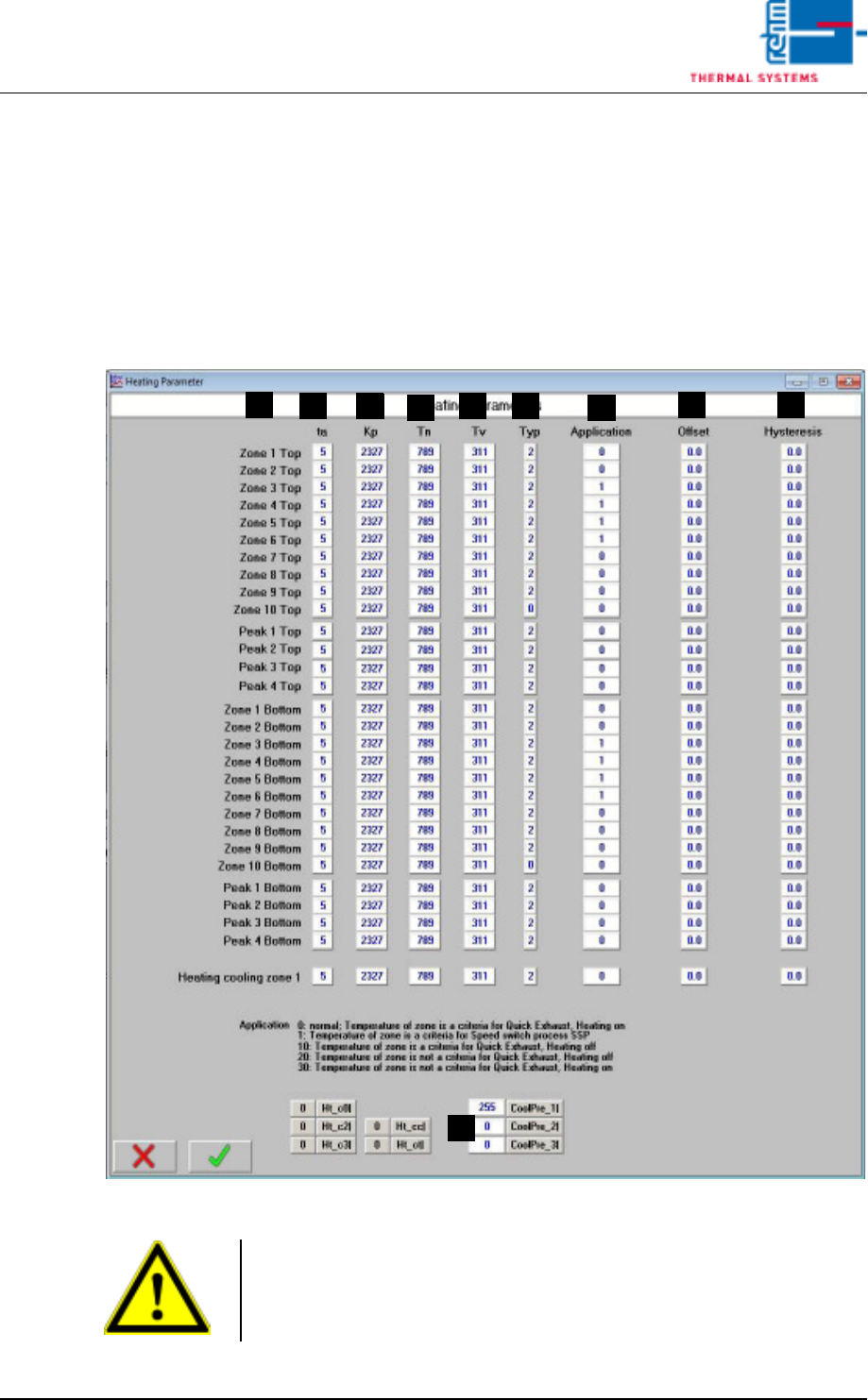
3.2.1 Heater Parameters
Fig. 3-3 Heater Parameters
A) Designations of the individual heat zones
F
D
B
A
C E
G
H I
J
Caution!
Values are system-specific and may only be changed by service personnel
from Rehm Thermal Systems GmbH!
This value may only be changed when heat is turned off.
Page 68 Vision XP+ VAC
3 Setup Instructions
3.2 Temperature Channels
Operating Instructions
Version 1.5
B) ta
Set sampling time (only relevant with B&R controller)
C) Kp
Proportional component for the PID controller
Default setting: for B&R controller: 2327
for S7 controller: 8
D) Tn
Integral component for the PID controller
Default setting: for B&R controller: 789
for S7 controller: 150
E) Tv
Differential component for the PID controller
Default setting: for B&R controller: 311
for S7 controller: 120
F) Type
This value must be set to 2 for one control channel. One open input must
be set to 0.
G) Application
With the Quick Cooling Down (SSP) you have to enter 1 in all zones
where cooling pipes are installed.
The Quick Exhaust behaves with the setting 0 as before (from Software
V3.14).
Over the values 10 a. 20 the behavior can be configured (corresponding
to the settings 1 and 2 with Software V3.13 and earlier).
H) Offset
Deviation at the temperature display can be compensated for with the
offset function.
I) Hysteresis
Tolerance evaluation performance can be adapted with the hysteresis
function.
J) Here you can adjust, which zone should be cooled down
Default values
CoolPre_1 = 255 (cooling last pre-heating zone)
CoolPre_2 = 0 (cooling zone 1 top)
CoolPre_3 = 0 (cooling zone 2 top)
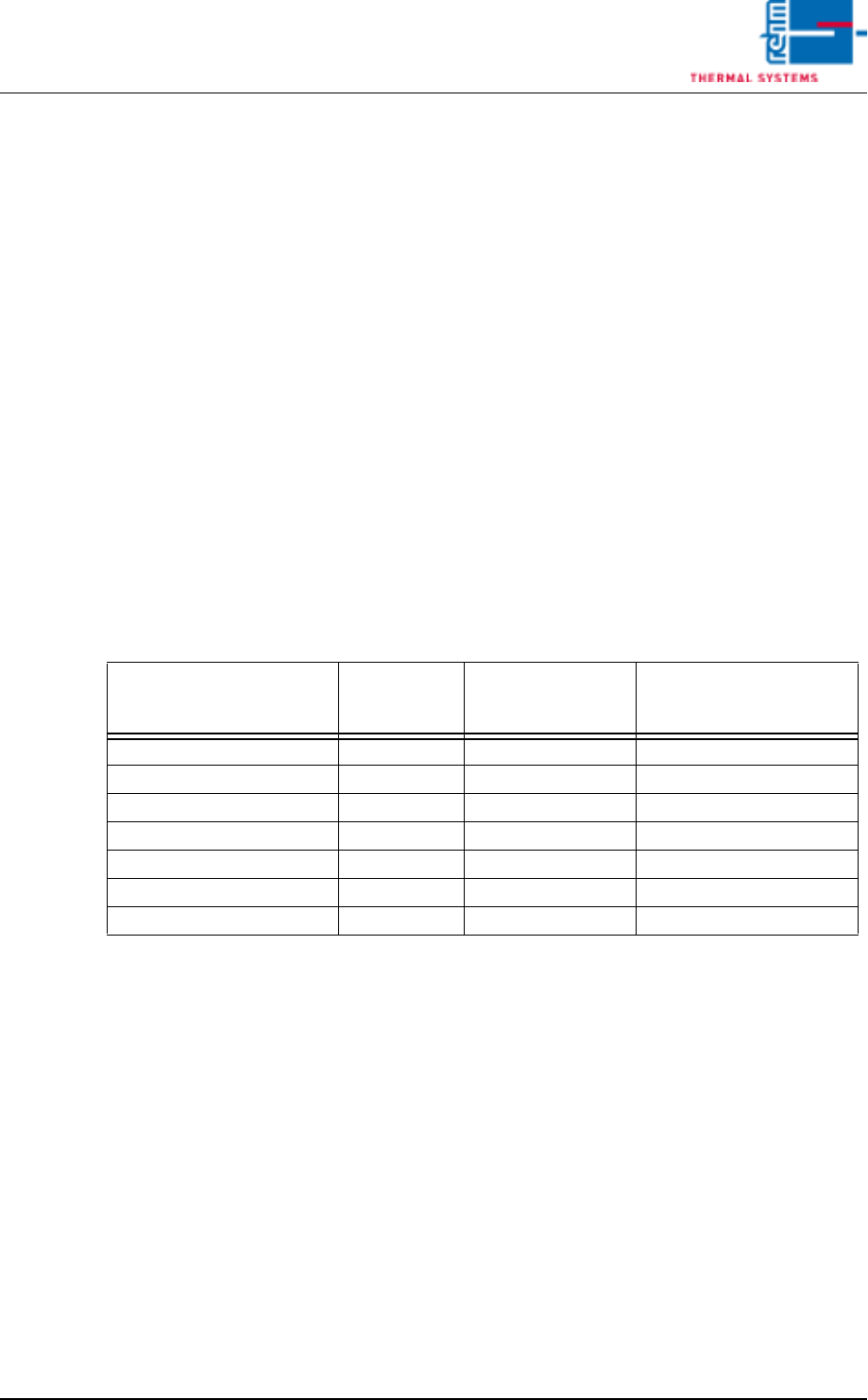
Function
Parameter
„Application“
Zone is criterion for
activation of the
function
Heating deactivated with
active function
Quick cooling down (SSP) 0 No No
Quick cooling down (SSP) 1 Yes No
Quick Exhaust 0 Yes No
Quick Exhaust 10 Yes Yes
Quick Exhaust 20 No Yes
Quick Exhaust 30 No No