ServiceInstruction_Vision XP - 第76页
Page 72 Vision XP+ V AC 3 Setup Instructions 3.2 T emperature Channels Operating Instructions V ersion 1.5 3.2.2 W atchdog Parameters Fig. 3-4 Watchdog Para meters A) Designations of the individual zo nes B) T ype This v…

Vision XP+ VAC Page 71
3 Setup Instructions
3.2 Temperature Channels
Operating Instructions
Version 1.5
51=Ht.Cont[46] ; monitoring cooling 2
52=Ht.Cont[47] ; monitoring cooling 3
53=Ht.Cont[48] ; monitoring cooling 4
54=Ht.Cont[49] ; monitoring cooling 5
55=Ht.Cont[50] ; monitoring cooling 6
56=Ht.Cont[51] ; monitoring cooling 7
60=Ht.Cont[52] ; monitoring water 1
61=Ht.Cont[53] ; FMX pipe
65=Ht.Cont[54] ; monitoring flux 1
66=Ht.Cont[55] ; monitoring flux 2
70=Ht.Cont[56] ; monitoring meassuring 1
71=Ht.Cont[57] ; monitoring meassuring 2
72=Ht.Cont[58] ; monitoring meassuring 3
73=Ht.Cont[59] ; monitoring meassuring 4
74=Ht.Cont[60] ; monitoring meassuring 5
75=Ht.Cont[61] ; monitoring meassuring 6
Page 72 Vision XP+ VAC
3 Setup Instructions
3.2 Temperature Channels
Operating Instructions
Version 1.5
3.2.2 Watchdog Parameters
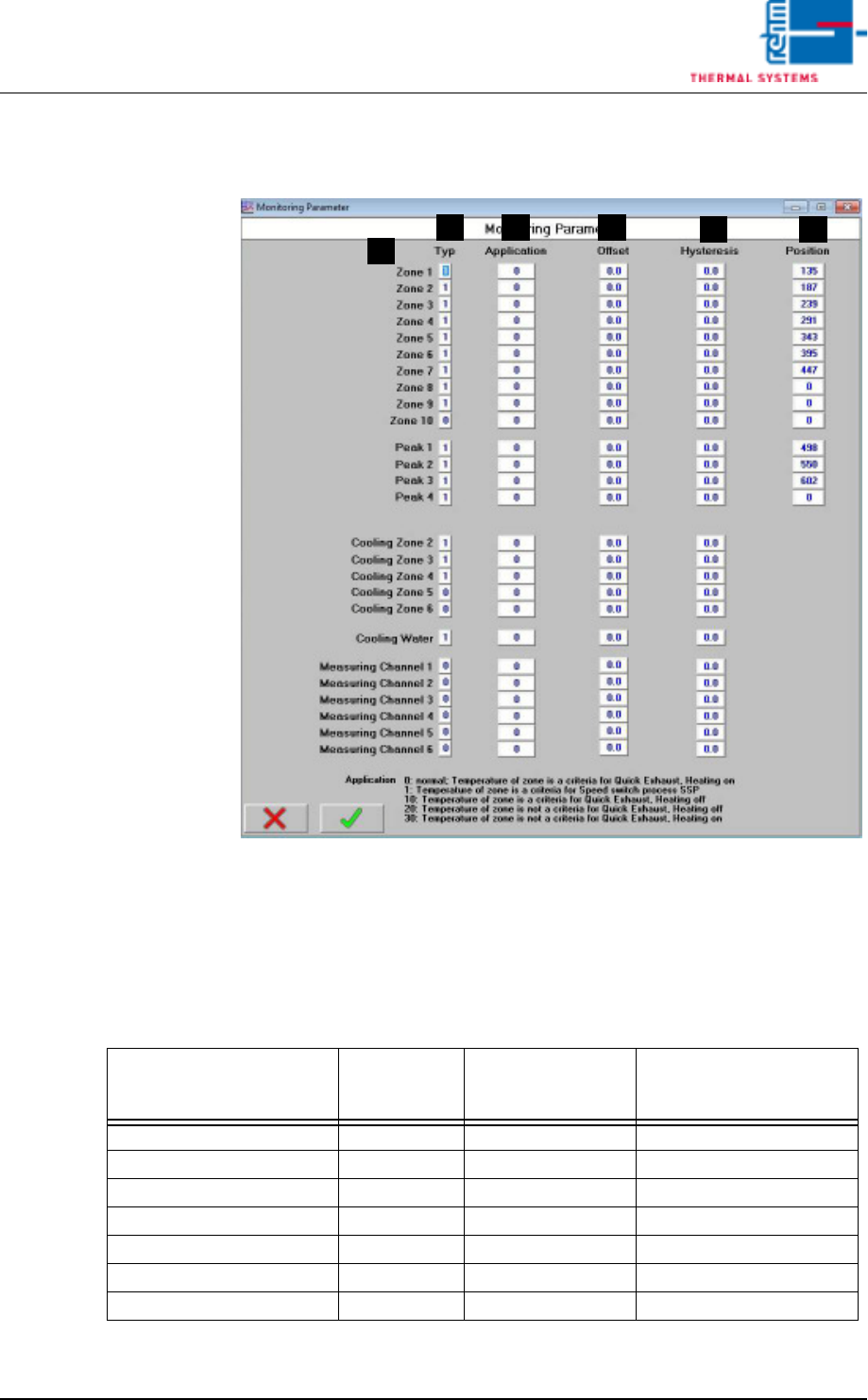
Fig. 3-4 Watchdog Parameters
A) Designations of the individual zones
B) Type
This value must be set to 1 for one watchdog channel. One open input
must be set to 0.
C) Application
With the Quick Cooling Down (SSP) you have to enter 1 in all zones
where cooling pipes are installed.
F
DB
A
C
E
Function
Parameter
„Application“
Zone is criterion for
activation of the
function
Heating deactivated with
active function
Quick cooling down (SSP) 0 No No
Quick cooling down (SSP) 1 Yes No
Quick Exhaust 0 Yes No
Quick Exhaust 10 Yes Yes
Quick Exhaust 20 No Yes
Quick Exhaust 30 No No

Vision XP+ VAC Page 73
3 Setup Instructions
3.2 Temperature Channels
Operating Instructions
Version 1.5
The Quick Exhaust behaves with the setting 0 as before (from Software
V3.14).
Over the values 10 a. 20 the behavior can be configured (corresponding
to the settings 1 and 2 with Software V3.13 and earlier).
D) Offset
Deviation at the temperature display can be compensated for with the
offset function.
E) Hysteresis
Tolerance evaluation performance can be adapted with the hysteresis
function.
F) Position
The calculated number of pulses for the individual heat zones is entered
here.