ServiceInstruction_Vision XP - 第89页
Vision XP+ V AC Page 85 3 Setup Instructions 3.5 Frequency Converter Operating Instructions V ersion 1.5 3.5.1 T yp Mitsubishi FR-D 700 Setting sys tem parameters In connectio n with a B & R cont rol 1. Start with po…
Page 84 Vision XP+ VAC
3 Setup Instructions
3.5 Frequency Converter
Operating Instructions
Version 1.5
3.5 Frequency Converter
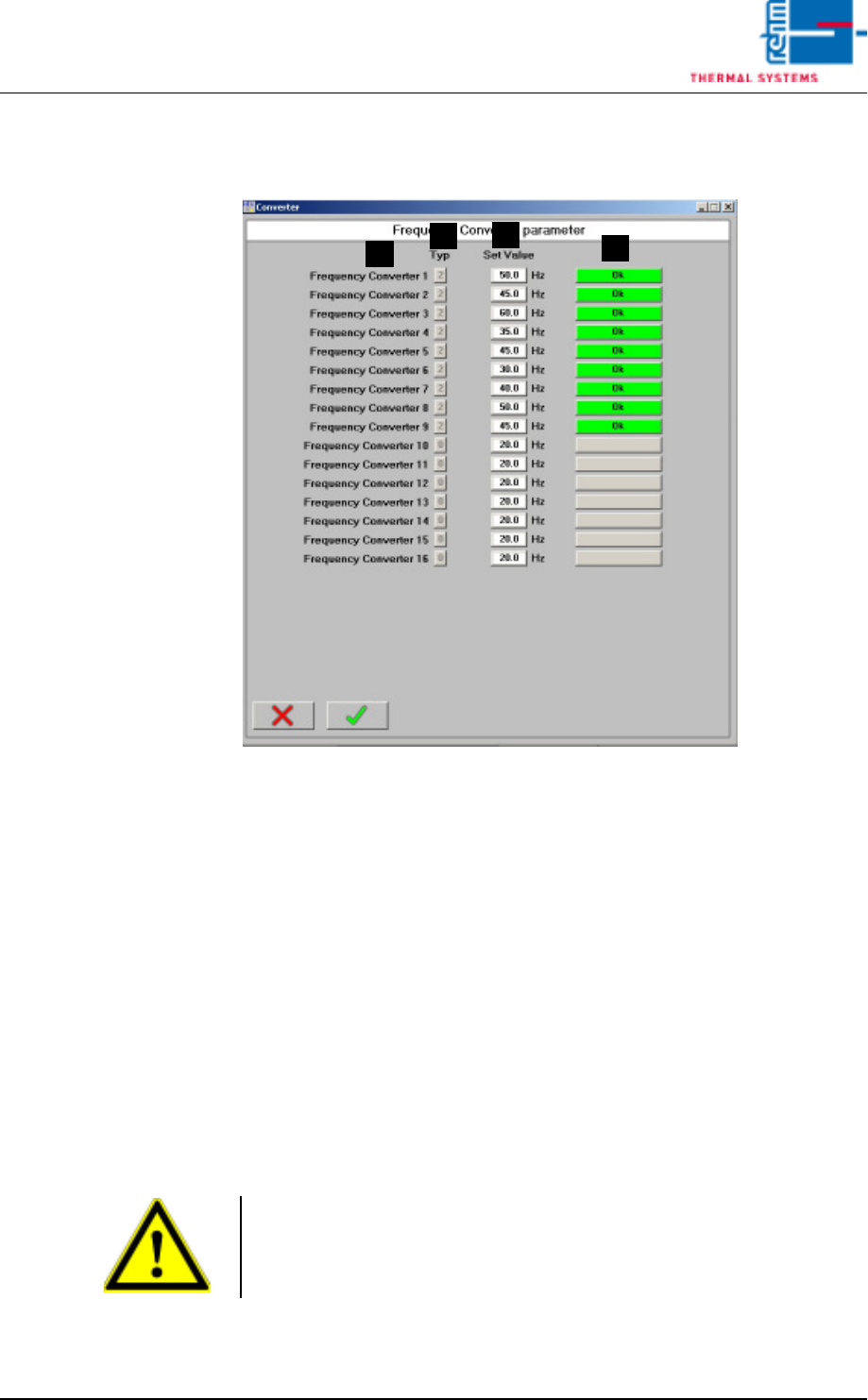
Fig. 3-10 Frequency Converter Parameters
Frequency converter parameters are entered to this window.
A) Designation of the frequency converter
B) Type
Only relevant if a B&R controller is used in combination with a Mitsubishi
frequency converter
0 = no frequency converter
1 = frequency converter, inactive
2 = frequency converter, active
3 = parameters configuration
C) Setpoint
Frequency setpoint for the respective converter
D) Status
Only relevant if a B&R controller is used in combination with a Mitsubishi
frequency converter
A
C
B
D
Note!
Frequency converters 13 to 16 are operated with their own set values in
standby mode and not with the values given by the standby mode. This is
necessary for example on machines with MRS-P.
Vision XP+ VAC Page 85
3 Setup Instructions
3.5 Frequency Converter
Operating Instructions
Version 1.5
3.5.1 Typ Mitsubishi FR-D 700
Setting system
parameters
In connection with a B & R control
1. Start with point 2 if the frequency converters are not activated.
As long as the system conveyor is running, a signal is applied to all of
the frequency converters, and input to the frequency converters is
blocked. The frequency converter is disabled with the STOP key.
2. Press the Mode key. A random parameter appears at the display. Select
parameter P 79 with the Digital Dial (knop).
Press the Set key and set the value to 1 with the Digital Dial. Press the
Set key to acknowledge the setting.
3. The parameter to be changed can now be selected by turning the Digital
Dial. The following, for example, appears at the display:
“P 7. ATTENTION!”. If parameter 30 has a value of 0, only parameters
0 through 9, 30 and 79 can be displayed. If all parameters are to be
selected, parameter 30 must be set to 1.
4. The current value for the selected parameter is displayed by pressing
the Set key.
5. The new value can now be selected with the Digital Dial.
6. The newly selected value is then saved to memory by activating the Set
key. The display returns once again to the parameters window.
7. Steps 3 through 6 must then be repeated if additional parameters need
to be changed.
Attention!
The heaters may not exceed a temperature of 70° C, because the fans
might otherwise overheat.
Note!
The frequency converters can only be parameterized when the heating fan
and the conveyor system stopped.
Page 86 Vision XP+ VAC
3 Setup Instructions
3.5 Frequency Converter
Operating Instructions
Version 1.5
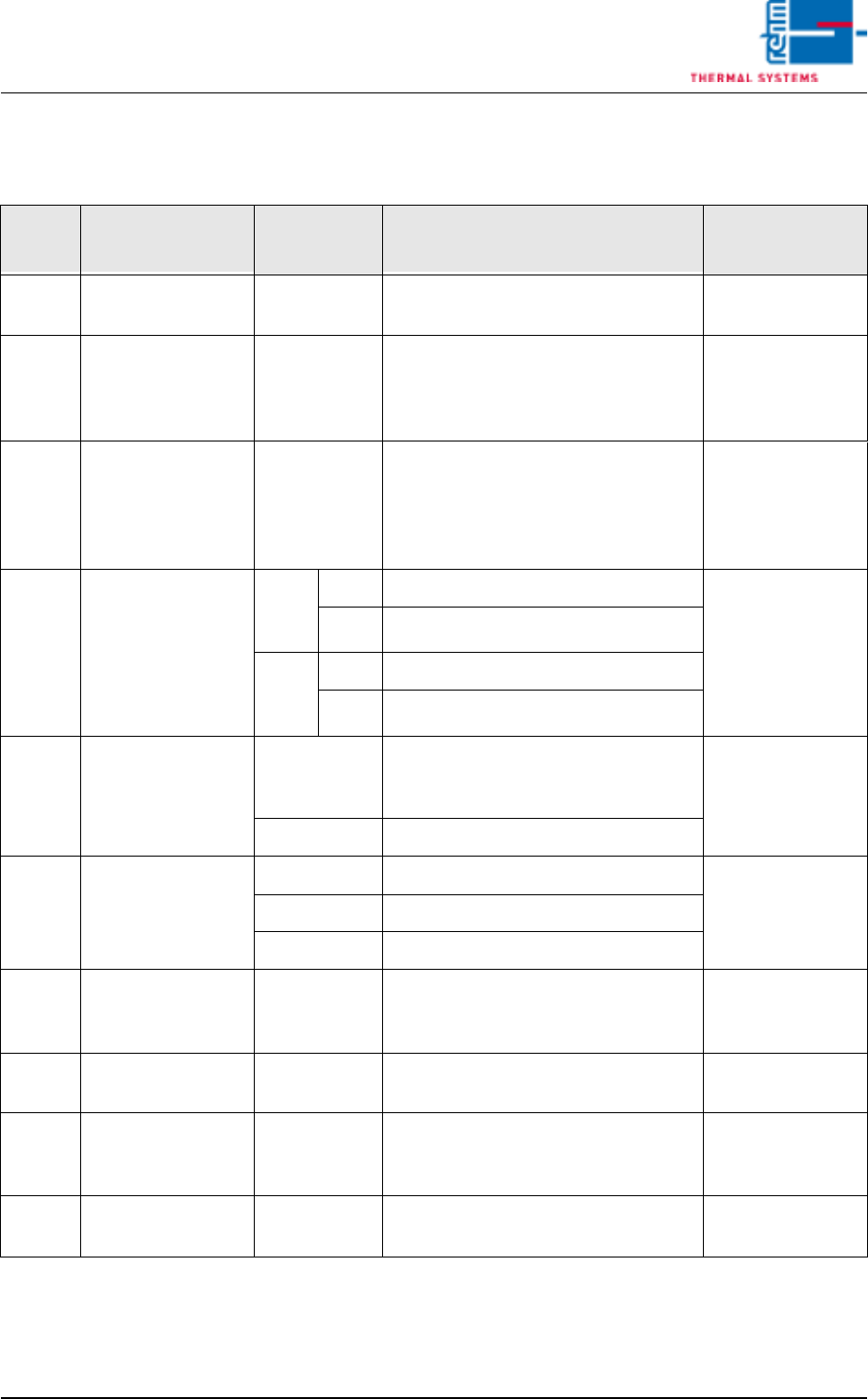
The following table includes all parameters which are set as standard
values.
Tab. 3-2 Parameter Mitsubishi FR-D 700
8. After all entries have been completed, press the Mode key once to
display the alarm list, or twice to return to the monitor display.
Para-
meter Function
Setting
Values Description of Selected Parameter
Setting Value for
this System
79 Operating mode
selection
0 / 1 0: Setpoint specification via PC
1: Set all parameters
1 (during
programming)
160 Display of param-
eters for the ex-
tended function
range
9999 / 0 0: No display / all parameters
9999: Display / basis parameters
Caution! Do not put the value man-
ually to 0. It happens automatically.
0 (during
programming)
117 Station number 1 to 31 If more than one frequency convert-
er is used, communication with the
corresponding converter is estab-
lished by means of the station num-
ber.
x
119
Stop bits / data
bits
8
bits
0 Stop bits: 1
0
1 Stop bits: 2
7
bits
10 Stop bits: 1
11 Stop bits: 2
123 Response time /
waiting time
0 to 150 ms Selection of the waiting time which
elapses from receipt of data until a
response is transmitted. 20
--- Setting with communication data
124
Activate
CR/LF command
0 CR/LF command deactivated
2
1 CR command activated
2 CR/LF command activated
192
A, B, C, terminal
function selection
0
1 frequency
set point
Relay output terminal
1
338 Write operating
instruction
0 / 1 0: Start from serial
1: Start from external
1
340 Select operating
mode with serial
communication
0 / 1 1: Interface operation at power-up 1
79 Operating mode
selection
0 / 1 0: Setpoint specification via PC
1: Set all parameters
1 (during
programming)