系统软件安装程序-.pdf - 第4页
SMT Software Engineering Group IM Opera tions YAMAHA MOTOR CO., L TD. MDOC-SOFT5011 1 The Proced ure of Syst em Software Ins tall YAMAHA ENG LISH. 4/16 List 3.1 Target Machine and Sys tem I nstall Dis k Target Machine Se…
SMT Software Engineering Group
IM Operations
YAMAHA MOTOR CO., LTD.
MDOC-SOFT50111 The Procedure of System Software Install YAMAHA ENGLISH. 3/16
3. Using Method
3.1 What to Prepare
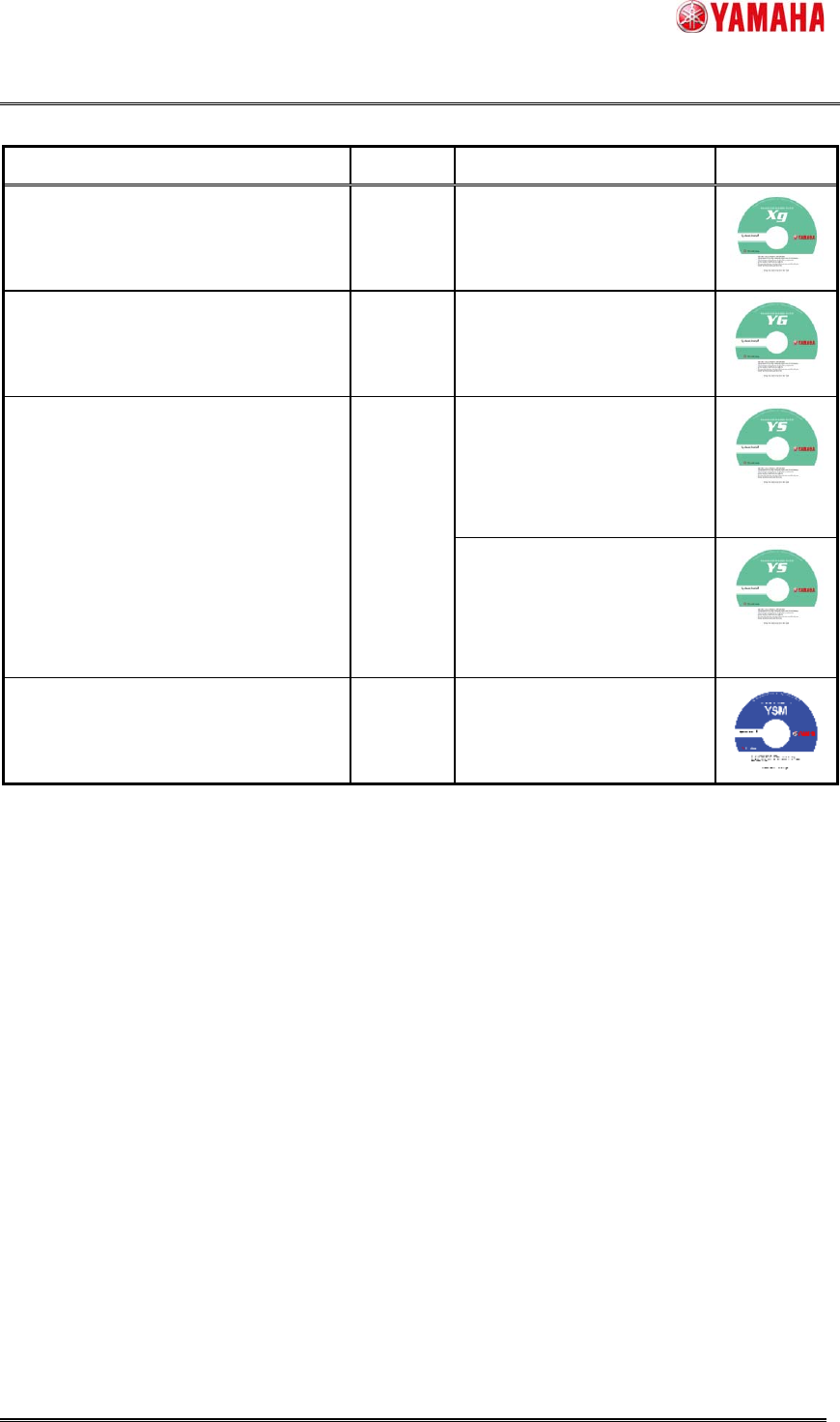
1) System Software Installation DVD
The system installation needs appropriate disk. The target machine is different by the disk.
Please, find out your machine from the following list (List 3.1), and prepare the correct one.
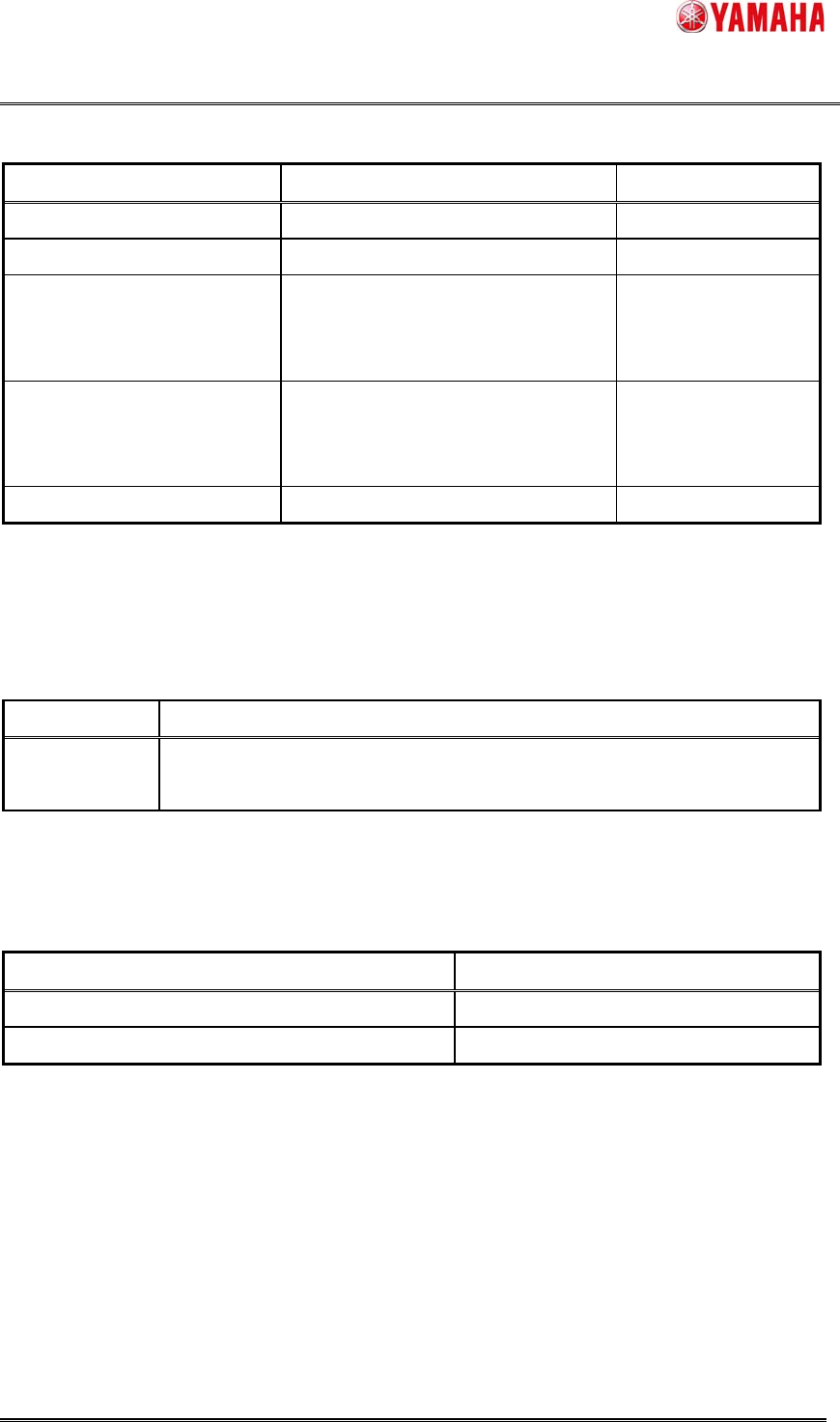
2) FLASH DISK
Prepare YAMAHA FLASH DISK that is attached to the machine.
When you purchase it, refer to the following list (List 3.2) where part No., and Part Name is shown.
3) PC
Its OS should be Windows® Xp (or Later).
And it has to be equipped with the DVD Drive. (-R is required.)
4) Memory Card Reader (USB), Memory Card Adapter (PC Card)
Prepare one of them to connect FLASH DISK to the PC.
These devices are not included with the machine or this disk.
And there is no memory card reader set as a YAMAHA genuine
The List 3.4 shows the typical measure to connect the FLASH DISK to PC.
Note:
This software needs Plug and Play (PnP).
The devices on the List 3.4 support plug and play.
Please adopt the device that supports plug and play in order to connect FLASH DISK to the PC.
SMT Software Engineering Group
IM Operations
YAMAHA MOTOR CO., LTD.
MDOC-SOFT50111 The Procedure of System Software Install YAMAHA ENGLISH. 4/16
List 3.1 Target Machine and System Install Disk
Target Machine Series Part No. / Part Name Label
YV88XG, YV100XG, YV100XTG,
YV180XG, THREEM, THREEM2,
HSD-XG, YVP-XG, YCP, YCPⅡ
XG KGA-M4964-31x (*1)
/ VGOS-V10 SYSTEM (DVD)
YG88, YG88R, YG100, YG100R,
YG200, YG200L, I-Cube2,
YGP, YGP CE, YGD
YG KGK-M4964-41x (*1)
/ VGOS-V21 SYSTEM (DVD)
YS88, YS100, YS12, YS12F, YS12P,
YS24, YS24X, YSP, YSH20, YSC1,
YG300, YG12, YG12F, YC8, YSP20
YS
KHN-M4964-01x (*1) (*2)
/ VGOS-V30 SYSTEM (DVD)
(Only for KHL-M4209-00x
System Board)
KHN-M4964-10x (*1) (*2)
/ DVD,VGOS-V30 SYSTEM
(Only for KLA-M4209-00x
System Board )
YSM40 YSM KLF-M4964-01x (*1)
/VGOS-V40 SYSTEM(DVD)
The system software version is printed on the label.
(*1) The end X is a revision number. (0~9)
(*2) The number of the install disks of YS Series is two.
A disk changes with part numbers of the system board to be used.
Refer to the 『6.1 How to recognize a System Board (YS Series)』of this manual for how to recognize a system board.
SMT Software Engineering Group
IM Operations
YAMAHA MOTOR CO., LTD.
MDOC-SOFT50111 The Procedure of System Software Install YAMAHA ENGLISH. 5/16
List 3.2 Part No, and Part Name (FLASH DISK)
Series Part No. / Part Name. Size
XG KHL-M4255-00x (*1) / FLASH DISK 1 [GB]
YG KHL-M4255-00x (*1) / FLASH DISK 1 [GB]
YS KHL-M4255-00x (*1) / FLASH DISK
(Only for KHL-M4209-00x System
Board)
1 [GB]
YS KLA-M4255-00x (*1) / FLASH DISK
(Only for KLA-M4209-00x System
Board )
2 [GB]
YSM KLA-M4255-10x (*1) / FLASH DISK 4 4 [GB]
(*1) The end X is a revision number. (0~9)
(*2) A flash disk changes with part numbers of the system board to be used.
Refer to the 『6.1 How to recognize a System Board (YS Series)』of this manual for how to recognize a system board.
List 3.3 OS and Peripheral equipment
OS Windows® Xp Professional (32bit) / Vista (32bit) / 7 (32bit / 64bit)
Peripheral
equipment
DVD Drive (-R is required.)
Memory Card Reader/Writer (USB) or Memory Card Adapter (PC Card)
List 3.4 Typical Measure to connect FLASH DISK to PC
Device (Bus) PC
Memory Card Reader / Writer (USB) Desktop, Note
Memory Card Adapter (PC Card) Note