EdisonStandardOwnersManual-RevA-20170818B.pdf - 第12页
A BOUT T HIS M ANUAL Edison Printer User Manual (Part Number 1023838) 12 Rev. A Copyright © 2017 ITW EAE All rights reserved. No part of the contents of thi s manual may be reproduced, copied or transmitted in any form o…

Edison Printer User Manual (Part Number 1023838) PREFACE
Rev. A xi
Copyright © 2017 ITW EAE
All rights reserved. No part of the contents of this manual may be reproduced, copied or transmitted in any form or by any
means including graphic, electronic, or mechanical methods or photocopying, recording, or information storage and
retrieval systems without the written permission of ITW EAE, unless for purchaser's personal use.
Figure 154. Inspect locating pins and bushings. ......................................................................... 156
Figure 155. Inspect Stencil Frame Clamp. .................................................................................. 157
Figure 156. Inspect Roller Plates. ................................................................................................ 158
Figure 157. Inspect Inlet Filters. .................................................................................................. 159
Figure 158. Inspect EdgeLoc+ System Springs. ......................................................................... 160
Figure 159. Inspect Solvent Return Trough. ............................................................................... 161
Figure 160. Inspect vacuum plenum and chamber. ..................................................................... 162
Figure 161. Inspect functionality of the Hard Stop. .................................................................... 163
Figure 162. Inspect front and rear transport belts. Note that image shows rail removed from
printer. ......................................................................................................................................... 164
Figure 163. Inspect Squeegee Z Belt and Tensioner. .................................................................. 165
Figure 164. Inspect Squeegee Z springs. ..................................................................................... 166
Figure 165. Inspect Vision X Motor Drive Belt. ......................................................................... 167
Figure 166. Inspect hood to hoop roll ground strap. ................................................................... 168
Tables
Table 1. Edison Stencil Printer Physical Dimensions. .................................................................. 16
Table 2. Signal Word Classification. ............................................................................................. 22
Table 3. International Hazard Symbols and Text. ......................................................................... 23
Table 4. Common Edison Printer Safety Labels. .......................................................................... 25
Table 5. Label Placement Sections. ............................................................................................... 27
Table 6. Inside Front Labels and Placement.................................................................................. 27
Table 7. Wiper Labels and Placement. .......................................................................................... 29
Table 8. Outside Front Labels and Placement. .............................................................................. 30
Table 9. Left and Right Panel Labels and Placement. ................................................................... 32
Table 10. Back Panel Labels and Placement. ................................................................................ 33
Table 11. Inside Door Labels and Placement. ............................................................................... 34
Table 12. Solvent System Labels and Placement. ......................................................................... 35
Table 13. Pneumatics Panel Labels and Placement. ...................................................................... 36
Table 14. Facility Requirements. ................................................................................................... 44
Table 15. Operational Specifications. ........................................................................................... 45
Table 16 Edison Printer Control Functions. .................................................................................. 97
Table 17. Preventive Maintenance Timing and Procedures. ....................................................... 132
Table 18. Two procedures for removing solvent from wiper pan. .............................................. 170
ABOUT THIS MANUAL Edison Printer User Manual (Part Number 1023838)
12 Rev. A
Copyright © 2017 ITW EAE
All rights reserved. No part of the contents of this manual may be reproduced, copied or transmitted in any form or by any
means including graphic, electronic, or mechanical methods or photocopying, recording, or information storage and
retrieval systems without the written permission of ITW EAE, unless for purchaser's personal use.
1. About This Manual
1.1. Important User Information
Copyright © 2017 by ITW EAE
All rights reserved. No part of the contents of this manual may be reproduced, copied, or
transmitted in any form or by any means including graphic, electronic, or mechanical methods or
photocopying, recording, or information storage and retrieval systems without the written
permission of the publisher, unless it is for the purchaser's personal use.
Printed and bound in the United States of America.
The information in this manual is subject to change without notice and does not represent a
commitment on the part of ITW EAE. ITW EAE does not assume any responsibility for any
errors that may appear in this manual.
In no event will ITW EAE be liable for technical or editorial omissions made herein, nor for
direct, indirect, special, incidental, or consequential damages resulting from the use or defect of
this manual.
Values displayed on screens are examples only. Though
those values may be typical, contact ITW EAE for the final
value.
Actual screens may vary from those published in this manual.
Software screens will vary between models and standard
options ordered.
The information in this document is not intended to cover all possible conditions and situations
that might occur. The end user must exercise caution and common sense when installing or
maintaining ITW EAE products. If any questions or problems arise, call ITW EAE MPM
Technical Support at 1-800-737-8110.
Edison Printer User Manual (Part Number 1023838) ABOUT THIS MANUAL
Rev. A 13
Copyright © 2017 ITW EAE
All rights reserved. No part of the contents of this manual may be reproduced, copied or transmitted in any form or by any
means including graphic, electronic, or mechanical methods or photocopying, recording, or information storage and
retrieval systems without the written permission of ITW EAE, unless for purchaser's personal use.
1.1.1. Printer Serial Tag
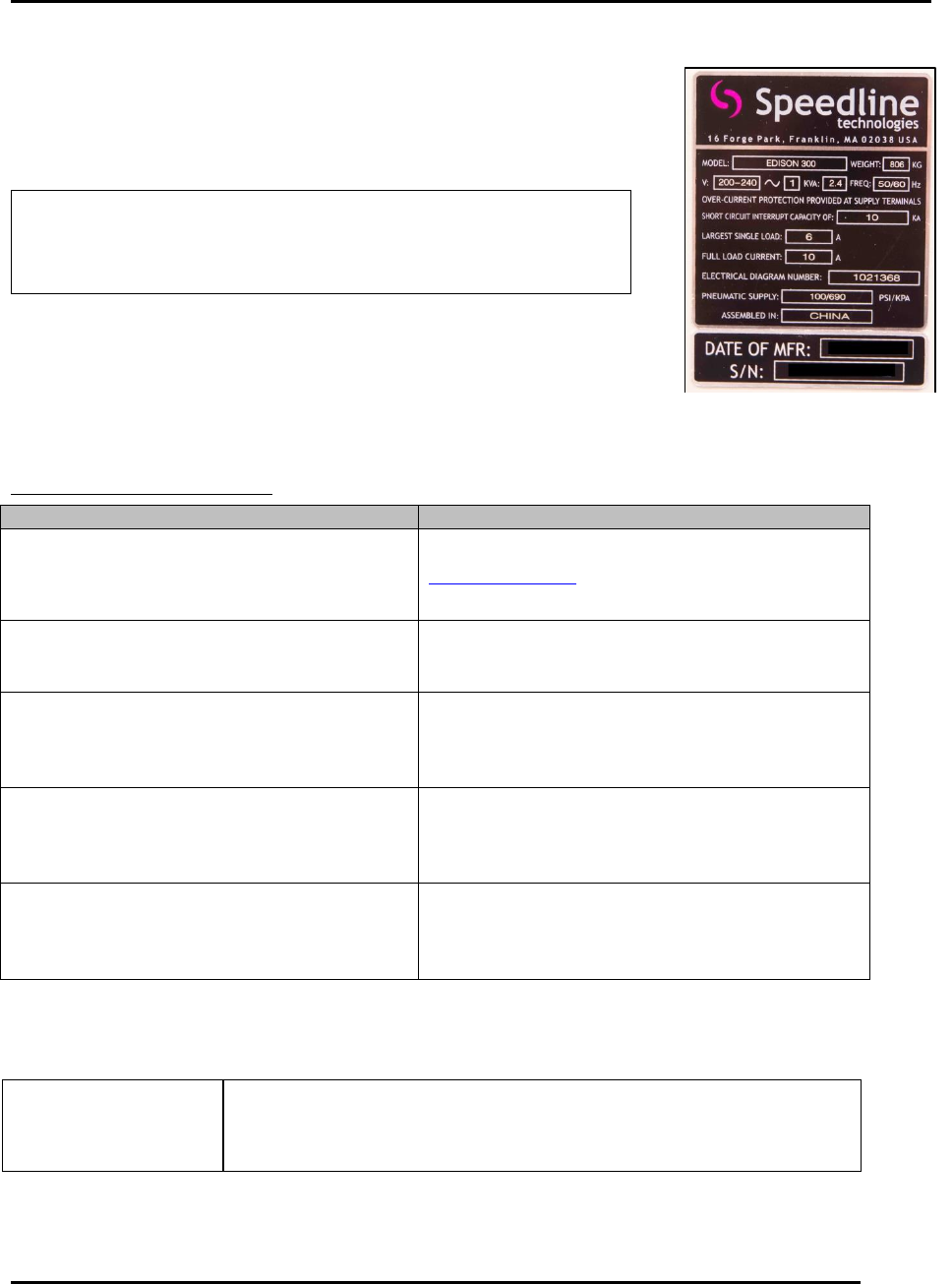
Find the printer model and serial number on the printer serial tag, which is
attached to the front of the printer. Use the printer model and serial
number when in contact with ITW EAE.
Removal of the printer serial tag voids
the system warranty.
1.2. Manufacturer
The Edison printer is manufactured by ITW EAE:
Global Headquarters / Area
Contact Information
ITW EAE
8860 207th Street
Lakeville, MN 55044
USA
Technical Support Center (TSC)
www.itweae.com
Americas
35 Parkwood Drive, Suite 10
Hopkinton, MA 01748
Tel: 508-520-0083, option 3, then option 2
Toll Free: 800-737-8110, option 1
Email: mtsc@itweae.com
Asia
61 Ubi Avenue 1
#06-01 UB Point
Singapore 408941
Tel: +65 6286-6635
Fax: +65 6593-0175
Email: tsc.ap@itweae.com
Europe
Im Gefierth 14
D-63303 Dreieich, Germany
Tel: +49 (0) 6103-8320
Fax: +49 (0) 6103-832-299
Email: Go to www.itweae.com and see Global
Sales Directory for Authorized Rep.
Mexico
José María Pino Suarez 1039-31
Colonia el Vigía 21
Zapopan, Jalisco, C.P. 45140 Mexico
Tel: (From US) 1-800-639-9574
Tel: (From Mexico) 01-800-718-1614
Tel: (Direct) +52 (33) 33-65-6511
Email: msupport@itweae.com
Refer to the printer serial tag for printer model and serial number when contacting technical
support.
When ordering replacement parts or service please state the
printer model and serial number.
Figure 1. Printer Serial Tag.
Removal of printer serial tag
voids system warranty.