EdisonStandardOwnersManual-RevA-20170818B.pdf - 第131页
Edison Printer User Manual (Part Number 1023838) M AINTENANCE Rev. A 131 Copyright © 2017 ITW EAE All rights reserved. No part of the contents of this manual ma y be reproduced, copied or transmitted in any form or by an…
PRINTER OPERATIONS Edison Printer User Manual (Part Number 1023838)
130 Rev. A
Copyright © 2017 ITW EAE
All rights reserved. No part of the contents of this manual may be reproduced, copied or transmitted in any form or by any
means including graphic, electronic, or mechanical methods or photocopying, recording, or information storage and
retrieval systems without the written permission of ITW EAE, unless for purchaser's personal use.
4. Remove the solvent tank fill cover, then insert a funnel and add solvent as required.
5. Remove the funnel and replace the cover.
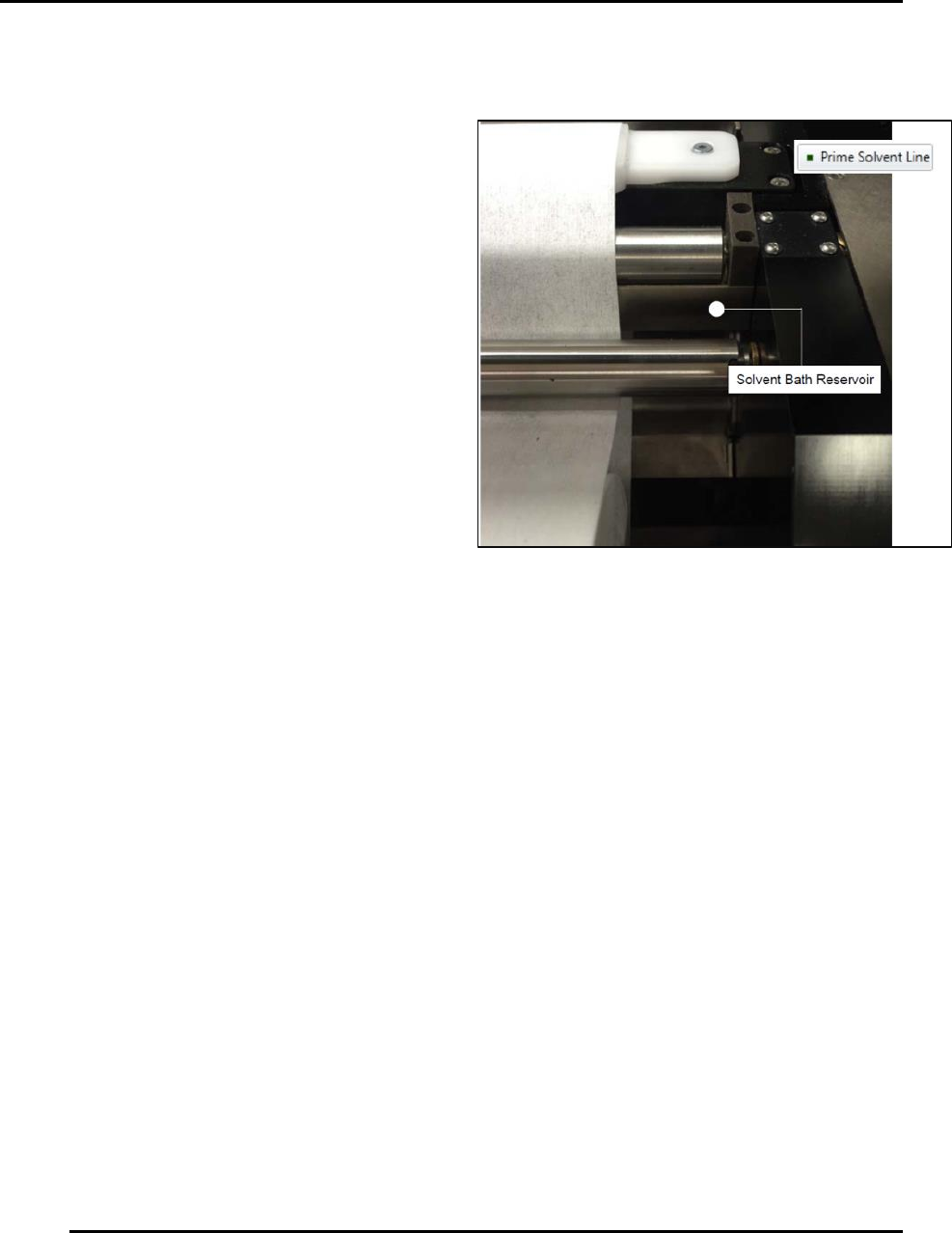
6. Click and hold Prime Solvent Line (on-
screen button) until you see solvent
feeding into the solvent bath reservoir
(Figure 133).
7. Close the front lower left drawer and
click Finish.
Figure 133. Hold Prime Solvent Line until solvent feeds
into solvent bath reservoir.
Edison Printer User Manual (Part Number 1023838) MAINTENANCE
Rev. A 131
Copyright © 2017 ITW EAE
All rights reserved. No part of the contents of this manual may be reproduced, copied or transmitted in any form or by any
means including graphic, electronic, or mechanical methods or photocopying, recording, or information storage and
retrieval systems without the written permission of ITW EAE, unless for purchaser's personal use.
6. Maintenance
Carefully follow the established Lock Out Tag Out policies of
your company in all cases.
6.1. Preventive Maintenance Guidelines and Timing
Routine preventive maintenance is critical to ensuring your printer performs at its optimum level:
Maintain critical process instruments in a calibrated state
Keep the equipment clean and make repairs to the unit immediately
Maintenance delays may be costly in added expense for labor and materials in addition to
loss of production
Generate historical data and trends to determine the frequency of preventive maintenance
activities
Environmental factors such as ambient temperatures and air quality can cause a variation
in the required frequency of preventative maintenance
Take caution when opening electrical enclosures and junction boxes.
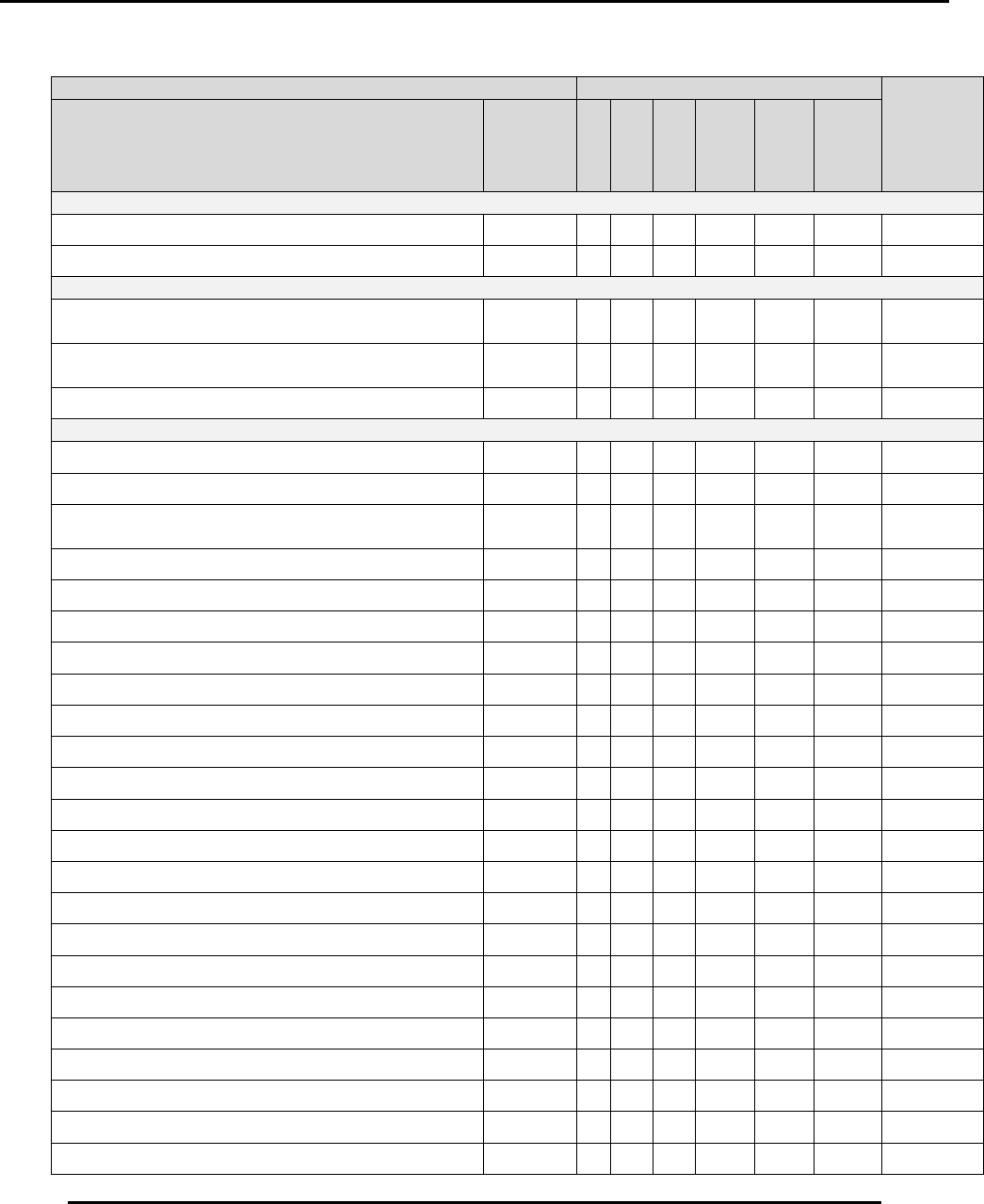
Refer to the Preventive Maintenance Guidelines (Table 17) for initial preventive maintenance
frequencies
Danger!
Electrical panels contain high voltage. Disconnect and lock out
the power supply before working inside any electrical panels.
Failure to lock out the power supply can result in injury or death.
MAINTENANCE Edison Printer User Manual (Part Number 1023838)
132 Rev. A
Copyright © 2017 ITW EAE
All rights reserved. No part of the contents of this manual may be reproduced, copied or transmitted in any form or by any
means including graphic, electronic, or mechanical methods or photocopying, recording, or information storage and
retrieval systems without the written permission of ITW EAE, unless for purchaser's personal use.
Table 17. Preventive Maintenance Timing and Procedures.
Preventive Maintenance
Days
Time
Required
(Minutes)
Activity
See
Section
(Click
hyperlink
below)
1
7
30
120
180
360
Paste Dispenser
Inspect Paste Dispenser Cartridge Latch
6.2.1.1
X
5
Inspect Paste Dispenser Empty Sensor
6.2.1.2
X
5
Verify Switch Functionality
Verify E-Stop (EMO) Operator Switch
Functionality
6.2.4.1
X
5
Verify Motion Power Off Operator Switch
Functionality
6.2.4.2
X
5
Verify Power On Operator Switch Functionality
6.2.4.3
X
5
General
Inspect Hood Gas Springs
6.2.2
X
5
Light Tower Lights and Audible Alarm
6.2.3
X
5
Verify Cover Interlock Active/Bypass Key Switch
Operator Switch Functionality
6.2.5
X
5
Verify Hood Lock Cylinder Functionality
6.2.6
X
5
Inspect and Clean the Anti-Static Brushes
6.2.7
X
5
Inspect Wiper Paper Shafts
6.2.8
X
5
Inspect the Knurled Shaft
6.2.9
X
5
Inspect Vacuum Hose
6.2.10
X
5
Inspect Trackball Condition
6.2.11
X
5
Inspect and Clean Keyboard
6.2.12
X
5
Inspect Stencil Stager Clamp Plates
6.2.13
X
5
Inspect Stencil Alignment Clamp Plates
6.2.14
X
5
Inspect Paste Height Monitor
6.2.15
X
5
Inspect Quik Release Squeegee Side Plates
6.2.16
X
5
Inspect and Drain Incoming Air Filter Bowls
6.2.17
X
10
Inspect Tooling Pins
6.2.18
X
10
Inspect Tooling Bridge Kits
6.2.19
X
10
Inspect Locating Pins and Bushings
6.2.20
X
5
Inspect Stencil Frame Clamps
6.2.21
X
5
Inspect Roller Plates
6.2.22
X
5
Inspect Inlet Filters
6.2.23
X
5
Inspect EdgeLoc+ System Springs
6.2.24
X
5
Inspect Solvent Return Trough
6.2.25
X
5