EdisonStandardOwnersManual-RevA-20170818B.pdf - 第22页
S AFETY Edison Printer User Manual (Part Number 1023838) 22 Rev. A Copyright © 2017 ITW EAE All rights reserved. No part of the contents of thi s manual may be reproduced, copied or transmitted in any form or by an y mea…
Edison Printer User Manual (Part Number 1023838) SAFETY
Rev. A 21
Copyright © 2017 ITW EAE
All rights reserved. No part of the contents of this manual may be reproduced, copied or transmitted in any form or by any
means including graphic, electronic, or mechanical methods or photocopying, recording, or information storage and
retrieval systems without the written permission of ITW EAE, unless for purchaser's personal use.
Never mix incompatible chemical materials in the printer. Refer to SDS sheets for all
materials that may interact.
Never use compressed air to clean or dry printer parts.
Caution!
Remove air pressure to the printer before servicing air pressure
components. Failure to comply may result in personal injury.
2.2.2. Personal Safety Tips
Be aware of any sharp edges or points before servicing the machine. Use adequate personal
protection at all times.
Do not operate or work around equipment while under the influence of alcohol, medicines,
tranquilizers or other drugs that can make you less alert or affect your judgment.
Keep a list of emergency telephone numbers close to the telephone and make sure all work
area personnel know where to access the list.
Report all accidents immediately to your supervisor. Consult a doctor or medical facility as
soon as possible if personal injury is involved.
Wear appropriate personal apparel. Do not wear loose clothing or jewelry which can become
entangled in exposed moving parts such as a conveyor.
Wear safety shoes when working in an industrial environment.
Wear hearing protection devices if working in an area where load noise is a problem.
Wear protective safety glasses when handling solvent or printing media as these chemicals
can cause eye injury.
Wear protective gloves when handling solder paste, solvents, printing media, cleaning agents,
lubricants and to protect hands and fingers from cuts and scrapes.
Warning!
If a malfunction occurs while the printer is operating, press the
red Emergency Stop button (Section 2.8.1).
Do not reach into the printer.
Warning!
Remove power from the printer before performing maintenance
on internally-mounted components. Moveable axes inside the
printer move quickly with force and cause serious injury
SAFETY Edison Printer User Manual (Part Number 1023838)
22 Rev. A
Copyright © 2017 ITW EAE
All rights reserved. No part of the contents of this manual may be reproduced, copied or transmitted in any form or by any
means including graphic, electronic, or mechanical methods or photocopying, recording, or information storage and
retrieval systems without the written permission of ITW EAE, unless for purchaser's personal use.
Caution!
Solvent may cause skin irritation or eye injury. Always wear
protective gloves and safety glasses when handling solvent, and
be careful not to spill the solvent when filing the solvent tank.
Failure to comply may result in personal injury and/or damage to
the environment.
2.2.3. Hazard and Safety Labels
Safety labels are a priority and help make obvious those places where extra caution is required.
Maintain safety labels in clear view and replace as necessary. The equipment provided has been
engineered and constructed to be as safe as possible.
2.2.3.1. Hazard Classification
Safety labels alert users to potential hazards. The labels use Signal Words to indicate the severity
of the safety hazard. Signal Words are classified according to SEMI S13
1
(Table 2):
Table 2. Signal Word Classification.
Signal Word
Description
Caution
Indicates a potentially hazardous situation which, if not avoided, may result in
minor or moderate injury. It may be used to identify unsafe practices.
Warning
Indicates a potentially hazardous situation which, if not avoided, could result in
death or serious injury.
Danger
Indicates a potentially hazardous situation which, if not avoided, will result in
death or serious injury.
1
Environmental, Health and Safety Guideline for Documents Provided to the Equipment User for Use with
Semiconductor Manufacturing Equipment
Edison Printer User Manual (Part Number 1023838) SAFETY
Rev. A 23
Copyright © 2017 ITW EAE
All rights reserved. No part of the contents of this manual may be reproduced, copied or transmitted in any form or by any
means including graphic, electronic, or mechanical methods or photocopying, recording, or information storage and
retrieval systems without the written permission of ITW EAE, unless for purchaser's personal use.
2.2.3.1.1. International Hazard Symbols
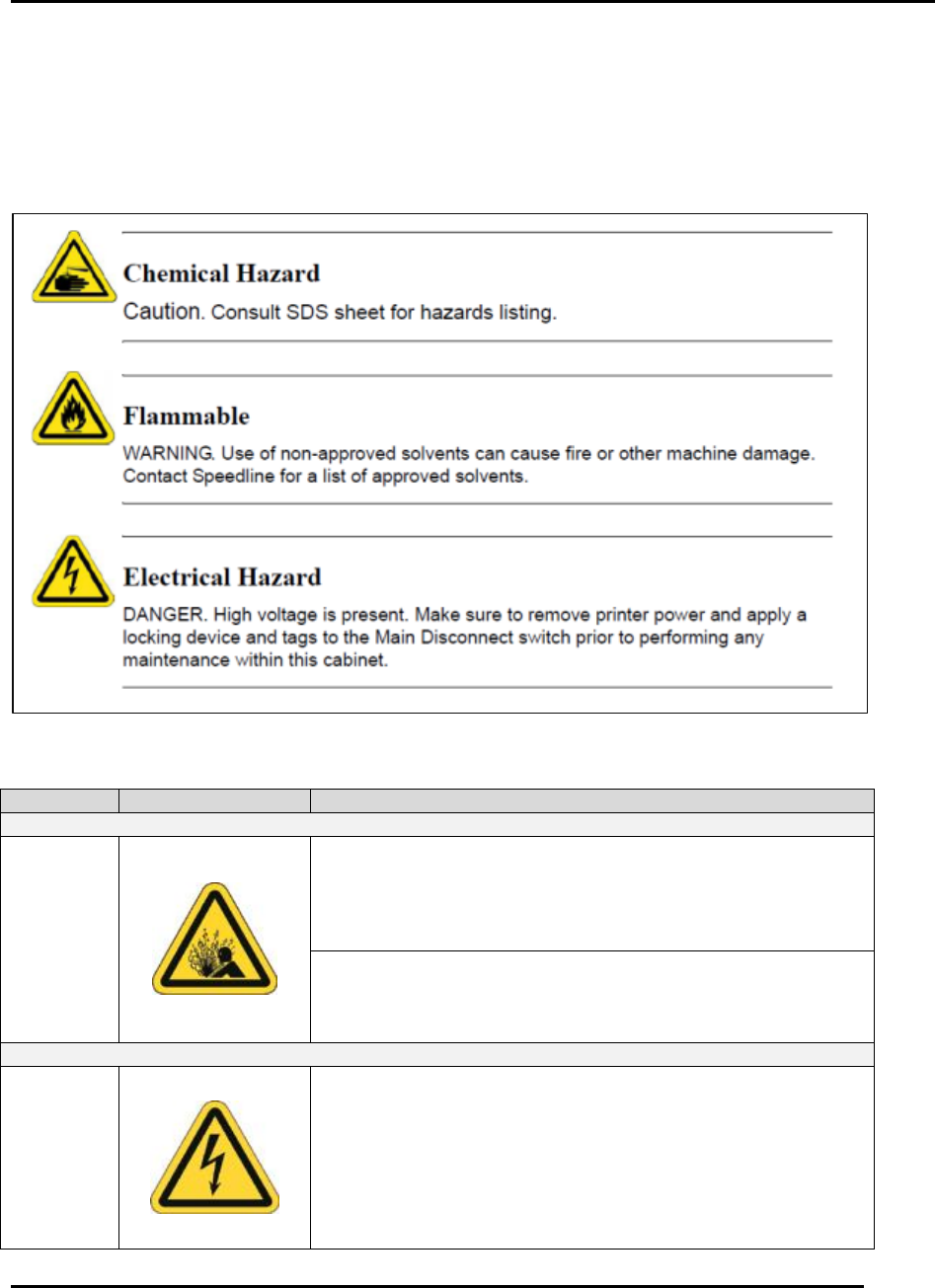
Each caution, warning, and danger listed in this manual is accompanied by the international
symbol which best represents the hazard. Leading text indicates whether the hazard is a caution,
warning, or danger (Figure 3). Table 3 lists the hazard information used in this manual.
Figure 3. Example Hazard Warnings.
Table 3. International Hazard Symbols and Text.
Hazard
Symbol
Signal Word & Label Text
Compressed Air Hazards
Air
Pressure
Caution. Compressed air can cause dirt/debris to dislodge
under pressure. Airborne particles and solvents may be
hazardous to your health. Do not use compressed air to clean
or to dry printer components. Failure to comply may result in
personal injury.
Caution. The impact of pressurized air can injure skin and
eyes. Be sure to remove air pressure to the printer before
servicing air pressure components. Failure to comply may
result in personal injury.
Electrical Hazards
Electrical
Hazard
WARNING. High voltage is present on the line (supply) side
of the printer main disconnect switch when the switch is in the
OFF position. Turn OFF the main disconnect switch, lock-out
and tag-out the main disconnect switch, and remove the
power cable from its power source before servicing.
Failure to comply could result in serious injury or death.