EdisonStandardOwnersManual-RevA-20170818B.pdf - 第39页
Edison Printer User Manual (Part Number 1023838) S AFETY Rev. A 39 Copyright © 2017 ITW EAE All rights reserved. No part of the contents of this manual may be reproduced, copi ed or transmi tted in any form or by any mea…
SAFETY Edison Printer User Manual (Part Number 1023838)
38 Rev. A
Copyright © 2017 ITW EAE
All rights reserved. No part of the contents of this manual may be reproduced, copied or transmitted in any form or by any
means including graphic, electronic, or mechanical methods or photocopying, recording, or information storage and
retrieval systems without the written permission of ITW EAE, unless for purchaser's personal use.
2.4.1. Lockout Procedure
Personnel authorized to lockout equipment must have the necessary
locks to perform the lockout.
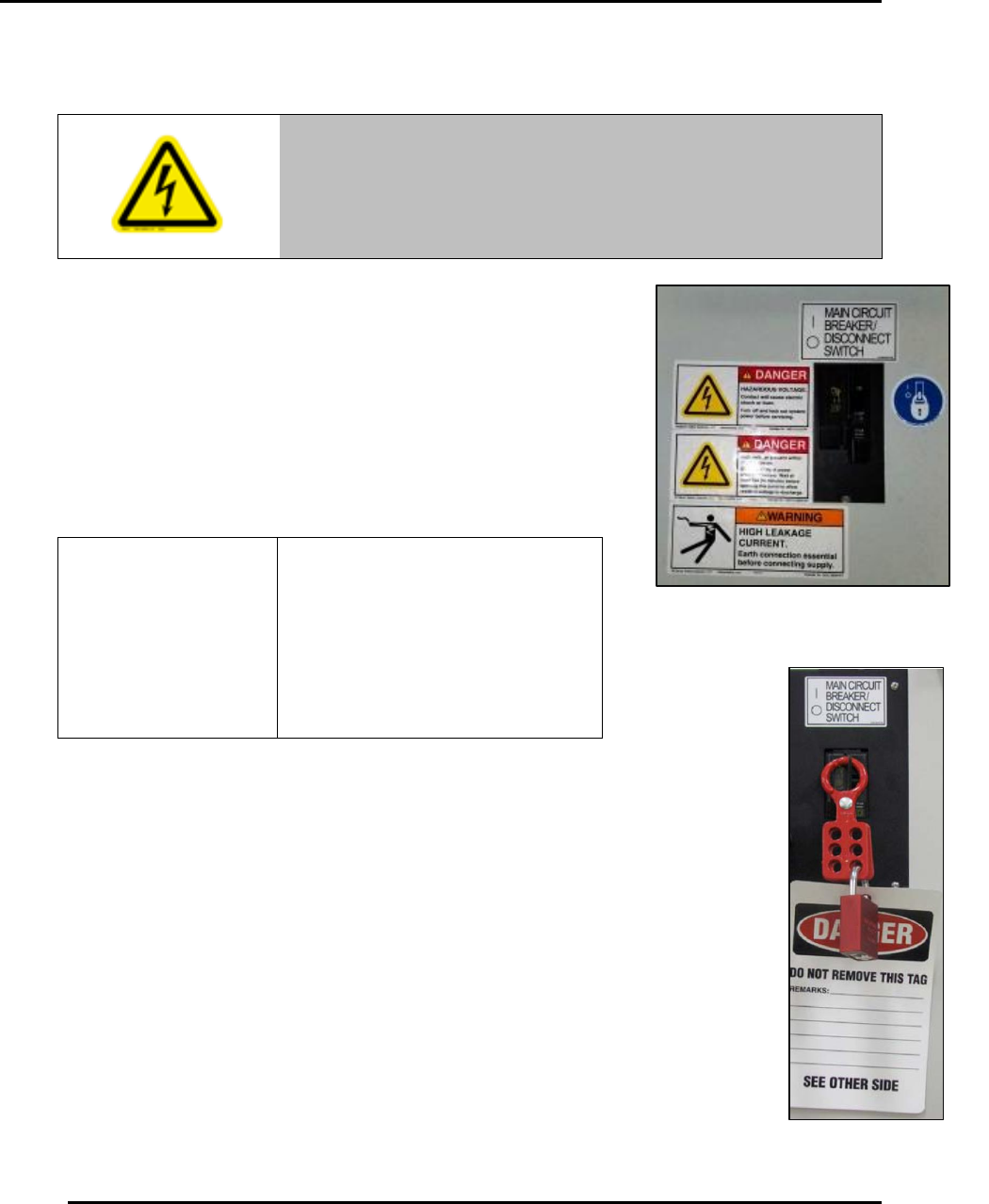
1. Set the Main Circuit Breaker/Disconnect Switch to O (OFF)
(Figure 12).
2. Unplug power cord from power source.
3. Test for power by attempting a start with the machine
controls.
4. Apply locking device and tag to the Main Disconnect switch
(Figure 13).
5. When work is complete, remove all tags and restore the machine to its
working state.
Warning!
Main disconnect terminals are live. Unplug printer power cord
from power source for added safety.
The Edison printer is designed to
effectively dissipate stored
energy when power is removed.
Once power is removed and the
system is locked and tagged,
there is no danger of electrical
shock due to stored energy.
Figure 12. Set main circuit breaker to
OFF before lockout procedure.
Figure 13. Example
Lockout Tagout.
Edison Printer User Manual (Part Number 1023838) SAFETY
Rev. A 39
Copyright © 2017 ITW EAE
All rights reserved. No part of the contents of this manual may be reproduced, copied or transmitted in any form or by any
means including graphic, electronic, or mechanical methods or photocopying, recording, or information storage and
retrieval systems without the written permission of ITW EAE, unless for purchaser's personal use.
2.5. Doors and Covers
Doors and covers on the Edison printer protect against the hazards behind them. Operation
without these safety devices in place creates hazards that the doors and covers are intended to
render safe for personnel. Inspect the Edison printer periodically to make sure the doors and
covers are in place.
2.6. Maintenance
Only qualified and trained personnel should perform maintenance or repair. Perform maintenance
tasks with appropriate proper personal protective equipment (PPE), including safety glasses and
protective gloves.
Danger!
Electrical panels contain high voltage. Disconnect and lock out
the power supply before working inside any electrical panels.
Failure to lock out the power supply can result in death or
injury.
Danger!
Use PPE and follow standard safety protocols when working
with solder paste, printing media and other chemicals. Make
sure to properly dispose of waste material according to
manufacturer’s instructions.
Warning!
Before performing maintenance procedures you may need to
reposition printer components to gain better access. Stay clear
as components move. Failure to keep hands clear of moving
parts could result in serious injury.
Warning!
Remove power from the printer before you perform maintenance
on internally mounted components. Moveable axes inside the
printer move quickly with force and cause serious injury.
SAFETY Edison Printer User Manual (Part Number 1023838)
40 Rev. A
Copyright © 2017 ITW EAE
All rights reserved. No part of the contents of this manual may be reproduced, copied or transmitted in any form or by any
means including graphic, electronic, or mechanical methods or photocopying, recording, or information storage and
retrieval systems without the written permission of ITW EAE, unless for purchaser's personal use.
2.6.1. Printer Relocation
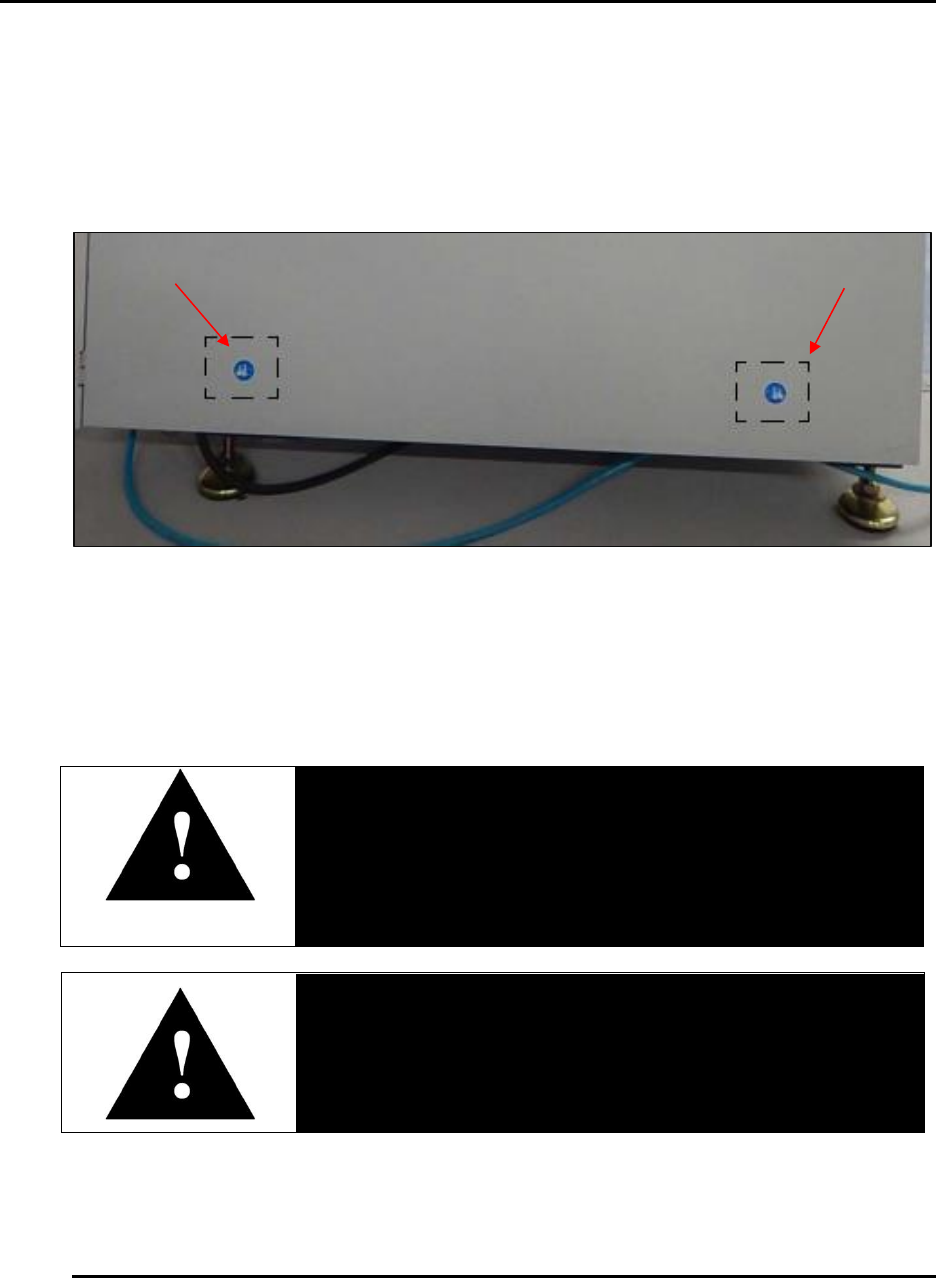
Before moving the Edison, disconnect all air supply and electrical power connections. Lift and
move the system using equipment with adequate weight capacity. Only lift at designated lift
points (Figure 14)
Figure 14. Lift at designated lift points.
2.7. Electrical Power
Only qualified and trained personnel should perform electrical maintenance or electrical repair.
Danger!
Electrical panels contain high voltage. Remove printer power
and apply a locking device and tags to the Main Disconnect
switch before working inside any electrical panels.
Danger!
Contact with energized electrical sources may result in serious
injury or death.
Before performing maintenance, disconnect all electrical power from the machine. Use a
padlock and lockout all disconnects feeding power to the machine.
Never clean, lubricate or repair the printer when in operation.