KE-750_QA表.pdf - 第60页
FUNCTION NAME X/Y Servo Driver Parameters (KE760) Function/Performance CHECK/ADJUSTMENT METHODS (REMEDIAL ACT ION PROCEDURE) ASSURED QUALITY Reliability QUALITY CHARACTERISTI CS (SPECIFIC ATION VALUES) CATEGORY Safety Pr…
FUNCTION NAME X/Y Servo Driver Parameters (KE750) Function/Performance CHECK/ADJUSTMENT METHODS (REMEDIAL ACTION PROCEDURE)
ASSURED QUALITY Reliability
QUALITY CHARACTERISTICS (SPECIFICATION VALUES) CATEGORY Safety
Product Image
ROLE IN FUNCTION (MEANING OF SPECIFICATION VALUES)
POSSIBLE MALFUNCTIONS (CAUSED BY INCORRECT SPECIFICATION VALUES)
COMPONENTS
NO. Part No. Part Name Associated Quality Characteristics
1 E9612721000 AC servo driver
2 KM000000030 800-W AC servo driver
3 MODEL KE-750/760
4 UNIT Electrical REF. NO.
5
NAME
EL-2
6 FUNCTION X/Y Servo Driver Parameters
7
NAME (KE750) 1/3
8
9
10
QA Table
Setting values
See the adjustment procedure that follows.
See p. 3/3 for the setting procedure.
Serves as the control parameters of X/Y-axis motor, directly affecting the operation of X/Y-axis.
1. Degraded placement accuracy
2. Hunting and oscillation at stopping
3. Abnormal oscillation during operation
4. Degraded stopping accuracy
5. Servo driver alarm
KE 750
X-axis Y-axis
Parameter No. Name
0000 Control mode 0009 0009
0001 Position loop gain 1 0240 01C0
0002 Speed loop gain 1 0058 0040
0003 Speed loop integral time 1 0680 0680
0004 Not used — —
0005 Speed limit 1388 1388
0006 Current limit 007E 008A
0007 Imposition range 0004 0004
0008 Filter constant 7FFF 7FFF
0009 to 000b Not used — —
000C Speed alarm 13EC 13EC
000d Not used — —
000E Frequency divider/multiplier setting 0080 0080
000F CTRLSW (control operation selector switch) 0186 0186
0010 Monitor address setting 0030 0030
0011 Overload alarm level 0037 003C
0012 External encoder resolution 02A3 02A3
0013 Position loop gain 2 0220 0180
0014 Speed loop gain 2 0040 0028
0015 Speed loop integral time 2 0480 0500
0016 Not used — —
0017 Position loop gain gradient 0002 0030
0018 Speed loop gain gradient 0018 0020
0019 Speed loop integral time gradient 0008 0030
001A to 001d Alarm history 1 to 4 0000 0000
FUNCTION NAME X/Y Servo Driver Parameters (KE760) Function/Performance CHECK/ADJUSTMENT METHODS (REMEDIAL ACTION PROCEDURE)
ASSURED QUALITY Reliability
QUALITY CHARACTERISTICS (SPECIFICATION VALUES) CATEGORY Safety
Product Image
ROLE IN FUNCTION (MEANING OF SPECIFICATION VALUES)
POSSIBLE MALFUNCTIONS (CAUSED BY INCORRECT SPECIFICATION VALUES)
COMPONENTS
NO. Part No. Part Name Associated Quality Characteristics
1 E9612721000 AC servo driver
2 KM000000030 800-W AC servo driver
3 MODEL KE-750/760
4 UNIT Electrical REF. NO.
5
NAME
EL-2
6 FUNCTION X/Y Servo Driver Parameters
7
NAME (KE760) 2/3
8
9
10
QA Table
Setting values
See the adjustment procedure that follows.
See p. 3/3 for the setting procedure.
Serves as the control parameters of X/Y-axis motor, directly affecting the operation of X/Y-axis.
1. Degraded placement accuracy
2. Hunting and oscillation at stopping
3. Abnormal oscillation during operation
4. Degraded stopping accuracy
5. Servo driver alarm
KE 760
X-axis Y-axis
Parameter No. Name
0000 Control mode 0009 0009
0001 Position loop gain 1 0230 0200
0002 Speed loop gain 1 0058 0040
0003 Speed loop integral time 1 0680 0680
0004 Not used — —
0005 Speed limit 1388 1388
0006 Current limit 007E 008A
0007 Imposition range 0004 0004
0008 Filter constant 7FFF 7FFF
0009 to 000b Not used — —
000C Speed alarm 13EC 13EC
000d Not used — —
000E Frequency divider/multiplier setting 0080 0080
000F CTRLSW (control operation selector switch) 0186 0186
0010 Monitor address setting 0030 0030
0011 Overload alarm level 0037 003C
0012 External encoder resolution 02A3 02A3
0013 Position loop gain 2 0210 01C0
0014 Speed loop gain 2 0040 0028
0015 Speed loop integral time 2 0480 0540
0016 Not used — —
0017 Position loop gain gradient 0002 0060
0018 Speed loop gain gradient 0018 0040
0019 Speed loop integral time gradient 0008 0040
001A to 001d Alarm history 1 to 4 0000 0000
MODEL KE-750/760
UNIT Electrical REF. NO.
NAME
EL-2
FUNCTION X/Y Servo Driver Parameters
NAME 3/3
QA Table
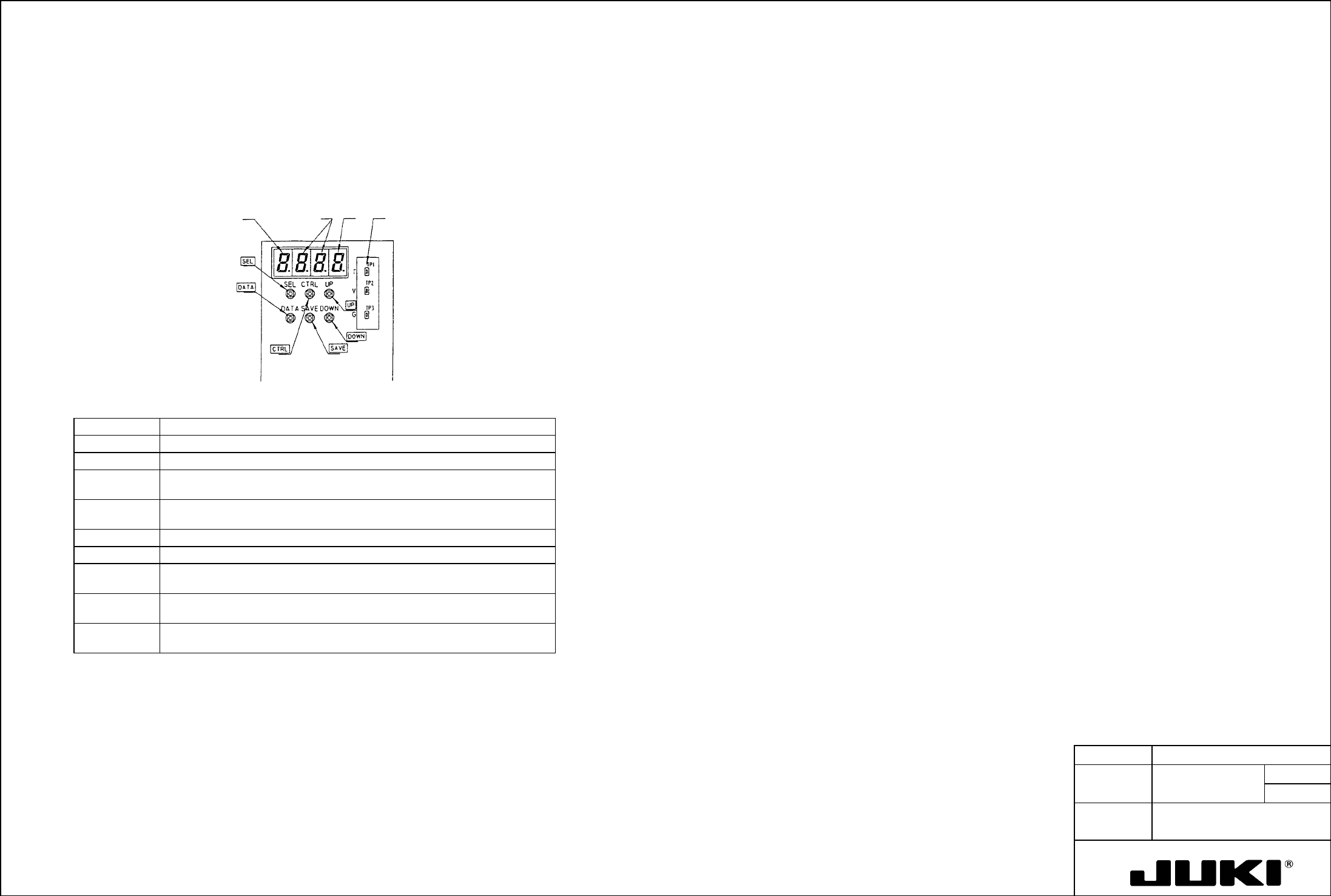
9-1 Parameter Setting Procedure
Setting procedure
(1) Turn ON the driver.
Parameter Setting
The LED displays the control mode number, alarm number and SV-ON/OFF, and the input information.
Use the setting switches on the driver panel to set the various parameters given in 9-2.
(2) Press the SEL switch, and the LED (hexadecimal 4 digits) shows the parameter number currently set.
Monitor output
Input
information
A
larm no. and
servo ON/OFF
Mode no.
Holding down the SEL switch, press the UP or DOWN switch to set the parameter number in the LED.
The digit that is incremented or decremented by 1 at this time is that marked with a lit "D.P."
To change the digit to be incremented or decremented, press CTRL while holding down SEL.
(3) Press the DATA switch, and the LED (hexadecimal 4 digits) shows the data of the parameter number currently set.
Holding down the DATA switch, press the UP or DOWN switch to set the data for the parameter number in the LED.
The digit that is incremented or decremented by 1 at this time is that marked with a lit "D.P."
To change the digit to be incremented or decremented, press CTRL while holding down DATA.
(4) The parameter data newly set and displayed on the LED has been newly set in the CPU, but not yet been saved in the
internal EEPROM.
To save the data, press SAVE while holding down the DATA switch.
When the data is written to EEPROM, the data starts blinking. If the data does not blink, start the procedure over.
(5) If you have more data to change, repeat steps (2) to (4).
Pushbutton Function
Note: New data can be set or changed whenever the driver is ON; however, data can be saved only when the servo is
OFF. Be sure first to turn OFF the SV-ON signal before attempting to save data.
SEL Displays the parameter number.
SEL + CTRL Moves the position of the digit to be changed of the parameter number.
Other functions that can be performed while the servo is OFF are setting the mode and changing the frequency
divider/multiplier setting.
SEL + UP Adds 1 to the specified digit of the parameter number (Keep pressing the
buttons to quickly change the number.)
SEL + DOWN Subtracts 1 from the specified digit of the parameter number (Keep pressing the
buttons to quickly change the number.)
DATA Displays the data for the parameter number.
DATA + CTRL Moves the position of the digit to be changed of the parameter data.
DATA + UP Adds 1 to the specified digit of the parameter data (Keep pressing the buttons
to quickly change the number.)
DATA + DOWN Subtracts 1 from the specified digit of the parameter data (Keep pressing the
buttons to quickly change the number.)
DATA + SAVE Writes the parameter data currently displayed in EEPROM when the servo is
OFF (The data is retained even when power is turned OFF.)
Note:
The control mode can be switched and data can be saved only when the SV-ON signal is OFF.