KE-750_QA表.pdf - 第69页
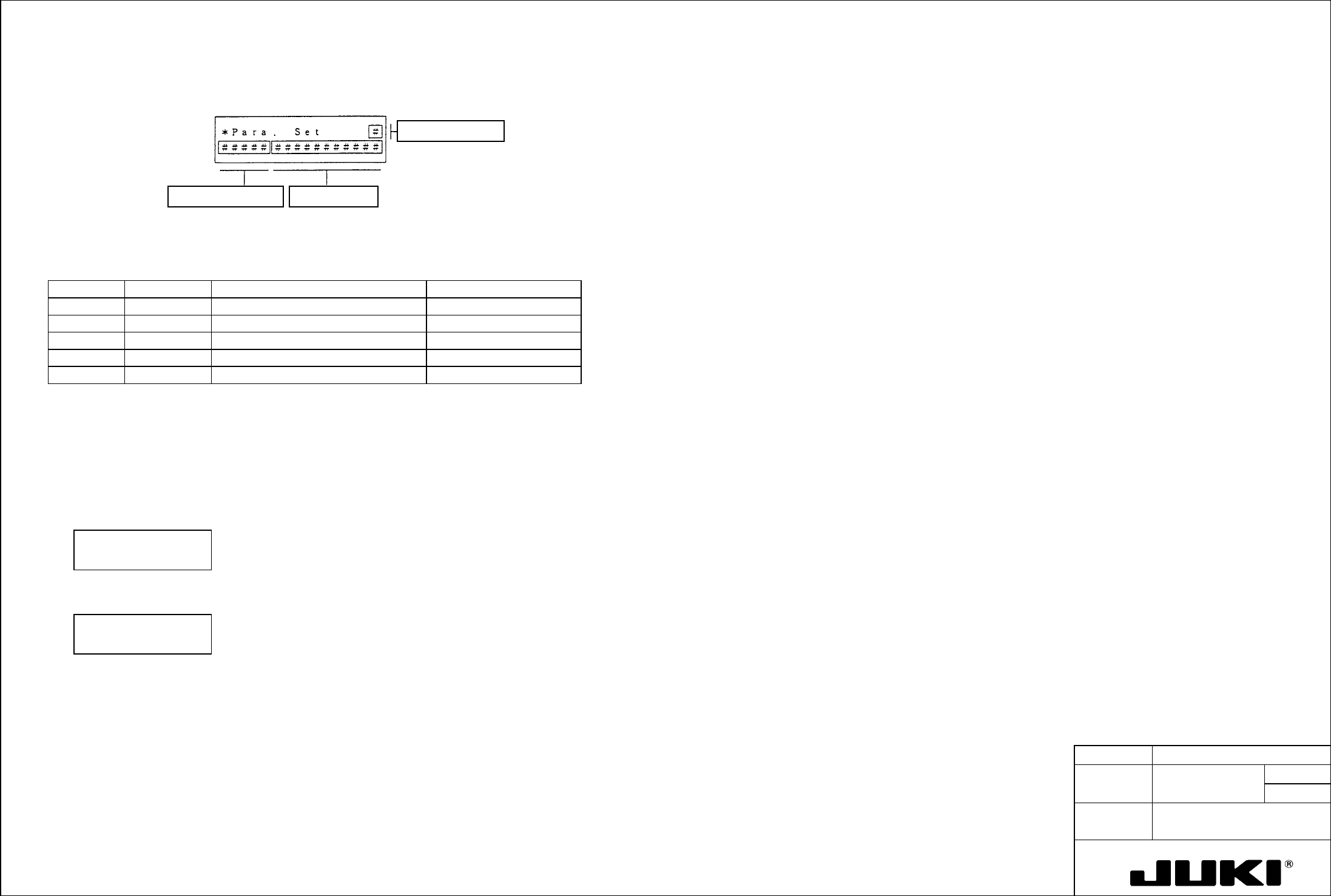
MODEL KE-750/760 UNIT Electrical REF. NO. NAME EL-4 FUNCTION Z-Axis/ θ -Axis Servo Driver NAME Parameters 6/8 QA Table (Setting Exercise) Gain setting mode (screen mode 5) Let's set, for example, Tvi:1 to 50 msec. U…
MODEL KE-750/760
UNIT Electrical REF. NO.
NAME
EL-4
FUNCTION Z-Axis/θ-Axis Servo Driver
NAME Parameters 5/8
QA Table
Parameter selecting mode (screen mode 1)
When in this mode, you select parameters according as instructed on the screen.
Contents of optionParameter abbreviation
Screen page number
Table 7-5 Screen Mode 1 Parameters
Page no. Abbreviation Name No. of options available
0 TYPE Control mode 2
1 ENKD Encoder type 1
2 ENPL No. of encoder pulses 1
3 MOT Motor type P30, P50 series
4 CABLE Applicable cable length 4
(Setting Exercise)
Let's change, for example, the amplifier control method from Position to Velocity.
Step 1. Select screen mode 1.
Step 2. Using
↓ or ↑, select page 0 and then, using > or <, select Velocity.
Then, the following message appears:
*Para. Select 0
TYPE: Velocity
Step 3. Press WR, and the following message appears:
* Completed 0
TYPE: Velocity
Step 4. Press MODE to go back to the initial screen.
To set for another page, repeat steps from step 2.
Notes:
- No data can be changed of mode 1 - 0, 3, and 4 unless bit 7 (SPC bit) of SSW2 (mode 0 - 11) has first been set to
"1."
The new setting made becomes valid only after power is turned OFF.
- Pages 1 and 2 only monitor the current setting values and do not allow the setting to be changed.
MODEL KE-750/760
UNIT Electrical REF. NO.
NAME
EL-4
FUNCTION Z-Axis/θ-Axis Servo Driver
NAME Parameters 6/8
QA Table
(Setting Exercise)
Gain setting mode (screen mode 5)
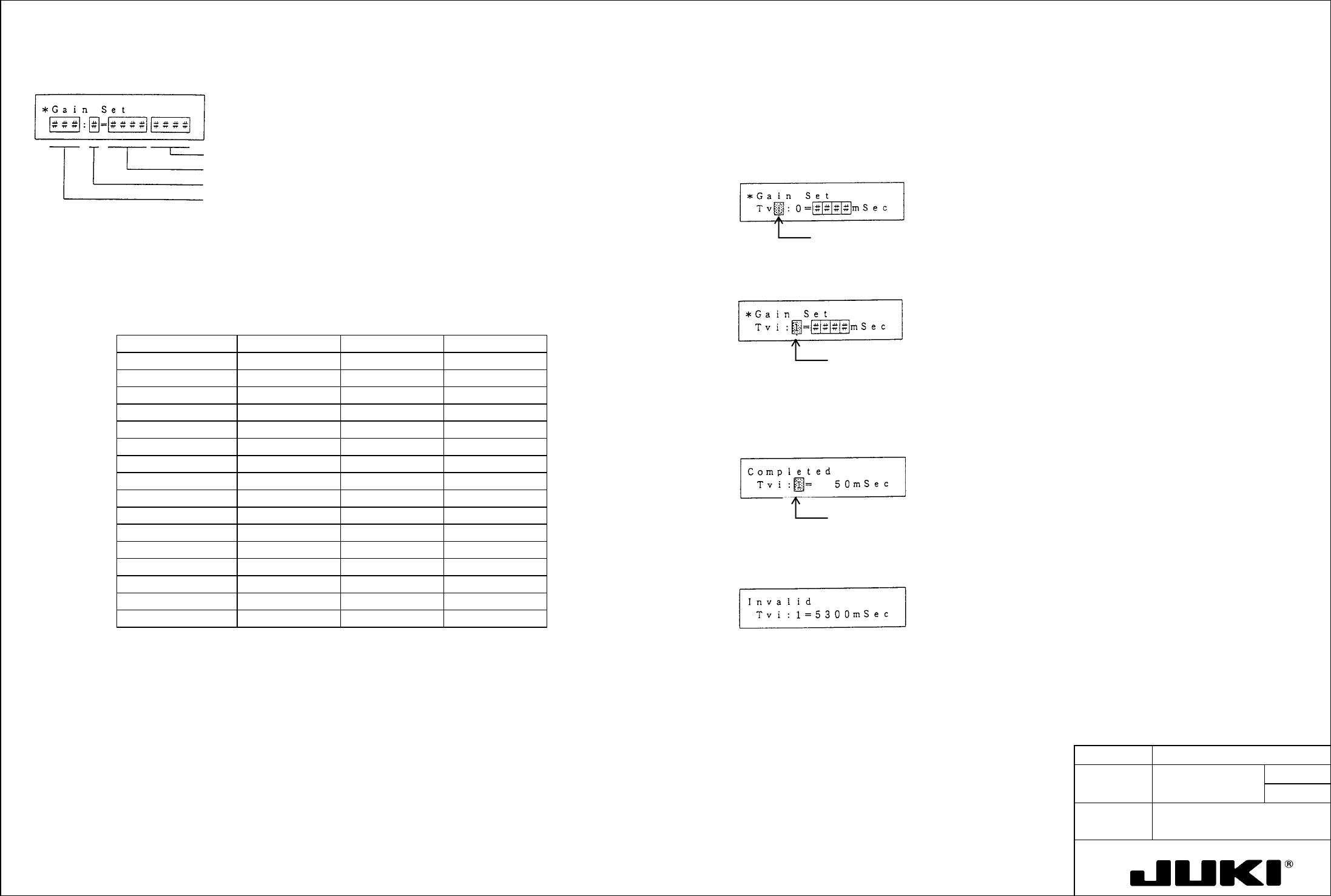
Let's set, for example, Tvi:1 to 50 msec.
Unit
Setting value data
Gain setting switch (RSW) value 0 to F
Parameter type Kp, Kvp, Tvi
Step 1. Set bit 7 of SSW2 to "1."
Return the mode select screen and select screen mode 5.
Step 2. Using > or <, move the cursor to the desired parameter type and, using
↓ or ↑, select Tvi.
Cursor blinks.
When in this mode, you can change the parameter (Kp, Kvp, Tvi) corresponding to the value set with the gain setting switch
(RSW) when the selector switch (SW) on the amplifier front panel is placed in the upper position to any desired value. The
following table shows the relation between the gain setting switch and the set parameter.
Step 3. Using > or <, move the cursor to the gain setting switch value and, using ↓ or ↑, select 1.
Table 7-9 Gain Setting Switch and Gain Setting Values
(Figures in parentheses are factory settings.)
Cursor blinks.
Gain setting switch Kp Kvp Tvi
0 Kp: 0 ( 10) Kvp: 0 ( 100) Tvi: 0 ( 20)
1 Kp:1 ( 10) Kvp: 1 ( 20) Tvi: 1 ( 20)
Step 4. Using > or <, move the cursor to the digit of the setting data in which you want to enter a value.
2 Kp: 2 ( 20) Kvp: 2 ( 35) Tvi: 2 ( 50)
Step 5. Using the numeric keys 0 to 9, enter "50" consecutively.
3 Kp: 3 ( 20) Kvp: 3 ( 35) Tvi: 3 ( 50)
Step 6. Press WR to store the data in nonvolatile memory.
4 Kp: 4 ( 30) Kvp: 4 ( 50) Tvi: 4 ( 50)
When the data has been set, the following message appears:
5 Kp: 5 ( 30) Kvp: 5 ( 50) Tvi: 5 ( 20)
Cursor blinks.
6 Kp: 6 ( 30) Kvp: 6 ( 70) Tvi: 6 ( 50)
7 Kp: 7 ( 30) Kvp: 7 ( 70) Tvi: 7 ( 20)
8 Kp: 8 ( 45) Kvp: 8 ( 100) Tvi: 8 ( 50)
9 Kp: 9 ( 45) Kvp: 9 ( 100) Tvi: 9 ( 20)
A Kp: A ( 45) Kvp: A ( 140) Tvi: A ( 50)
If a value has been entered that falls outside the setting range, the following message appears and the remote
operator does not bother storing the data in memory.
B Kp: B ( 45) Kvp: B ( 140) Tvi: B ( 20)
C Kp: C ( 60) Kvp: C ( 200) Tvi: C ( 50)
D Kp: D ( 45) Kvp: 9 ( 200) Tvi: D ( 20)
E Kp: E ( 60) Kvp: E ( 280) Tvi: E ( 50)
F Kp: F ( 60) Kvp: F ( 280) Tvi: F ( 20)
5300 msec. has
been entered:
Example:
Step 7. Press MODE to go back to the initial screen.
In the gain setting mode, make the following settings: Kp:1 = 30 rad/s., Kvp:1 = 70, and Tvi:1 = 30 msec. Then, place the
selector switch (SW) on the amplifier front panel in the upper position and set the gain setting switch (RSW) to "1." In this
condition:
To set another data, repeat steps from step 2.
The 30 rad/s value is set for Kp (position loop gain), 70 for Kvp (proportional gain), and 30 ms for Tvi (integral time
constant).
Note: BEFORE SETTING THE OPERATOR INTO THE GAIN SETTING MODE, be sure set bit 7 of SSW2 (mode 0 - 11) to
"1."
760 MODEL KE-750/
UNIT Electrical REF. NO.
NAME
EL-4
FUNCTION Z-Axis/θ-Axis Servo Driver
NAME Parameters 7/8
QA Table
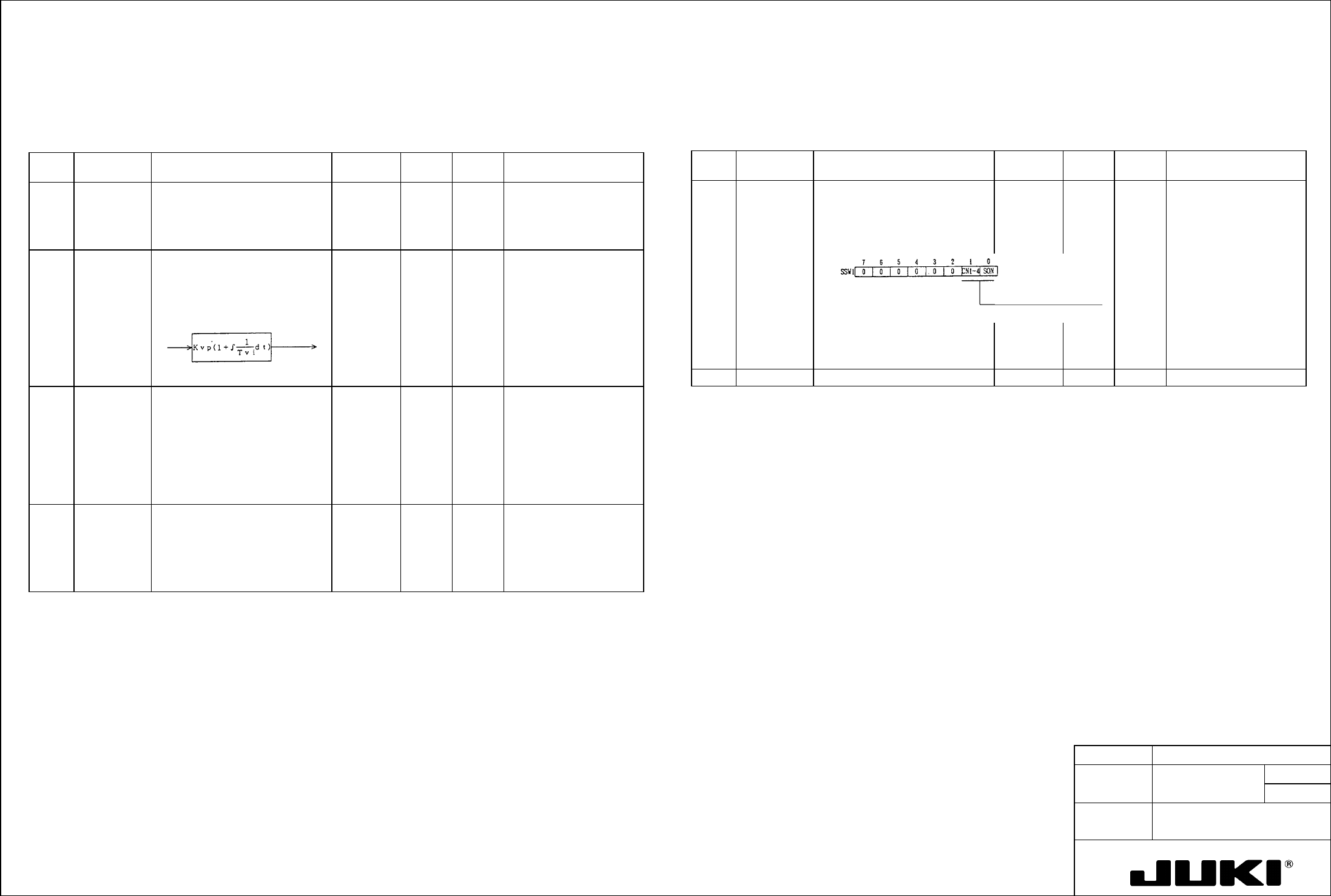
Parameter Descriptions (Speed Control Type)
– Parameter Listing
Table 8-7-1 Screen Mode 0 (Key input setting) Table 8-7-2 Screen Mode 0 (Key input setting)
Page
no.
Abbreviation Name and description Standard
value
Unit Setting
range
Remark
Page
no.
Abbreviation Name and description Standard
value
Unit Setting
range
Remark
2 Kvp Speed loop proportional gain:
Proportional gain of the speed
controller (proportional integral
control).
70 — 10 to
3000
Data cannot be changed
from the operator when
the selector switch (SW)
on the amplifier front panel
is in the upper position.
10 SSW1 Selector switch 1:
- The desired function can be set
the digital switch.
00000000 bit 0.1 Select either external
signal enable or internal
force-ON.
3 Tvi Speed loop integral time constant:
Integrated time constant of the
speed controller (proportional
integral control).
20 mS 2 to
1000
Data cannot be changed
from the operator when
the selector switch (SW)
on the amplifier front panel
is in the upper position.
7 ENCR Output pulse dividing ratio:
The dividing ratio of encoder signal
(phase A, phase B) can be set.
Dividing ratio =
β/α
Where,
α .. 1 to 64, 8192
β... 1 (when α = 1 to 64)
2 (when
α= 3 to 64)
1 to 8191 (when
α= 8192)
1/1 — 1 to
1/8192
8
8 LTG Low speed:
- Set the speed of low speed
output.
- Low speed output LTG turns ON
when the speed slows down
below the set level.
50 min
-1
10 to
9999
Speed
deviation
Current
command
11
17/
18/ Enable external 19/ Internal force-ON
20/
21/ Selector switch 2:
- The desired function can be set the digital switch.
22/ Speed command polarity
0 | Turns forward with a "+" input.
1 | Turns forward with a "-" input.
Alarm output logic
0 | OFF when an alarm occurs.
1 | ON when an alarm occurs.
CN1-4 pin select
0 | PCON (P control)
1 | ZCMD (zero clamp)
Cch (CN1-35, 36) logic
0 | Tr ON with Cch output
1 | Tr OFF with Cch output
Test mode execution
0 | Disabled
1 | Enabled
System parameter overwrite enable
0 | Disabled
1 | Enabled
23/ Set bits 6 and 7 back to "0" after execution. They can also be reset to "0" by turning power OFF.
The bit 5 setting becomes valid only when power is once turned OFF.
24/ Z-Axis/$-Axis Servo Driver Parameters 7/8