KE-750_QA表.pdf - 第79页
FUNCTION NAME OCC Light L Light Map Function/Performance CHECK/ADJUSTMENT METHODS (REMEDIAL ACTION PROCEDURE) ASSURED QUALITY Reliability QUALITY CHARACTERISTI CS (SPECIFIC ATION VALUES) CATEGORY Safety Product Image ROL…

MODEL KE-750/760
UNIT Electrical REF. NO.
NAME
EL-8
FUNCTION Head Vacuum Level 2/2
NAME
QA Table
Before starting the adjustment procedure, make sure that the DC power source voltage has been properly adjusted.
Adjustment procedure
a. Check that the pressure sensors have been connected to CN17, 18, and 19 of the head main board. (Connection to
CN19 is not necessary in KE-760.)
b. Close the circuit breaker and turn ON power.
c. With the sensors connected, measure the voltage of pin 2 of the following and record the values:
(1) CN17 Left head
(2) CN18 Right head
(3) CN19 Center head
(4) TP7 GND
d. Measure the voltage at the following check pins:
(5) TP5 Left head
(6) TP1 Right head
(7) TP3 Center head
(4) TP7 GND
Turn the following variable resistors so that the voltages measured become 1/2 of the measurements taken in step c:
(8) VR5 Left head
(9) VR1 Right head
(10) VR3 Center head
e. Turn the following variable resistors so that the voltages at the following check pins become 1.25 V ±0.01 V:
Check pins:
(11) TP6 Left head
(12) TP2 Right head
(13) TP4 Center head
(4) TP7 GND
Variable resistors:
(14) VR6 Left head
(15) VR2 Right head
(16) VR4 Center head
This completes the adjustment of the head vacuum level.

FUNCTION NAME OCC Light L Light Map Function/Performance CHECK/ADJUSTMENT METHODS (REMEDIAL ACTION PROCEDURE)
ASSURED QUALITY Reliability
QUALITY CHARACTERISTICS (SPECIFICATION VALUES) CATEGORY Safety
Product Image
ROLE IN FUNCTION (MEANING OF SPECIFICATION VALUES)
POSSIBLE MALFUNCTIONS (CAUSED BY INCORRECT SPECIFICATION VALUES)
COMPONENTS
NO. Part No. Part Name Associated Quality Characteristics
1 E86067250A0 Base unit board assembly DC power source output voltage adjustment
2 E86127210A0 OCC light board assembly
3 MODEL KE-750/760
4 UNIT Electrical REF. NO.
5
NAME
EL-9
6 FUNCTION OCC Light L Light Map
7
NAME
8
9
10
QA Table
1. Before making the adjustment, make sure that the DC power source output voltage has been properly adjusted.
Light map MAX_LVL = 130 ±5
2. Turn ON the OCC light L.
3. With a white ceramic PWB clamped and positioned on the transport rails, move the head so that the OCC camera L can
view the center of the ceramic PWB.
4. Read the light map at the center in the horizontal direction and turn VR1 of the base unit board to obtain the specified
MAX_LVL value.
5. After VR1 has been adjusted, read light map several times to ensure that the map is stabilized.
Note: When adjusting the OCC light, turn the polarizer filter to a position that provides the brightest light map.
Serving as the adjustment of brightness of lighting for recognition of BOC mark and IC mark, it affects the image taken in
through the recognition process. It also affects the image reading of feed bank recognition.
1. Degraded placement accuracy
2. BOC mark and IC mark recognition error
3. Feeder bank mark recognition error
4. Error in the automatically calculated pickup position value for feeder bank position correction
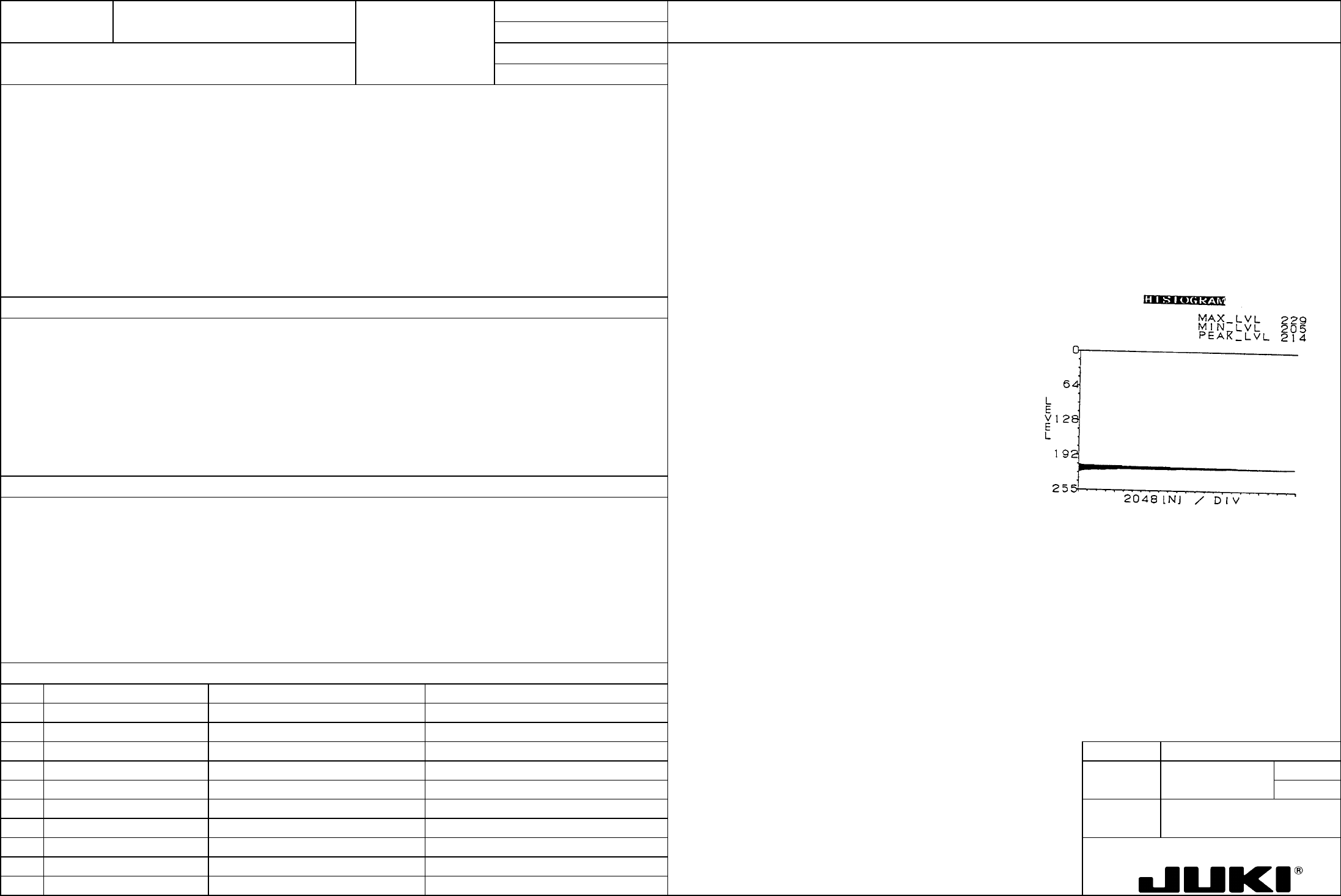
FUNCTION NAME OCC Light R Histogram Function/Performance CHECK/ADJUSTMENT METHODS (REMEDIAL ACTION PROCEDURE)
ASSURED QUALITY Reliability
QUALITY CHARACTERISTICS (SPECIFICATION VALUES) CATEGORY Safety
Product Image
ROLE IN FUNCTION (MEANING OF SPECIFICATION VALUES)
POSSIBLE MALFUNCTIONS (CAUSED BY INCORRECT SPECIFICATION VALUES)
COMPONENTS
NO. Part No. Part Name Associated Quality Characteristics
1 E86067250A0 Base unit board assembly DC power source output voltage adjustment
2 E86247150A0 BOC light board assembly
3 MODEL KE-750/760
4 UNIT Electrical REF. NO.
5
NAME
EL-10
6 FUNCTION OCC Light R Histogram
7
NAME
8
9
10
QA Table
1. Before making the adjustment, make sure that the DC power source output voltage has been properly adjusted.
Histogram PEAK_LVL = 0.92 x MAX_LVL ±5
2. Turn ON OCC light R.
3. Turn VR6 of the base unit board so that OCC light R becomes the brightest.
4. Place a ceramic PWB (white) at a position about 10 mm from the leading edge of the LED of OCC light R. (At this time,
ensure that OCC light R runs parallel with the ceramic PWB.)
5. Show the histogram (as shown below on the right) under the condition of 4 and record the MAX_LVL value at that time.
6. With the ceramic PWB clamped and positioned on the transport rails, move the head so that the OCC camera R can view
the center of the ceramic PWB.
7. Read histogram and turn VR6 of the base unit board to obtain the specified PEAK_LVL value.
Serving as the adjustment of brightness of lighting for recognition of feeder bank mark, it affects the image taken in through the
recognition process.
1. Feeder bank mark recognition error
2. Error in the automatically calculated pickup position value for feeder bank position correction