00197966-02_Ri CPU086 to BoxPC 827C X-Serie.pdf - 第15页
Nur für internen Gebrauch ! ASM Assembly Sys tems GmbH & Co KG Technische Änderu ngen vorbe halten 13.11.2018 Rupert-Ma yer-Strasse 44 81379 Mün chen, Deutschland 00197966-0 2_Ri CPU086 to BoxPC 8 27C X -Serie Seite …
Nur für internen Gebrauch!
ASM Assembly Systems GmbH & Co KG Technische Änderungen vorbehalten 13.11.2018
Rupert-Mayer-Strasse 44
81379 München, Deutschland 00197966-02_Ri CPU086 to BoxPC 827C X-Serie Seite 14 - 23
Nur für internen Gebrauch!
ASM Assembly Systems GmbH & Co KG Technische Änderungen vorbehalten 13.11.2018
Rupert-Mayer-Strasse 44
81379 München, Deutschland 00197966-02_Ri CPU086 to BoxPC 827C X-Serie Seite 15 - 23
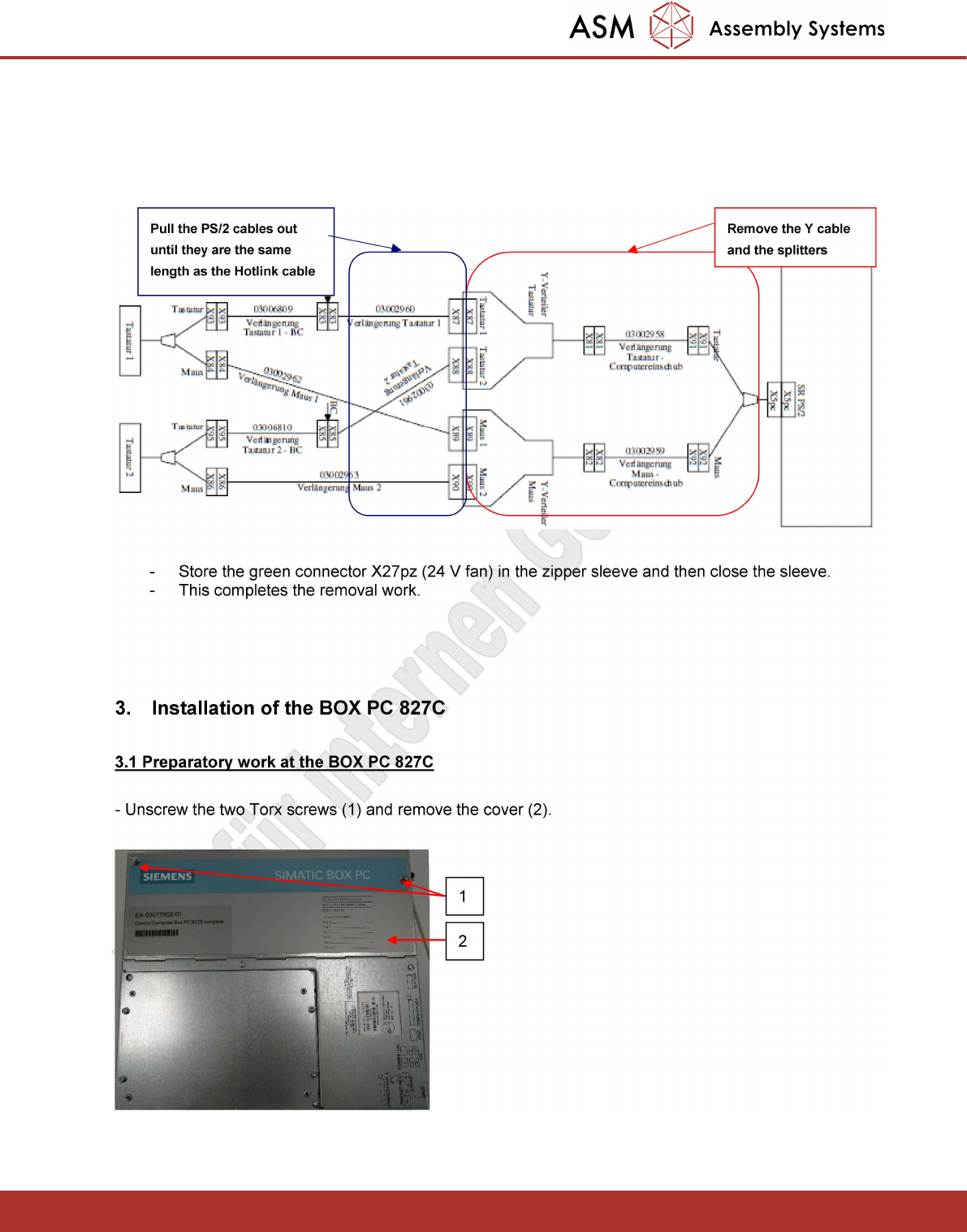
- Remove the two existing PS/2 Y splitters and cables between them and the PS/2 Y cable
(03002958 and 03002959). To do this, open the black zipper sleeve.
- The 4 PS/2 cables coming from keyboards 1 and 2 (03002960; 03002961; 03002962; 03002963)
must be pulled out from the zipper sleeve, until they are the same length as the Hotlink cable.
- Store the green connector X27pz (24 V fan) in the zipper sleeve and then close the sleeve.
- This completes the removal work.
3. Installation of the BOX PC 827C
3.1 Preparatory work at the BOX PC 827C
- Unscrew the two Torx screws (1) and remove the cover (2).
Remove the Y cable
and the splitters
Pull the PS/2 cables out
until they are the same
length as the Hotlink cable
1
2
Nur für internen Gebrauch!
ASM Assembly Systems GmbH & Co KG Technische Änderungen vorbehalten 13.11.2018
Rupert-Mayer-Strasse 44
81379 München, Deutschland 00197966-02_Ri CPU086 to BoxPC 827C X-Serie Seite 16 - 23
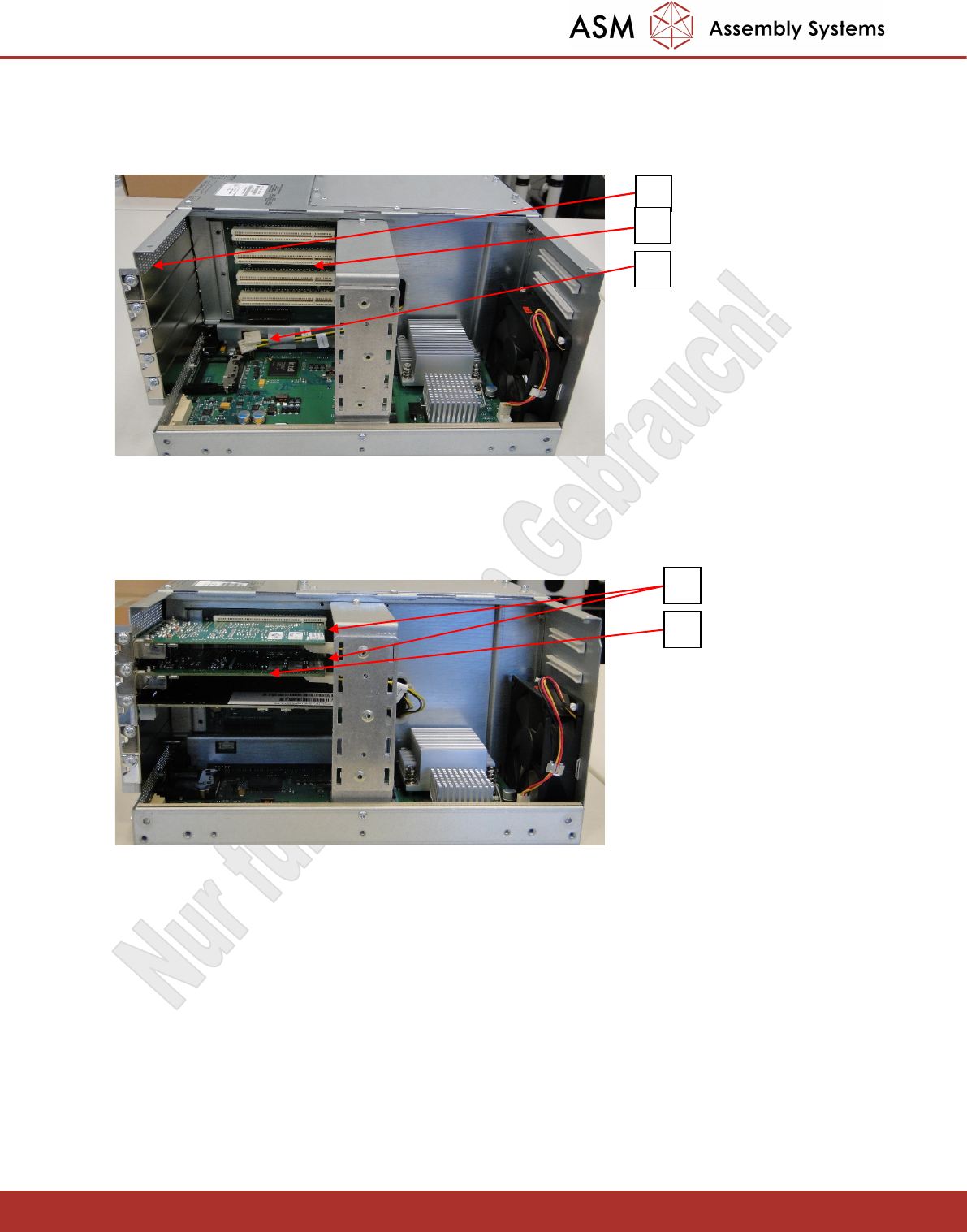
- Unscrew the three blank plates (1) for the Hotlink adapter and the CAN bus adapter. These adapters are
installed in the top three white PCI slots (2).
- Push the two supply cables (3) for the Hotlink adapter to one side.
- Connect the three adapters as shown below.
- Connect the supply cables (1) to the top and bottom Hotlink adapter 03052135.
- The CAN bus adapter 03079973 is inserted in the third PCI slot from the top (2).
- Then mount the cover of the BOX PC 827C again.
1
2
3
1
2