PPS Pro version 8.2 - 第143页
4022 591 98 247 User Manual 05.07 P PS-Pro v8.2 139 Guidelines for using PPS-Pro 3.8.1 Pre-assign tr acks in a con file SCREEN 85 Pre-assignin g Multi Tr ack f eeders NOTE: Pos 1 (left and right) as well as po s 49 and 5…

User Manual 4022 591 98247
138 PPS-Pro v8.2 05.07
Guidelines for using PPS-Pro
Furthermore set the ‘FeederTypeName’ to <Feeder_id> _ALT. Note that the
<Feeder_id> must be a known feeder, example of a name of such a definition:
ITF2_24_ALT. Currently only the ITF2 feeders are supported. Those ‘*_ALT’
feeders have twice the size of the original feeder, thus ensuring enough room
for the alternate pick position.
3.7.2.1 Adding alternate feeders in the ALE file (ACM)
Note that in the current default ALE files the alternate feeders are not
present. These can be defined as follows:
Add feeder definitions of the alternate feeder(s) to the ALE file, the following
feeders can be defined: ITF2_08_ALT, ITF2_08s_ALT, ITF2_12_ALT,
ITF2_16_ALT, ITF2_24_ALT, ITF2_32_ALT, ITF2_44_ALT and ITF2_56_ALT. Both
name and type must have this name. (Do not use Reel* names) Define twice
the number of slots as the regular feeder has.
Add the feeder(s) to the applicable feederbank definition(s) from the
machines that must get assignments of alternate feeders.
3.7.3 Alternate feeding with stick feeders (ACM)
Start PIM and select the part or package that requires alternate feeding, select
the field
‘Philips_AlternatePos’ and set its value to ‘YES’.
3.7.4 Alternate feeding with trays (ACM and AQ)
Start PIM and select the part or package that requires alternate feeding.
‘Philips_AlternatePos’ and set its value to ‘YES’.
After optimization, the AS generator tries to locate an empty slot in the tray
trolley and it fills this slot with the same part.
3.8 Tracks on Twin Bulk Feeders
‘Tracks’, also known as ‘lanes’, are different feederpositions on e.g. ‘Twin Bulk
feeders’. In the next paragraphs there are examples how to pre-assign a track.
This keyword in the ALE file is used with MPGs that support multi-track
feeders, which contain multiple part numbers. The concept of ‘tracks’ is used
to differentiate the locations in the feeder for part pickup and placement. The
value of this keyword (in below example ‘2’) indicates the number of track
locations that exist in the feeder.
NOTE: For ALE specifications Refer to manual “Description ALE-file 12nc 4022 591
98715”
4022 591 98247 User Manual
05.07 PPS-Pro v8.2 139
Guidelines for using PPS-Pro
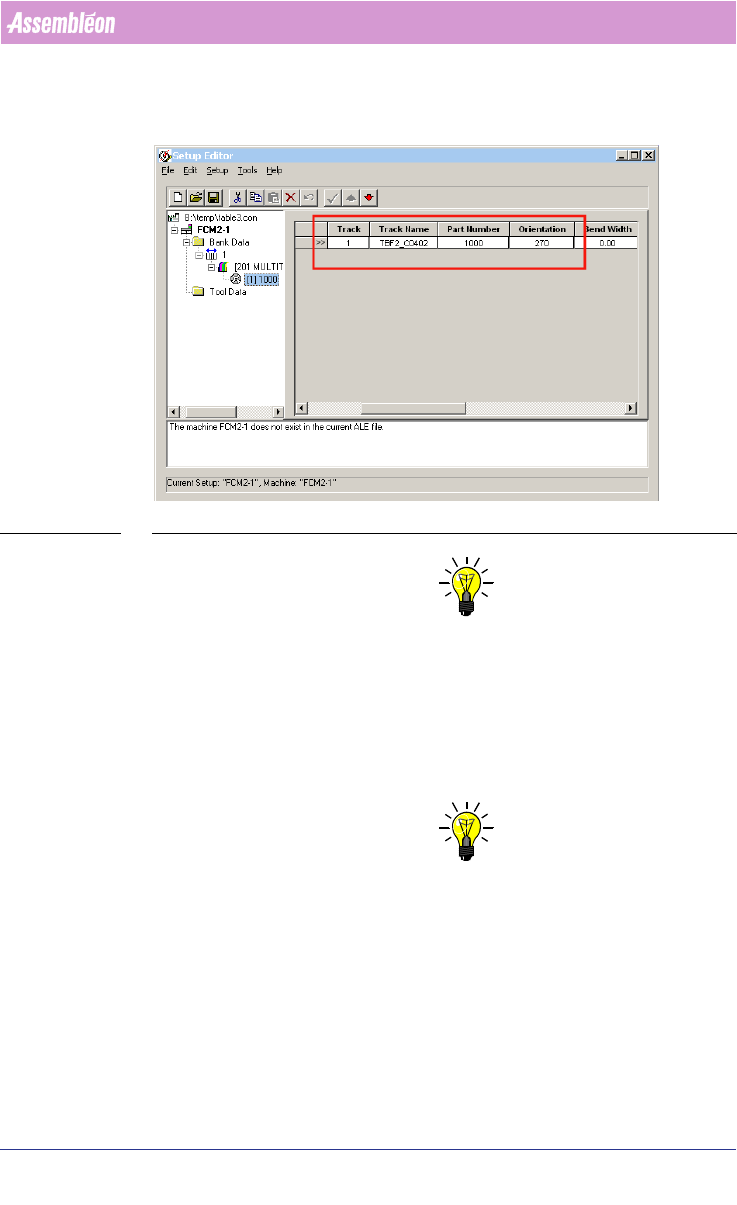
3.8.1 Pre-assign tracks in a con file
SCREEN 85 Pre-assigning Multi Track feeders
NOTE: Pos 1 (left and right) as well as pos 49 and 50 (left and right) cannot be
used by trays. Position 1 will be used for calibration and position 49 and 50
can not be reached by the lift mechanism of the ACM.
3.8.2 Application of FeederBars
FeederBartypes 1-5 are all used only on FCM I machines whereas
FeederBar_ITF is used only on FCM- II, FCM-MF and FCM-XM machines.
NOTE: The relationship feeder – FeederBar is provided in the ALE file. (The example
provided states which feeders fit on a particular FeederBar.) Furthermore
note that FeederBar4 is designed as a fixed FeederBar for the WVM module
(on a FCM-I machine).
3.9 Pre-assign trays
Tray pre-assignments are possible by using .con files.

User Manual 4022 591 98247
140 PPS-Pro v8.2 05.07
Guidelines for using PPS-Pro
NOTE: Do not run the ‘Line Scheduler’ with these .con files since it cannot handle
the track records. Use the Run Time Balancer instead.
Tray component heights do not have an influence on the chosen position. So
thick trays can be assigned on adjacent positions. It is advised to run the
optimization in such a case with a pre-assignment and optimizer setting
‘From MDF’.