PPS Pro version 8.2 - 第32页
User Manual 4022 591 98247 28 PPS-Pro v8.2 05.07 PPS-Pr o GUI between your BO M-file and th e produ ct, or between the BOM-fil e and th e selected BOM-f ormat. T o complete the BOM import, all parts mu st be verified. SC…
4022 591 98247 User Manual
05.07 PPS-Pro v8.2 27
PPS-Pro GUI
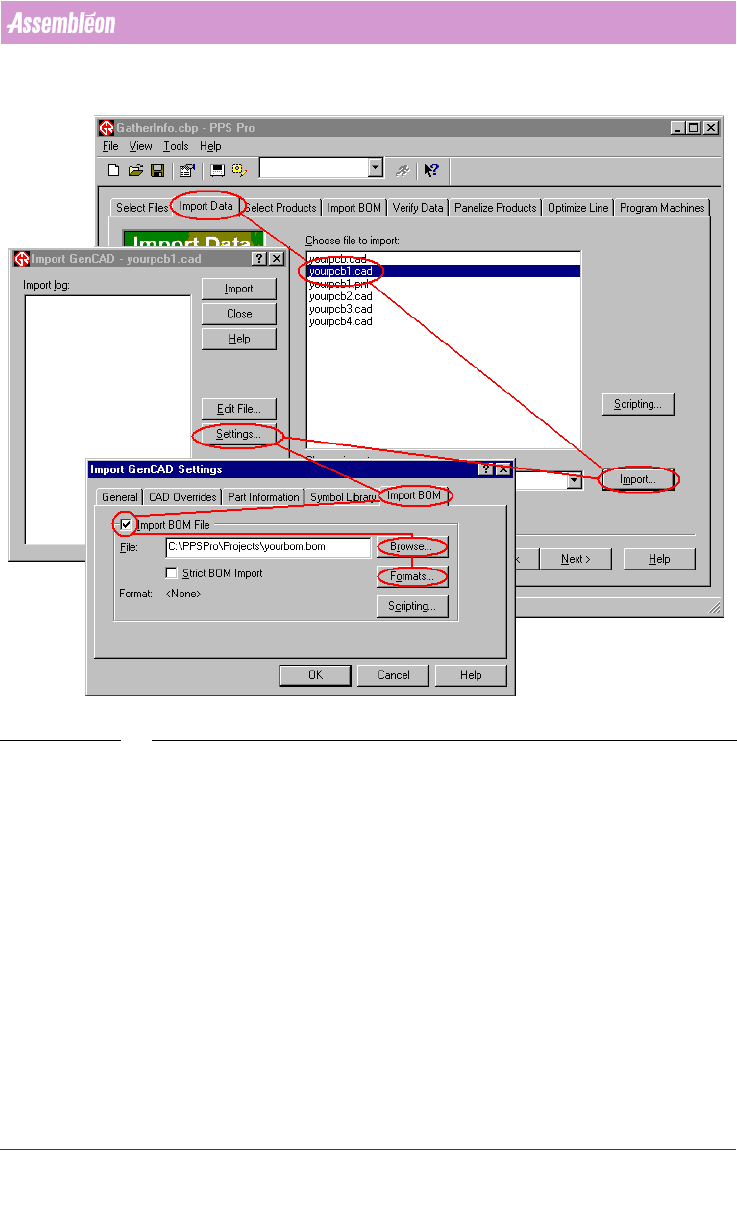
SCREEN 19 Import BOM
10. Press the Close button to close the ‘BOM-Formats Explorer’.
11. Press the OK button of the Import GenCAD Settings dialog
12. Press the Import button of the Import GenCAD dialog
13. Verify the BOM-file in the Verify BOM window
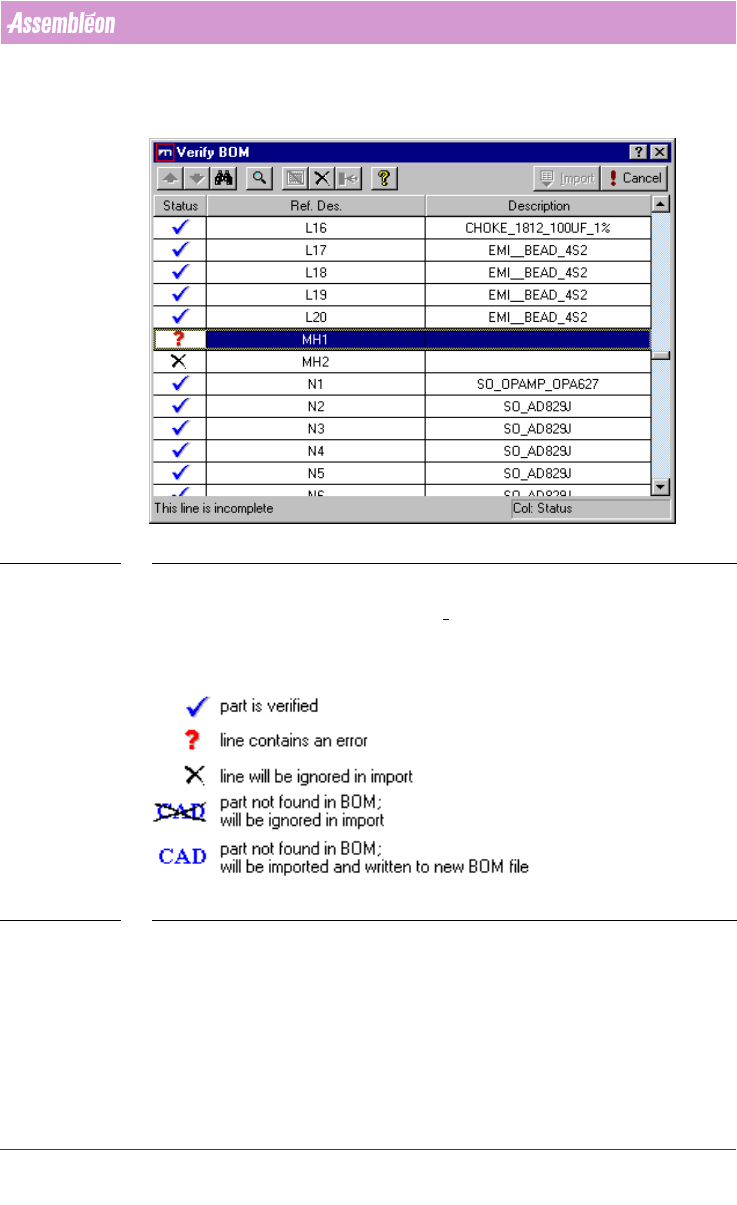
The Verify BOM dialog (see SCREEN 20 on page 28) box checks to see if each
line in your BOM-file is valid. Errors typically occur if discrepancies exist
User Manual 4022 591 98247
28 PPS-Pro v8.2 05.07
PPS-Pro GUI
between your BOM-file and the product, or between the BOM-file and the
selected BOM-format. To complete the BOM import, all parts must be verified.
SCREEN 20 Verify BOM file
When all the parts are imported with the status “Part is verified” (see SCREEN
21 on page 28) -Blue tick, then the Import tab is activated and ready for
importing.
SCREEN 21 Verify Status legend
Press the Import button in the Verify BOM window
2.9 Cad override
With CAD override files it is possible to obtain automatic changes during the
CAD import process. The following cad overrides can be convenient:
4022 591 98247 User Manual
05.07 PPS-Pro v8.2 29
PPS-Pro GUI
Remove_shapes: <package-name>
Pins_from_PSI: *
Fiducials: <package name which has to be regarded
as fiducial>
Alias: master string1
When importing ‘SmartCAD’ or ‘GenCAD’ files all packages that are not present
in the PSI file will automatically be classified as through-hole components in
the resulting MDF file. Users who only work with SMD equipment do generally
not want this behaviour. Automatic definition as SMD part is obtained by
invoking a CAD override file containing the following line:
SMD_part: *
For more details refer to the online help on cad overrides with ‘SmartCAD’ or
‘GenCAD’ import. If the importing took already place and the MDF file contains
a number of SMD parts classified as through hole, then it is adviced to add the
parts to PSI, delete the MDF and re-import again.
The Alias command provides a possibility to convert unknown package names
from the input file into known names as specified in PSI. For a detailed
description refer to the manual “Description PSI 8.2”, chapter 2.
2.10 How to use a BOM file
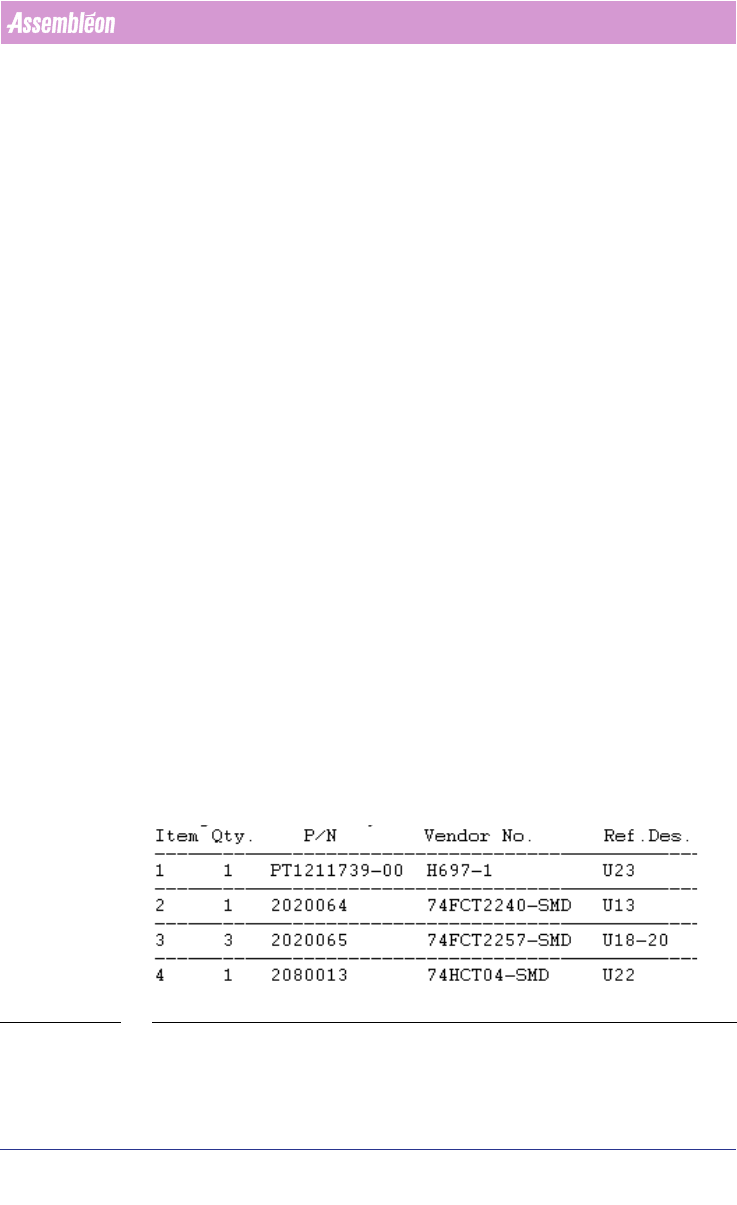
BOM (Bill Of Materials) files are text-files that contain reference designators,
Vendor names and possibly even more component information
(see FIGURE 1
on page 29). With a BOM-file it is possible to select components from CAD-
data, or update component information in an MDF-file. A BOM-file is useful
when panels, which are quite similar but do not carry exactly the same
components (so-called family-boards) are produced. All panels will be using
the same board-design/cad-data, but each product has its own BOM-file to
specify which components should be mounted and which should not be
mounted.
FIGURE 1 BOM file - Example