PPS Pro version 8.2 - 第51页
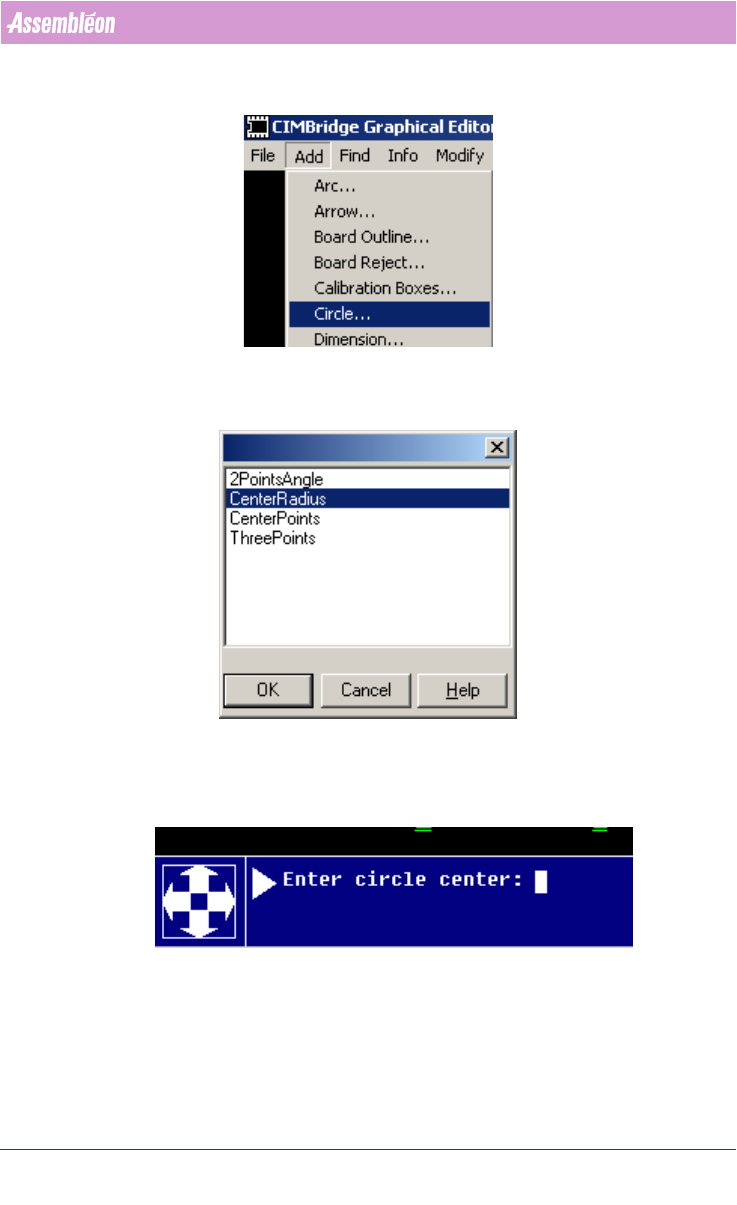
4022 591 98 247 User Manual 05.07 PPS-Pro v8.2 47 PPS-Pro GUI 1. T ake car e tha t n o oth er i tem is s elec ted (u se ctr l-d t o en sur e this ) Cl ick on one cir cle in th e MDF editor (it is n ot correct t o select …
User Manual 4022 591 98247
46 PPS-Pro v8.2 05.07
PPS-Pro GUI
3. Select one of the presented types:
CenterRadius is a normal circuit, the remainder of this example uses this type.
4. Enter the (X, Y) coordinates of the circle center:
5. Enter the radius of the circle.
6. Steps 4 and 5 can be repeated until all circles have been entered.
7. Finally press enter (as circle center) to complete the data entry.
To turn a circle into a reference hole proceed as follows:
4022 591 98247 User Manual
05.07 PPS-Pro v8.2 47
PPS-Pro GUI
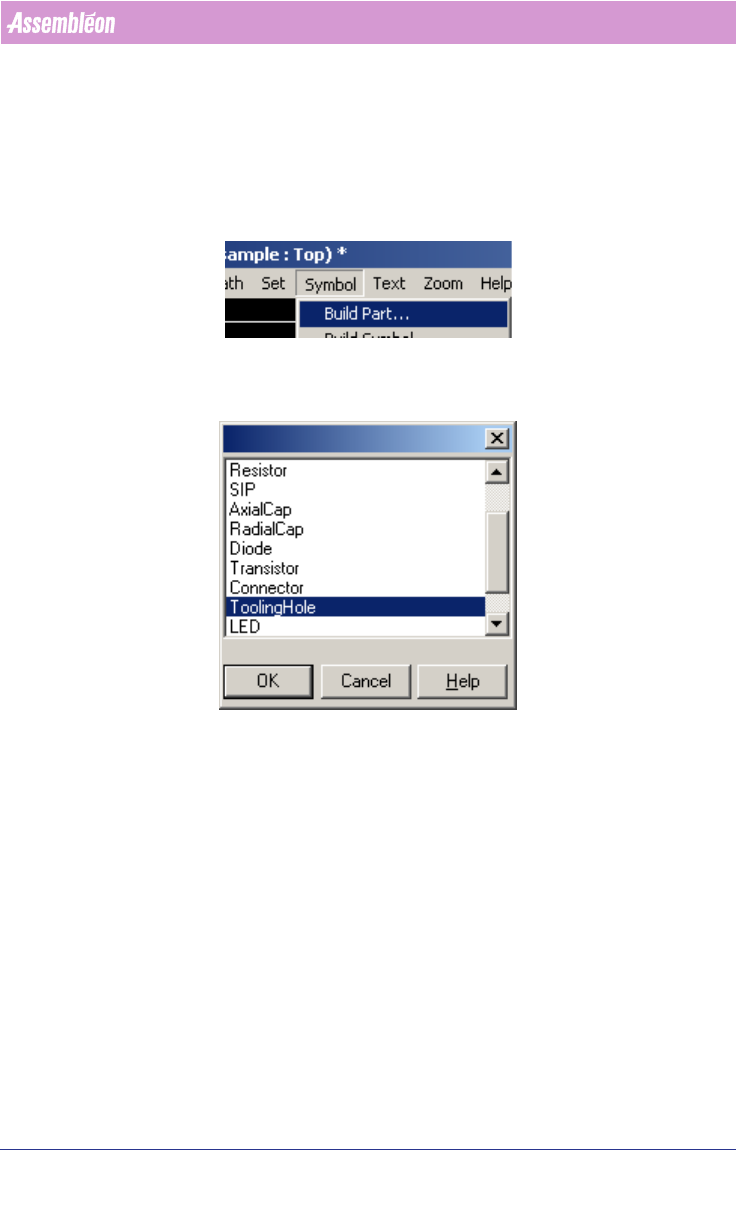
1. Take care that no other item is selected (use ctrl-d to ensure this) Click on
one circle in the MDF editor (it is not correct to select all circles since that
would turn them into one object). The circle is now the only purple object
shown.
2. Select Symbol > Build Part
3. Select ToolingHole from the selection list:
4. Click on the next circle and repeat step 3 until all (required) circles have
been turned into ToolingHoles.
2.14 Fiducial arrangements and Badmark Grouping
As the number of circuits on a PCB increases, the number of fiducial meas-
urements and (possible) badmark sensing activities performed by a Camera
also increases. In some cases the time that is needed by the Camera will
dominate the cycle time of the entire machine, which is not desirable. To
avoid this domination the concepts of fiducial arrangements
(see 2.15 on page
48) and badmark groupings (PowerLine) (see 2.16 on page 48) or area
badmarks can be used.
Fiducial arrangements enable the usage of the same set of fiducials for
multiple circuits.
User Manual 4022 591 98247
48 PPS-Pro v8.2 05.07
PPS-Pro GUI
2.15 Fiducial arrangement
A fiducial arrangement is an arbitrary set of fiducials plus an arbitrary set of
boards (=circuits) grouped together.
The purpose of the fiducial arrangement is to use the same fiducials for the
alignment of several boards (circuits). The result is a reduced number of
fiducials, which reduces the time required for fiducial measurements.
The creation of fiducial arrangement groups is performed using the MDF editor
(see 2.17 on page 50). One fiducial set per arrangement group can be defined
by the user. A maximum of 64 (on FCMs in extended mode 512) arrangements
per PCB can be defined.
2.16 BadMark Group
A badmark group (Reject Group) is a single panel-level badmark plus an
arbitrary set of board instances grouped together.
A number of applications are characterized by the fact that their PCBs have
many identical boards (=circuits).
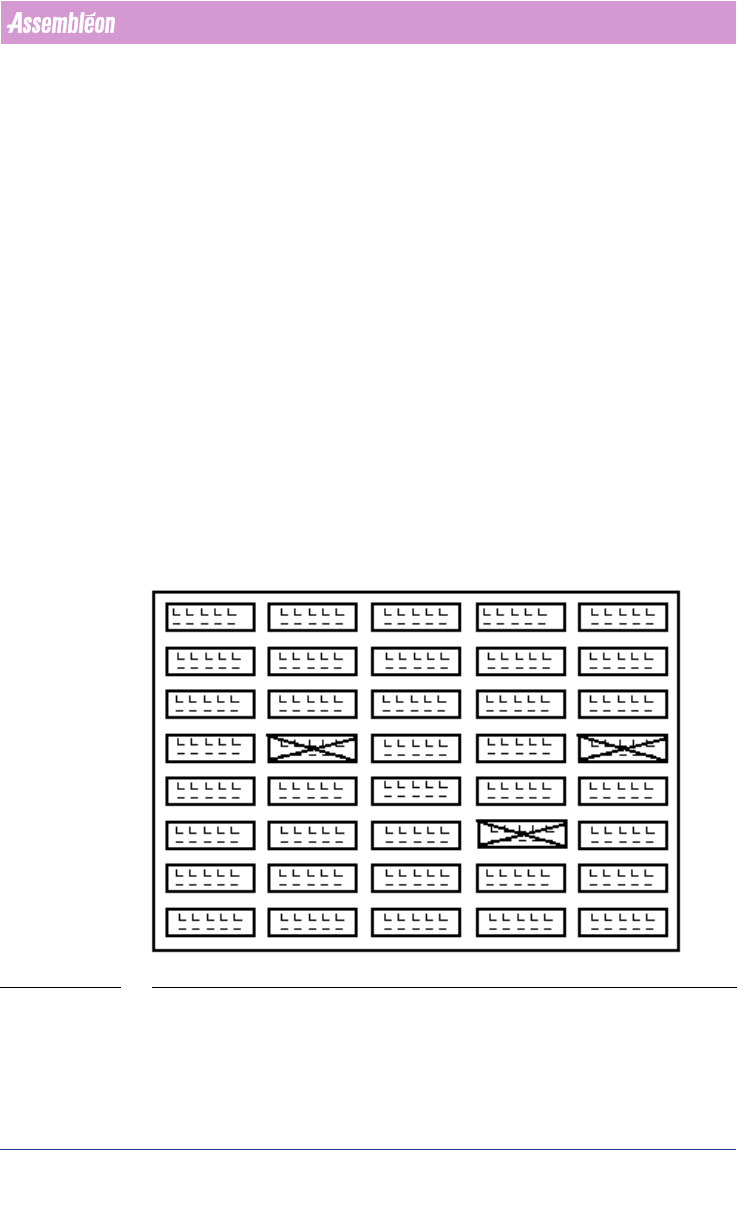
Often there are tens to hundreds of identical boards per PCB (see FIGURE 4 on
page 48).
FIGURE 4 Circuit Badmarks
In many cases the circuit patterns on the PCB are tested in an earlier phase
and some of them are marked “bad” in this phase. This means the Machine
should not mount components on these boards (indicated by the crosses).