PPS Pro version 8.2 - 第67页
4022 591 98 247 User Manual 05.07 PPS-Pro v8.2 63 PPS-Pro GUI 2.25.1.1 Optimizer Machine Specifi c Contro l for P o werline & A-series SCREEN 40 Philips Optimizer Machine-Spec ific Con trols Powerlin e a nd A -S erie…

User Manual 4022 591 98247
62 PPS-Pro v8.2 05.07
PPS-Pro GUI
NOTE: If no ‘Path’ is created for a specific machine (No parts are assigned to the
machine) the optimizer generates an error: “Path named ‘%machine_
name%’ for machine of name is not present”.
(see 2.24 "Line Optimize Tab"
on page 60)
b) From MDF: This option is set if no Optimize Line is used and
only one cell is used in the line.
(see 2.24 "Line Optimize Tab"
on page 60)
3. Press the Settings button in the Machine specific frame of the appearing
window.
After these steps, if a Powerline or A-series Cell is applicable the Philips
Optimizer Machine-Specific Controls
window appears Set the desired
calculation settings
(see 2.25.1.1 "Optimizer Machine Specific Control for
Powerline & A-series" on page 63).
If a Gemline type of Cell or machine is used a different screen is shown. Fill in
the desired calculation settings.
4022 591 98247 User Manual
05.07 PPS-Pro v8.2 63
PPS-Pro GUI
2.25.1.1 Optimizer Machine Specific Control for Powerline &
A-series
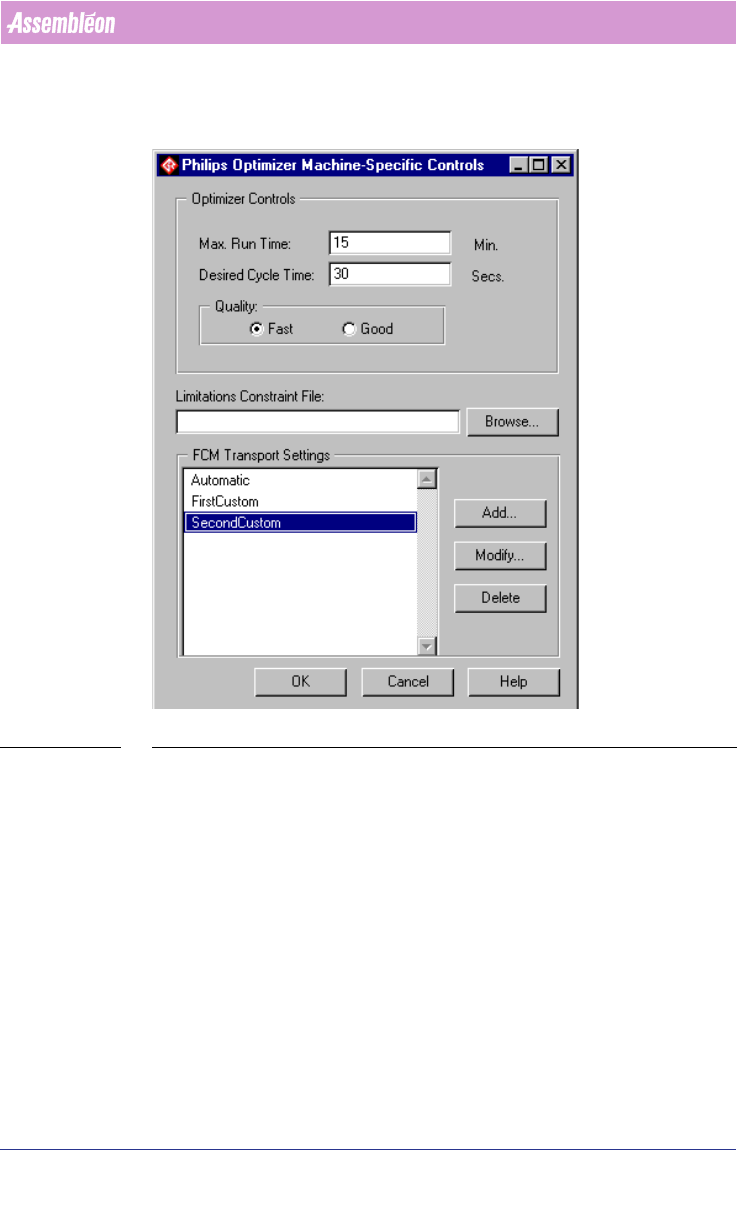
SCREEN 40 Philips Optimizer Machine-Specific Controls Powerline and A-Series
Function of the different fields:
■ Max. Run Time: Means the maximum allowed time to calculate a specific
cell. This includes the time to find the “first” solution if “difficult” calcu
-
lations are performed. If this time is passed the optimizer will stop. Either
all machine programs and listings are created or the optimizer will fail
with an error if no solution is found in that specified set time.
■ Desired Cycle Time: Means the desired time that the machines in a cell
should reach. If the desired time has been achieved the optimizer will
stop.
■ Quality: Fast means ‘stop at first feasible solution’. Good means the time
that the optimizer can calculate taking in to account the “Max. Run Time”
and “Desired Cycle Time”.
■ Limitations Constraint File: This file contains limitations that can be set
on Feeders, and Part Numbers.
(see 2.31 on page 77)
User Manual 4022 591 98247
64 PPS-Pro v8.2 05.07
PPS-Pro GUI
■ FCM Transport Settings: This is only relevant for cells that contain FCM
machines. This is used is for setting the transport settings of these
machines.
(see 3.2.11 on page 100)
NOTE: If not default settings are made but FCM Transport Settings are used as in
screen 40. The FCM Transport settings will overwrite the settings that are
made via the ALE file.
2.25.1.2 Optimizer Machine Specific Control for Gemline
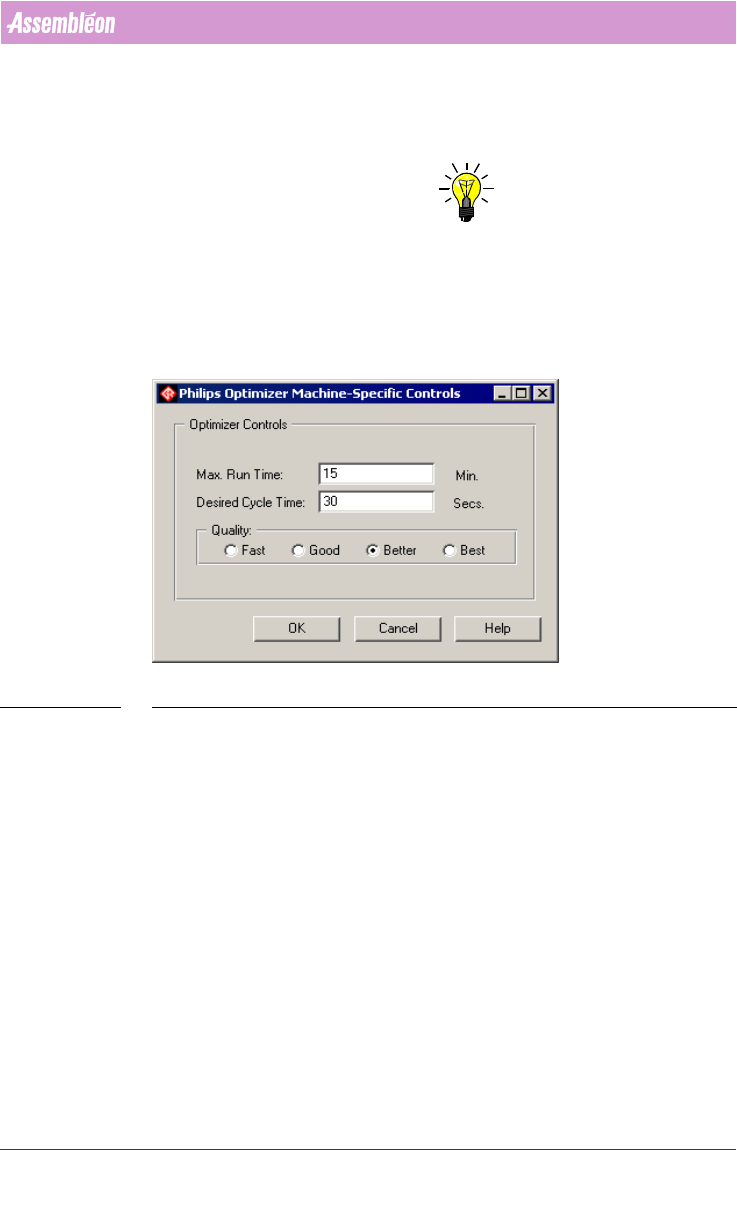
SCREEN 41 Philips Optimizer Machine-Specific Controls Gemline
Max. Run Time and Desired Cycle Time are not used.
■ Fast: Provides a parts placement optimization in the shortest time to
produce. The Gemline optimizer will make 1 run.
■ Good: Provides more efficient optimization, but takes a longer time to
produce. The Gemline optimizer will make 4 runs.
■ Better: Provides more efficient optimization, but takes even longer to
calculate. The Gemline optimizer will make 7 runs.
■ Best: Provides the most efficient optimization, but takes the longest time
to calculate. The Gemline optimizer will make 10 runs.