PPS Pro version 8.2 - 第94页
User Manual 4022 591 98247 90 PPS-Pro v8.2 05.07 Guidelines for using PPS-Pro 3.1.7 Fiducial and refer ence hole s lost when import exp. and comb CAD in CAD2CAD ■ Description: When an expand ed and combined CAD files cr …

4022 591 98247 User Manual
05.07 PPS-Pro v8.2 89
Guidelines for using PPS-Pro
CHAPTER 3 Guidelines for using PPS-Pro
3.1 General Guidelines for PPS-Pro
3.1.1 Top and bottom calculations
When a calculation is done for PCB Top and Bottom sides (in some cases a
common setup for Top and Bottom is wanted), it is mandatory to change the
board_id of one of the PCB sides in the MDF file. This can be done with the
MDF editor. (Select side, Select all, set board id)
3.1.2 Copied file from network-drive not shown
When a project is created on a network-drive then copying an mdf file directly
does not work. However when the project is re-opened the mdf file is shown
and behaviour is normal.
Advice: Always work directly on the hard disk and avoid network drives, they
also cause performance loss.
3.1.3 Up-loading files
To ensure proper working of the up-load functionality, the separator between
the file extensions in the ALE-file must be the same as the separator which is
specified under the pc-settings.
3.1.4 Don’t change name of result files
When an optimization is done, don’t change the name of any result file in the
explorer. All result files are removed in PPS-Pro when a changed file is double
clicked.
3.1.5 Machine setting “From path” and “From MDF”
When a machine setting has been set to "From path", and the "Fixed Setup"
button is pressed, the machine setting will be set to "From MDF" without noti
-
fication after pressing the OK button. This only occurs if ‘No Optimizer’ is
selected in the Preferences. If this selection is made no paths will be
produced. That is the reason why this setting reverts to ‘From MDF’.
3.1.6 Special characters in mdf file
This paragraph gives an overview of special characters which are allowed and
which are not allowed in mdf file names.
■ Allowed in mdf file name:. #! $ % ^ & +
■ Not allowed in mdf file name: ‘ ~ @ ( ) [ ] { } ; , = ’

User Manual 4022 591 98247
90 PPS-Pro v8.2 05.07
Guidelines for using PPS-Pro
3.1.7 Fiducial and reference holes lost when import exp. and
comb CAD in CAD2CAD
■ Description: When an expanded and combined CAD files created with
CAD2CAD are imported, the fiducials and reference holes are not imported.
■ Advice: Set the importer setting so that the importer also imports
‘Mechanical Parts’.
3.1.8 TTF feeders
Twin Tape Feeders are available for FCM II, FCM MF, FCM ME GemLine Xii and
AX. For FCM and A-Series optimizers, Twin tape feeder versus ITF feeder
selection is automatically determined by the optimizer, if the user has
specified specific inventory values, these are taken into account. For more
information on how to set the inventory refer to the Description ALE-file 12nc
4022 591 98715. For GemLine users selection of TTF is based on the contents
of the GemLine database.
3.1.8.1 Pre-assignment of parts or packages to ITF2_08 (Power-
Line and/or A-Series)
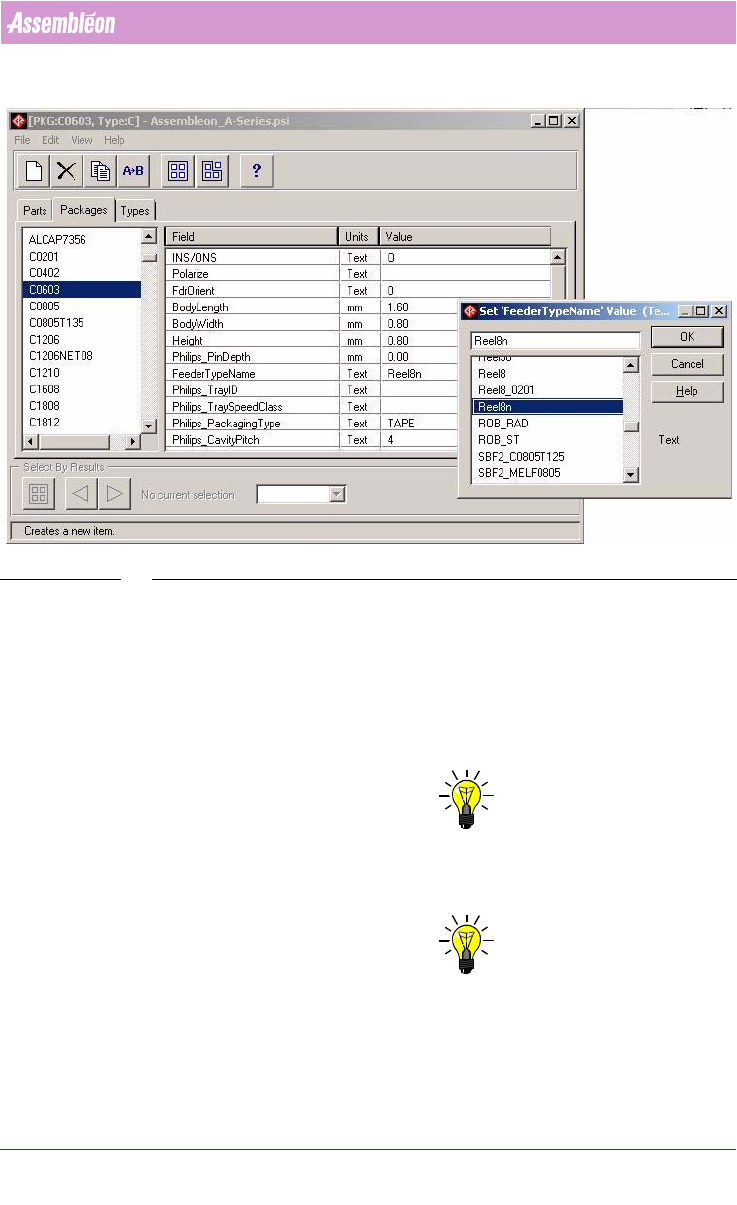
Edit the PSI file, click Packages (or Parts) tab, select package (or part) and
in the ‘Field’ select ‘Feeder Type Name’. Change this field to Reel8n and this
package/part will only be placed using ITF feeders. If set to Reel8 the
optimizer will decide between ITF2_08 and TTF_08.
4022 591 98247 User Manual
05.07 PPS-Pro v8.2 91
Guidelines for using PPS-Pro
SCREEN 58 Forced Feeder Type ITF2_08
3.1.9 Combined product calculation
A combined product calculation consists of a set of PCBs that are calculated in
one run. The result is one common setup for all PCBs and for each PCB an
action spec. The benefit of this approach is that the changeover time between
the action specs can be extremely low because neither feeder exchanges nor
manual nozzle exchanges have to take place.
NOTE: Depending on PCB size, most Combined Product Calculations can contain
max. 25 products (sometimes less). Note that top and bottom sides are
counted as 2 products.
NOTE: Depending on configuration of PC (System memory) and Windows (Pagefile)
a solution is not found if products are used that contain many parts.