PPS Pro version 8.2 - 第98页
User Manual 4022 591 98247 94 PPS-Pro v8.2 05.07 Guidelines for using PPS-Pro can be d one in ‘Win dow s™’ in the Start > S e ttings > C ontro l P anel > System and th en the Envir o nment tab . When this v alue…
4022 591 98247 User Manual
05.07 PPS-Pro v8.2 93
Guidelines for using PPS-Pro
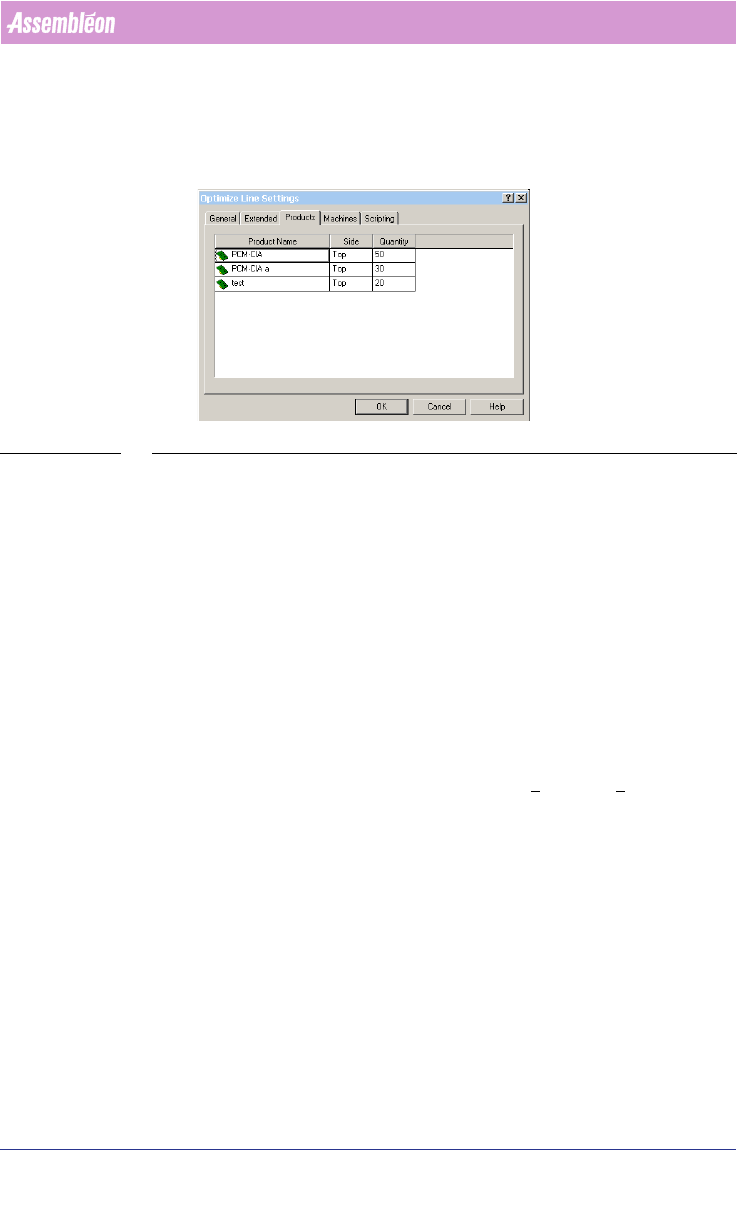
weight factor each PCB has, for example one could enter the number of PCBs
that have to be produced. The feature works for both A-Series and FCM/ACM
optimizers.
SCREEN 59 Setting Production Quantity
3.2 PowerLine Guidelines for PPS-Pro
For information on ALE and PSI about the PowerLine use the manuals
Description ALE-file (12nc 4022 591 98715) and the Description PSI-file
(12nc 4022 591 98815)
3.2.1 Define artwork reference for fiducials and badmarks
Fiducials and badmark settings for Powerline must be set in the ALE file (Refer
to Description ALE-file 12NC 4022 591 98715)
3.2.2 FFA support (FCM)
Fixed Fiducial Alignment (FFA) is supported. An environment variable must be
set. This can be done in ‘Windows™’ in the Start >
Settings > Control Panel >
System and then the Environment tab. The variable to set is:
‘FCM_FFA_CNF’
This value indicates the index step in which the FFA action takes place.
Known restrictions on this implementation of FFA:
■ This method does not work in combined FFA & BVM lines.
■ FFA in index 0 is not supported.
3.2.3 Pre-pick on ACM
The environment variable ‘ACM_PREPICK’, which is needed for obtaining ACM
prepick, default is set to ‘YES’. It is possible to set this variable to ‘NO’. This
User Manual 4022 591 98247
94 PPS-Pro v8.2 05.07
Guidelines for using PPS-Pro
can be done in ‘Windows™’ in the Start > Settings > Control Panel > System
and then the Environment tab.
When this value is set to ‘YES’, prepick actions will be generated.
Examples:
First part of Actions when ‘ACM_PREPICK’ is set to ‘YES’ or when it is omitted:
[ACTION]
PICK HD2 1 2215_ FB1 241
PICK HD1 1 2013_ FB1 241
ALIGN HD1 1 2013_ CA1
ALIGN HD2 1 2215_ CA2
FIDUCIAL FA1 1 2
MOUNT HD1 1 2013_
MOUNT HD2 1 2215_
First part of Actions when ‘ACM_PREPICK’ is set to ‘NO’:
[ACTION]
FIDUCIAL FA1 1 2
PICK HD2 1 2215_ FB1 241
PICK HD1 1 2013_ FB1 241
ALIGN HD1 1 2013_ CA1
ALIGN HD2 1 2215_ CA2
MOUNT HD1 1 2013_
MOUNT HD2 1 2215_
NOTE: Combination of pre-pick and placelast is not supported.
3.2.4 Placement of RNET and CNET components on FCM
When the FCM is equipped with the ‘Compact Laser Module II’ (PA 1150/04)
which is also referred to as ‘CLM II’ it is possible to select ‘RNET’ mode
[intended for all ‘RNET’ (Resistor Network) as well as ‘CNET’ (Capacitor
Network) packages]. This is done by means of connecting a special cable. In
‘RNET’ mode the module executes a different vision algorithm for some
packages.
In ‘PPS-Pro’ it is possible to force the assignment of ‘RNET’ parts to ‘RNET’
configured modules. This effect is obtained by assigning to the ‘RNET’ package
a newly introduced nozzle, this way all parts that do not contain this nozzle
cannot be assigned to the placement module. For this assignment two new
artificial nozzle definitions have been added to the allowed list of nozzles that
can be assigned to a package, these are 4720R and 4730R.
The user who wants to place ‘RNET’ and ‘CNET’ packages can assign the
respective 4720R or 4730R nozzle in the alternate nozzle fields (*_2 fields) of
4022 591 98247 User Manual
05.07 PPS-Pro v8.2 95
Guidelines for using PPS-Pro
all packages that can be placed with the ‘CLM II’ in ‘RNET’ mode. Of course, for
the ‘RNET’ and ‘CNET’ packages themselves only the first nozzle fields will be
used to assign one of the ‘RNET’ nozzles.
3.2.5 Line time and MAX machine time can differ
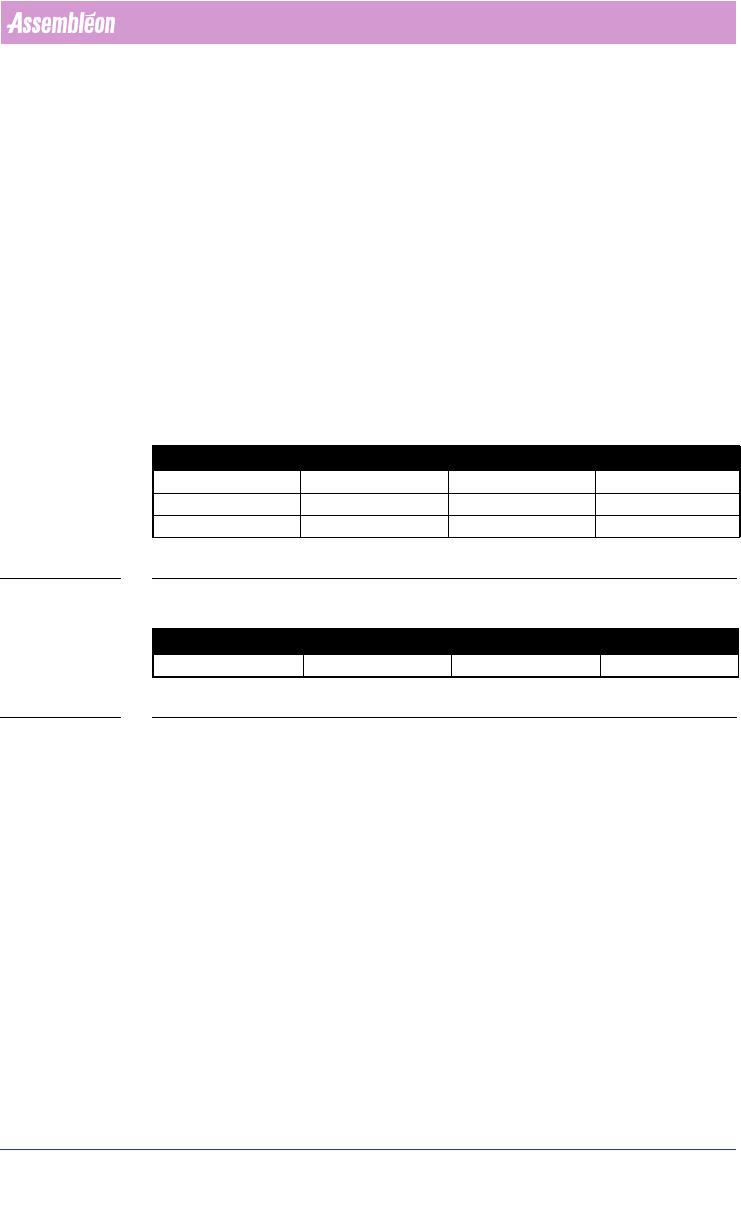
■ Description:The visualisation of the ‘Line time’ can differ from the time
which is mentioned for the fastest optimized machine. For the first three
examples the line time corresponds with the highest machine time
(see
TABLE 3 on page 95). However it is possible that sometimes the machine
time increases a bit, while the line time remains its best found time (see
TABLE 4 on page 95).
■ Advice: we advice to stop the optimizer only when the following condition
has been reached. The Line time corresponds with the maximum
optimized time of all machines and if that specific time is satisfying.
TABLE 3 Line time and equal or less machine time
TABLE 4 Line time and increase machine time differ
3.2.6 Feeders
3.2.6.1 Length of (stick)feeder name for ACM
On the ACM the feeder name is a reference to a feeder file on the machine,
therefore the name may not exceed 8 characters.
3.2.6.2 Pre-assign unused part
When a non-used part type, is pre-assigned to a placement module (PM) and
to a specific feeder, then after optimization, the CON file does not contain a
description for the matching PM, concerning to the nozzle and feeder. This
only occurs when no other feeder is assigned at all to the PM.
Line time Machine 1 time Machine 2 time Machine 3 time
12 11 12 10
11 10 11 10
10 9 10 9
Line time Machine 1 time Machine 2 time Machine 3 time
10 9 11 9