00197465-01_SM_CP20-A-M_EN.pdf - 第39页
3 Service Work Conveyor 3.10 Replacing and Setting the Jaws [03010313-xx] Service Manual SIPLACE C&P20, C&P20A, C&P20M 39 Final Work: Further installation is performed by following the above instru ctions in …
3 Service Work Conveyor
3.10 Replacing and Setting the Jaws [03010313-xx]
38 Service Manual SIPLACE C&P20, C&P20A, C&P20M
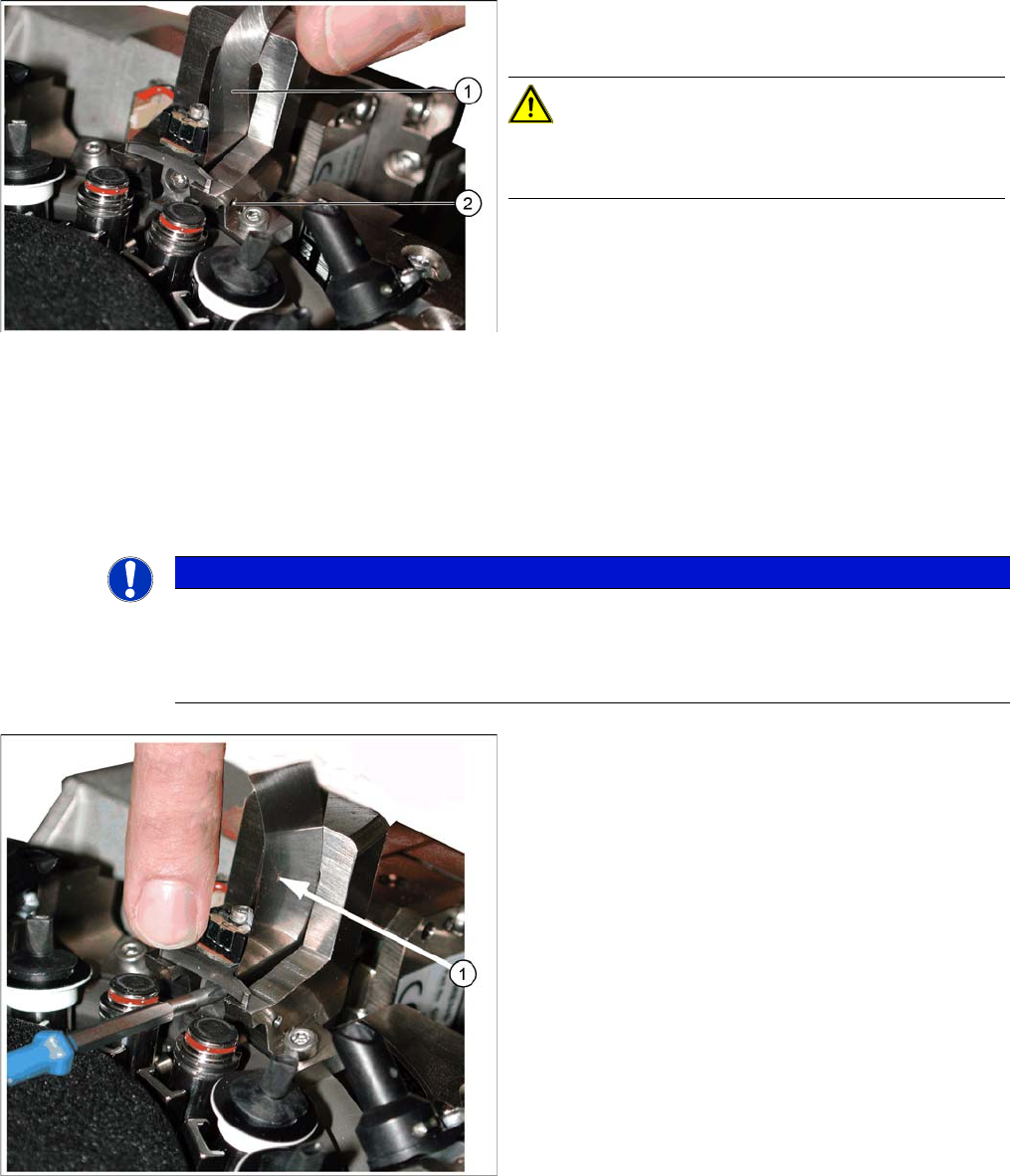
► Place a 0.04 mm feeler gauge between the jaws and the side stop in the jaw setting gauge.
► Move the jaws so that they are against the two contact surfaces and the side stop (stop pin) + feeler
gauge.
► Hold the jaws in this position and tighten the Phillips screw with the torque wrench (torque 35 Ncm)
(see next diagram).
Correct setting with feeler gauge
1. Feeler gauge 0.04 mm
2. Stop pin (drilling for pin, view from outside)
CAUTION!
The stop pin is fixed with adhesive.
Do not adjust the stop pin.
NOTICE
Snap jaws
Make sure that the jaws lie flat against the contact surfaces and the side stop and do not turn.
Use the 0.01 feeler gauge to check that the jaws are really against the contact surfaces of the
gauge (through own weight).
Tightening the screws fastening the jaws
► Pull out the feeler gauge (1) and test with the 0.01
feeler gauge. This should fit easily between the stop
pin and the jaws.
► Carefully tip the jaw setting gauge to remove it, with
-
out hitting the jaws.
► Feed the segment ball bearing back into the Z axis
jaws.
3 Service Work Conveyor
3.10 Replacing and Setting the Jaws [03010313-xx]
Service Manual SIPLACE C&P20, C&P20A, C&P20M 39
Final Work:
Further installation is performed by following the above instructions in the reverse order. Proceed as fol
-
lows:
► Attach the two new dead indexing plates (not the ones you removed, these could be damaged). At
-
tach nozzles, if required.
► Remove the hose piece from the return unit.
► Refit the Z axis cover.
► Fit the remaining parts and install the head in the machine.
► Connect all cables and hoses.
► Switch the placement machine on.
► Determine the zero point correction value for the star and Z axes.
See also
5.4.3 Determining the zero point correction value for the star and Z axis from SW605.03.SP1 [ ➙ 57]
5.4.4 Determining the Zero Point Correction Value for the Star and Z Axis from SW705.04 [ ➙ 58]
3 Service Work Conveyor
3.11 Replacing the Component Sensor [03006742-xx]
40 Service Manual SIPLACE C&P20, C&P20A, C&P20M
3.11
3.11 Replacing the Component Sensor [03006742-xx]
Replacing the Component Sensor [03006742-xx]
Parts, equipment and tools
▪ Component sensor [03006742-xx]
▪ Torque screwdriver 100-500 Ncm [03078400-xx]
▪ Extension/straight TX20 [03073256-xx]
▪ Magnet removal plate C&P20A [03078491-xx]
▪ Tools for removing the head, if needed (see also the service manual for your machine)
Overview
Preparation
► Remove the head from the machine. For removal and installation details of the placement head, read
the service manual for your machine.
Removal
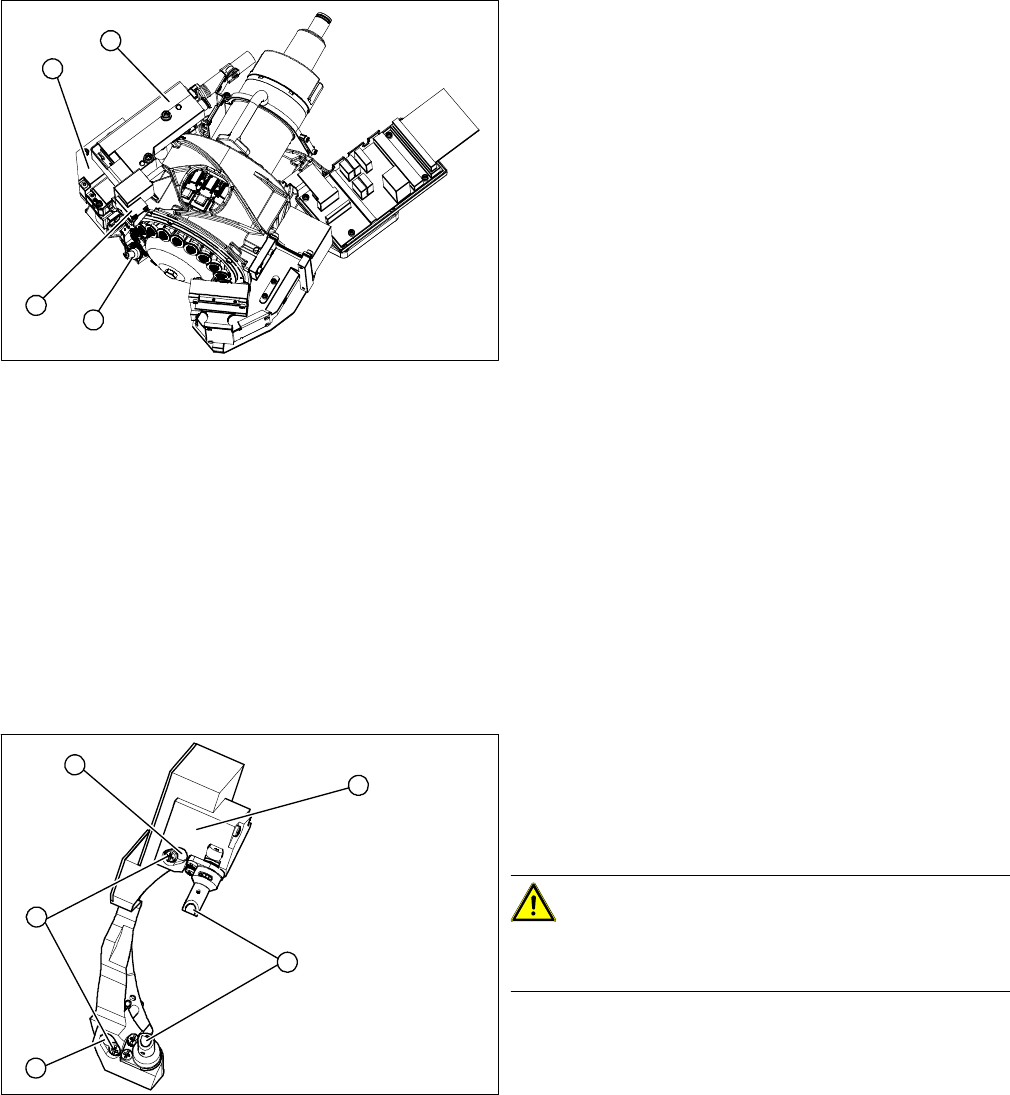
► Remove the pressure control valve (4). This gives you access to the Z drive
► Remove the cover (2) on the Z axis and then remove the Z axis (3) with the return unit. (See also
"3.12 Replacing the Z Drive [03058631-xx]" [ ➙ 42])
► You can now access the component sensor (1).
► Unplug the electrical connection to the intermediate distributor. Remove any cable ties.
1. Component sensor
2. Z axis cover
3. Z axis with return unit
4. Pressure control valve
1
4
3
2
1. 2 x locking screws, behind: fastening screws
2. Lens system of transmitter and receiver unit
3. Complete component sensor
4. 2 x fastening screws
CAUTION!
Make sure that you do not damage or contaminate the
optical system of the transmitter and receiver unit.
4
4
1
3
2