00197465-01_SM_CP20-A-M_EN.pdf - 第63页
5 Settings 5.6.1 Transmitting the Head-Spec if ic Data (from SW601) 5.6 Trans ferring the head specific data Service Manual SIPLACE C&P20, C&P20A, C&P20M 63 5.6 5 . 6 T r a n s f e r r in g t h e h e a d s p …
5 Settings
5.5 Calibrating the Digital Pressure Control Valve 5.5.3 Checking the Pressure Tightness of the Vacuum System
62 Service Manual SIPLACE C&P20, C&P20A, C&P20M
5.5.3
5.5.3 Checking the Pressure Tightness of the Vacuum System
Checking the Pressure Tightness of the Vacuum System
► Switch over to operator level SIPLACE (customer).
► Select Check sensors and functions --> Check sensors and functions of specific components
.
► Select the relevant head.
► Select Check vacuum functions --> Segment 1 or Segment 2 --> Switch on.
► Seal the nozzle with a finger and click on Measure pressure.
5.5.4
5.5.4 Checking the Air Blast
Checking the Air Blast
► Switch over to operator level SIPLACE (customer).
► Select Check sensors and functions --> Check sensors and functions of specific components
.
► Select the relevant head.
► Select Check vacuum functions --> Segment 1 or Segment 2 --> Switch pressure on.
► Seal the nozzle with a finger and click on Measure pressure.
5 Settings
5.6.1 Transmitting the Head-Specific Data (from SW601) 5.6 Transferring the head specific data
Service Manual SIPLACE C&P20, C&P20A, C&P20M 63
5.6
5.6 Transferring the head specific data
Transferring the head specific data
► From software version 601 read the section "5.6.1 Transmitting the Head-Specific Data (from
SW601)" [ ➙ 63].
► From software version 701 read the section "5.6.2 Transferring the Head-Specific Data (from
SW701)" [ ➙ 65].
5.6.1
5.6.1 Transmitting the Head-Specific Data (from SW601)
Transmitting the Head-Specific Data (from SW601)
CAUTION
Observe the direction of transfer!
After replacing the assembly, you need to send the valid machine data at the station to the new
assembly.
As the buttons required are very near to each other, take care that you do not accidentally press
the wrong one on the touch screen!
► Make sure you press the correct arrow button. To be on the safe side, select the button with
the mouse.
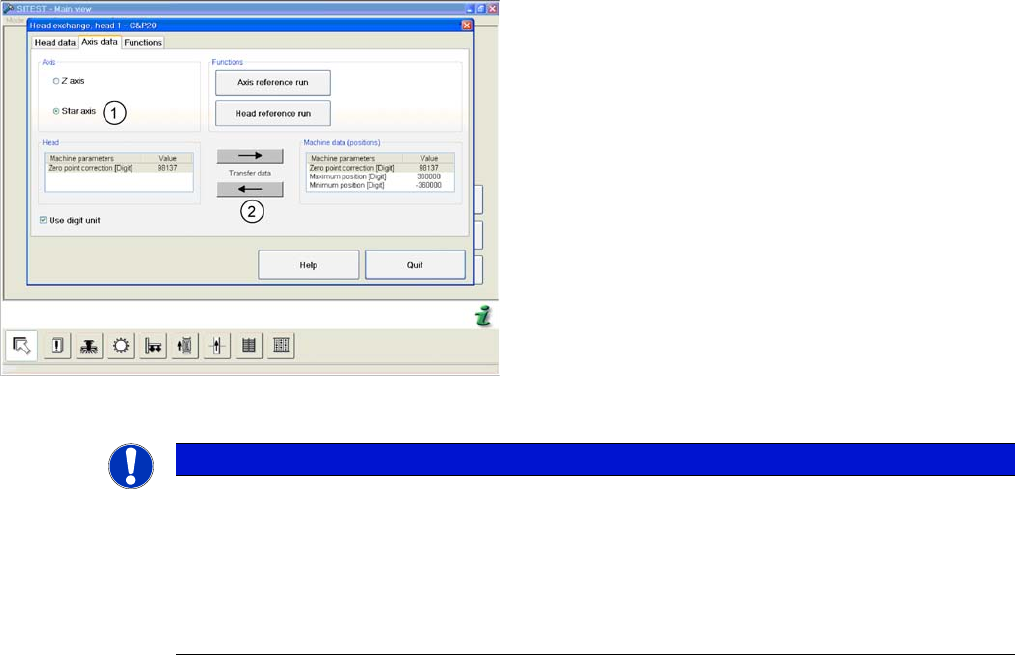
(C&P20 shown as example)
► Start SITEST and select the menu Settings: Head
Exchange: Head for the relevant head.
► Select the Axis data tab
► and enable the setting Z Axis (1).
► Transfer the machine data with the button (2) , from
the list on the right to that on the left (3).
5 Settings
5.6 Transferring the head specific data 5.6.1 Transmitting the Head-Specific Data (from SW601)
64 Service Manual SIPLACE C&P20, C&P20A, C&P20M
(C&P20 shown as example)
► and enable the setting Star axis (1).
► Transfer the machine data with the button (2), from
the list on the right to that on the left.
► Select Close.
NOTICE
If you have accidentally transferred the data in the wrong direction, proceed as follows:
► Calculate the zero point correction value for the head (you may need to use the label at
-
tached to the head) and enter this in SITEST.
Make sure that you use the unit "digit" for entering the data.
► Check the minimum and maximum positions and enter the values from the above screen
-
shots for the C&P20.