00197465-01_SM_CP20-A-M_EN.pdf - 第65页
5 Settings 5.6.2 Transferring the Head-Specific Data (from SW701) 5.6 Trans ferring the head specific data Service Manual SIPLACE C&P20, C&P20A, C&P20M 65 5.6.2 5 . 6 . 2 T r a n s f e r r in g t h e H e a d …
5 Settings
5.6 Transferring the head specific data 5.6.1 Transmitting the Head-Specific Data (from SW601)
64 Service Manual SIPLACE C&P20, C&P20A, C&P20M
(C&P20 shown as example)
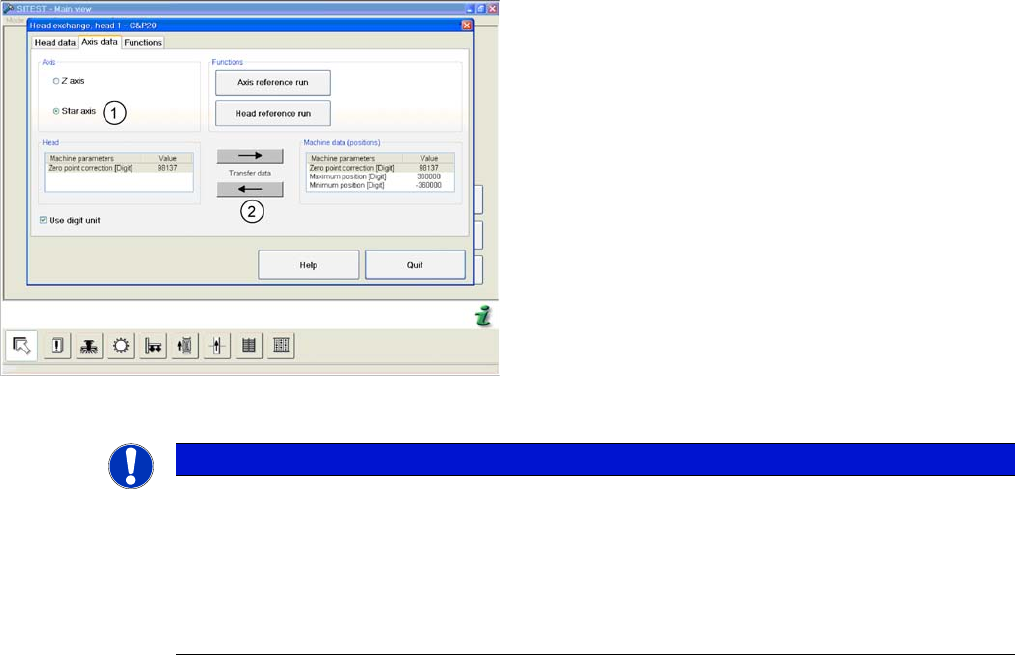
► and enable the setting Star axis (1).
► Transfer the machine data with the button (2), from
the list on the right to that on the left.
► Select Close.
NOTICE
If you have accidentally transferred the data in the wrong direction, proceed as follows:
► Calculate the zero point correction value for the head (you may need to use the label at
-
tached to the head) and enter this in SITEST.
Make sure that you use the unit "digit" for entering the data.
► Check the minimum and maximum positions and enter the values from the above screen
-
shots for the C&P20.
5 Settings
5.6.2 Transferring the Head-Specific Data (from SW701) 5.6 Transferring the head specific data
Service Manual SIPLACE C&P20, C&P20A, C&P20M 65
5.6.2
5.6.2 Transferring the Head-Specific Data (from SW701)
Transferring the Head-Specific Data (from SW701)
After changing the head hardware, the new head data
need to be imported from the head EPROM in the soft
-
ware.
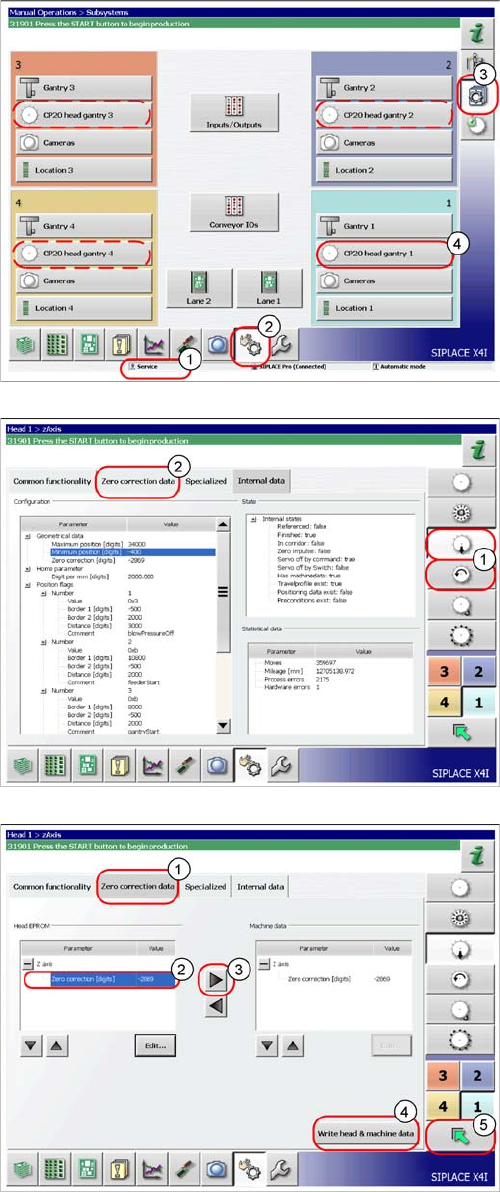
► Switch the machine on.
► Select the user level Service (customer) (1).
► Switch over to the menu Check sensors and
functions (2).
► Click on the button Check sensors and functions of
specific components (3).
► Click on the button CP20 head, gantry x for the gantry
concerned (4).
► Select the Z axis/star axis (1).
► Select Zero correction data (2).
This is where the axis data (Z and star axes) can be writ
-
ten from the head EPROM to the machine data. You can
also write the Z and star axis data from the machine data
to the head EPROM.
► In the Zero correction data (1) select the line Zero
point correction (2).
► ;Move the value out of the head EPROM and into the
machine data (3).
► Select Write head & machine data (4).
► The arrow button (5) takes you back one menu level.
5 Settings
5.6 Transferring the head specific data 5.6.2 Transferring the Head-Specific Data (from SW701)
66 Service Manual SIPLACE C&P20, C&P20A, C&P20M