4OM-1003-007.pdf - 第201页
1.4 "ERROR" Windows When the machine detects an error , the following "ERROR" window opens. Fig. 4B4 Example of "ERROR" W indow *1 Error ID Displayed is a string of alphanumeric characters (…
0511-001 2-20-2 AIL01ETRP
Check Code Display Section A Display Section B
802001 ACV Information Changing the feeder alternate condition to 'Disable' for ACV found
empty feeder.
802002 ACV Information Changing the feeder alternate condition to 'Disable' for ACV found
missing feeder.
802101 Feeder Maintenance The total number of feeder's shots reached a previous notice
Warning setting number.
802102 Feeder Maintenance "The feeder adsorption rate decreased and exceeded the previ-
Warning ous notice setting number.
802201 Head warning Head or Nozzle bypass started before scrap component check.
information
802301 PEC Inspect P.C.B. position gap (Warning value) was detected at P.E.C. re-
(Re_trial) trial check.
802401 Placement Data Step of not placed was occured by the skip setting of Comp sup-
ply data. Production is interrupted and please confirm it.
(Contents) Self-Diagnostics Error Message
(Description) Confirm the displayed contents.
809001 Internal Exception CPU2 Vector 0 exception has been disregarded.
Notice
809002 Internal Exception CPU2 spurious exception has been disregarded.
Notice
809003 Internal Exception CPU2 undefined exception has been disregarded.
Notice
809004 Internal Exception CPU3 undefined exception has been disregarded.
Notice
809005 Internal Exception EB005 SYSFAIL exception has been disregarded.
Notice
809101 Refer to data of the It was referring from exterior when the management data was
device. updated.
809102 Refer to data of the It was referring from exterior when data was updated.
device.
809201
809202
(Contents) Self-Diagnostics Error Message
(Description) Confirm the displayed contents.
1.3 Machine lnformation
1.4 "ERROR" Windows
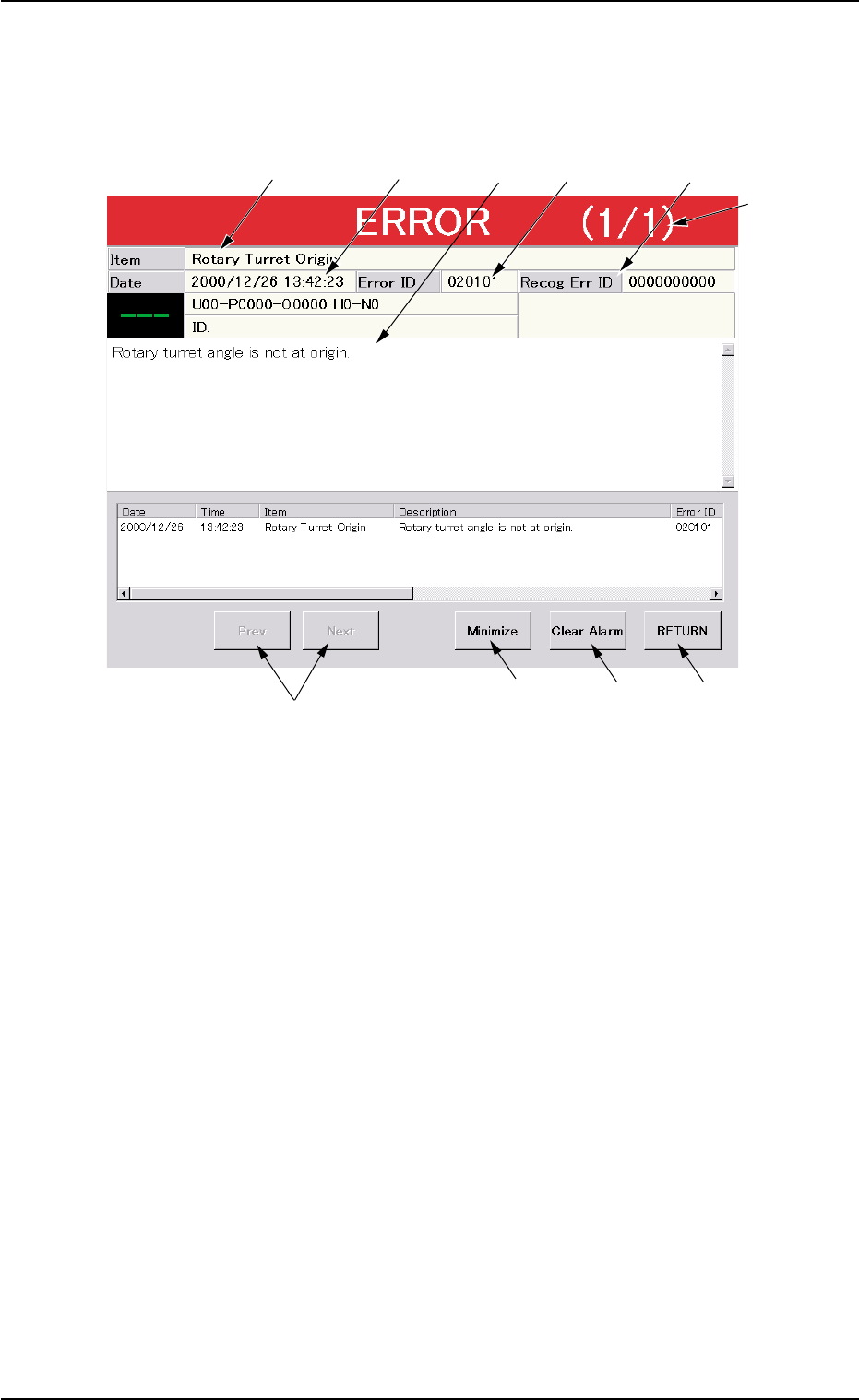
When the machine detects an error, the following "ERROR" window
opens.
Fig. 4B4 Example of "ERROR" Window
*1 Error ID
Displayed is a string of alphanumeric characters (6 characters)
that identifies an error.
When an error has occurred, use the error ID as an index and
refer to "3. Troubleshooting after Error Window (Error ID)" for de-
tails.
*2 Recog Err ID
Displayed is a string of numeric characters (10 characters) that
identifies an error.
When an error has occurred, use the recognition error ID as an
index and refer to "4. Troubleshooting after Error Window (Recog-
nition Error ID)" for details.
*3 Item
Displayed is a name of the classified element that caused an er-
ror.
1.4 "ERROR" Windows
0511-003 2-21 AIL01ETRP
*6
*1
*9
*8
*5
*3
*4 *2
*7
*10

0511-004 2-22 AIL01ETRP
*4 Description
Displayed are the description of the error.
In the case of a recognition error, the contents of the recognition
error are also displayed.
*5 Date and Time
Displayed are the date and time of error occurrence.
*6 Number of Pages
Displayed are the total number of pages and the number of the
current page.
Example: (3/5)
Total Number of Pages : 5
Number of Current Page : 3
*7 [Prev] and [Next] Buttons
[[Prev] Button: When pressed, this button opens the previous page.
[Next] Button: When pressed, this button opens the next page.
*8 [Clear Alarm] Button
When pressed, this button cancels an alarm (sound) only.
*9 [RETURN] Button
When pressed, this button cancels an alarm (sound) and closes
the "ERROR" window. The original window resumes.
• Reset Procedure from "ERROR" Window
(1) Take a note of "Error ID", "Item (Error Name)", and "Description" in
the "ERROR" window.
When you have forgotten an error message, refer to the list
of errors in the "Machine Error Recall" window. (Operation
Sequence: [RECALL MSG.] Button (Submenu) Æ "Machine
Error Recall" Window).
(2) Press the [RETURN] button to resume the original window.
(3) Use the error ID as an index and refer to "3. Troubleshooting after
Error Window (Error ID)" and "4. Troubleshooting after Error Win-
dow (Recognition Error ID)" for correct operations to reset the ma-
chine to its normal condition.
*10 [Minimize] Button
When this button is pressed, the "ERROR" window is minimized
and moves to the bottom left of the window.
Double-click the minimized window to return it to the size before
it was minimized.
1.4 "ERROR" Windows
Note