4OM-1003-007.pdf - 第302页
Error ID ltem Description 430f01 Component Pick-up miss Component Pick-up miss was detected. Please remove the componet before the operation of the Feeder Unit. (Cause 1) A component may be trapped (tilted vertically) be…
Error ID Item Description
430a02 Oil Cooler The oil cooler flowmeter alarm was detected.
(Cause 1) The cooling oil filter in the driving section of the main body may be defective.
(Remedy 1) Replace the oil filter with a new one.
Refer to "1.4.12 Replacement of Oil Filter" for the replacement procedure.
430a03 Oil Cooler Oil cooler operation fails. See if pressure sensor works,
or breaker works, or power source incapable.
(Cause 1) Self-Diagnostics Error Message
(Remedy 1) Zero all axes and re-start the operation.
When the machine cannot be set to its normal condition, consult our service
personnel for the remedy.
430b01 Cooling FAN Cooling FAN alarm signal was detected.
(Cause 1) Self-Diagnostics Error Message
(Remedy 1) Zero all axes and re-start the operation.
When the machine cannot be set to its normal condition, consult our service
personnel for the remedy.
430c01 Pickup Position Feedback Feedback value out of range. Please check feeder.
(Cause 1) Self-Diagnostics Error Message
(Remedy 1) Zero all axes and re-start the operation.
When the machine cannot be set to its normal condition, consult our service
personnel for the remedy.
430d01 Missing Large Comp. Fdr. Crg. is paused to avoid clash with missing component.
(Cause 1)Self-Diagnostics Error Message
(Remedy 1) Check the air pressure and zero all axes. After that, re-start the operation.
When the machine cannot be set to its normal condition, consult our service per-
sonnel for the remedy.
430e01 Air Cylinder Low pressure.
(Cause 1) Self-Diagnostics Error Message
(Remedy 1) Check the air pressure and zero all axes. After that, re-start the operation.
When the machine cannot be set to its normal condition, consult our service
personnel for the remedy.
0511-003 2-106 AIL01ETRP
3.3 Error IDs and Remedial Procedures
Error ID ltem Description
430f01 Component Pick-up miss Component Pick-up miss was detected. Please remove the
componet before the operation of the Feeder Unit.
(Cause 1) A component may be trapped (tilted vertically) between the tape feeding plane and
the suppressor of the tape feeder.
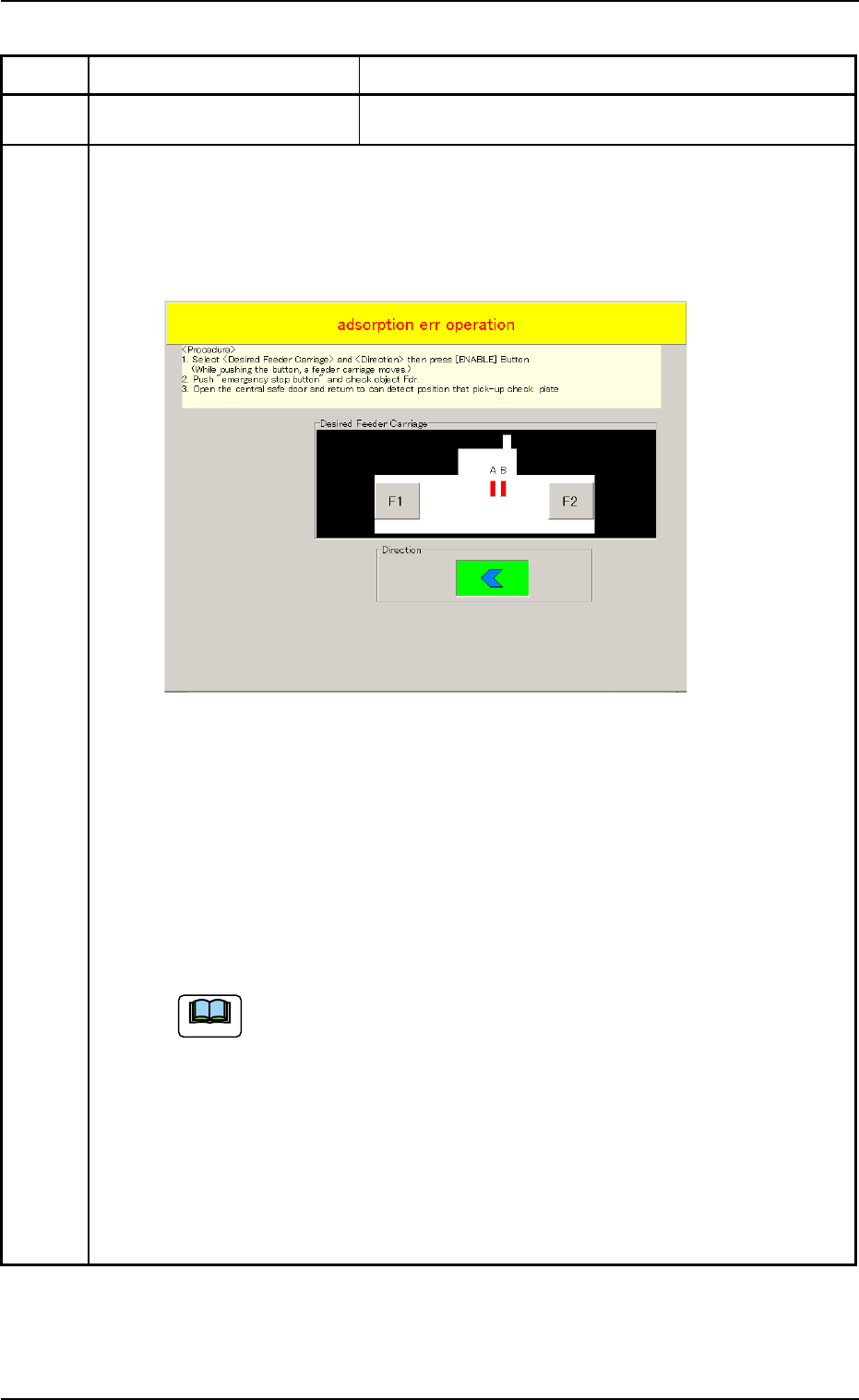
(Remedy 1) When the [RESET] button is pressed, the following "adsorption err operation"
window opens.
Follow the instructions in this window and the operational procedure below.
Fig. 21-1
(1) Select the [F1] or the [F2] button corresponding to the feeder carriage (object feeder
for component removal) of the tape feeder that requires the removal of the mispicked
component and the button in the "Direction" group box. After that, press the [EN-
ABLE] button. The selected feeder carriage moves to the place accessible for the
work to be performed.
(2) Press the [EMERGENCY STOP] switch.
(3) Open the feeder work area safety door (component replenishment section) and check
the object feeder.
• Remove the mispicked component from the object feeder.
When a pickup error has occurred in Feeder Carriage #2 ([F2]), the feeder
carriage cannot be moved to the place near the feeder work area safety
door.
Open the central safety door (feeder carriage cover) and check the object
feeder.
(Continued to the next page)
0511-002 2-106-1 AIL01ETRP
3.3 Error IDs and Remedial Procedures
Note
0511-001 2-106-2 AIL01ETRP
Error ID ltem Description
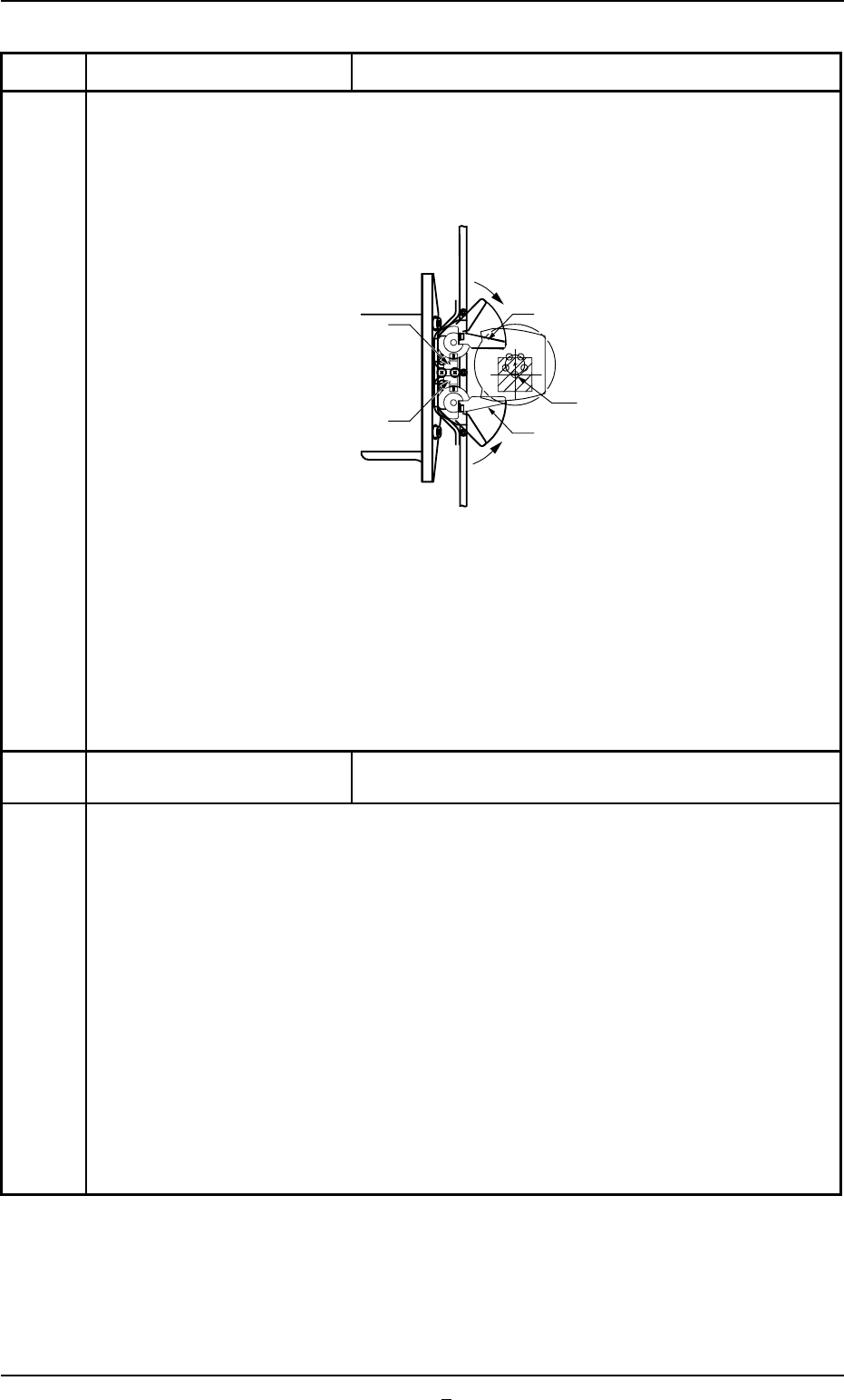
(4) Open the central safety door (feeder carriage cover) and return the pickup error
check plate to the original detectable position.
• Return the pickup error check plate to the position where it is aligned parallel to
the tape feed direction of the tape feeder.
Fig. 4B21-2
(5) Cancel the "Emergency Stop" mode.
Refer to "3.1 [EMERGENCY STOP] Switch Pressed" in "Section 4" (Vol. 1) for
how to reset the [EMERGENCY STOP] switch to its normal condition.
431001 Inverter Inverter alarm signal was detected.
[Shutdown touch sw key and mainbreaker sw off.]
(Cause 1) When an instantaneous power failure occurs in the power supply to the machine,
the machine is stopped in an error condition.
(Remedy 1) (1) Reset the error window, follow the shutdown procedure, and set the power
breaker to "OFF".
(2) Wait for approximately 10 seconds. Then, set the power breaker to "ON" to
start up the machine.
(3) Perform the zeroing operation and restart the operation.
* When a P.C.B was produced at the time of error, follow the "Warm Start"
procedure and finish the P.C.B.
(Remedy 2) When an error still occurs after shutdown and power breaker reset operations
and the machine cannot be reset to its normal condition because there is a
problem in the power supply line, consult our service personnel for the remedy.
Pickup Error Check Sensor A
Pickup Error Check Sensor B
Return
Return
Pickup Error Check Plate A
Pickup Center
Pickup Error Check Plate B