00195044-22_UM_VisionTeachStation_5.x.x_DE_EN.pdf - 第127页
Vision Teach Station 5.x.x User Manual 5 Installing the cameras 05/2019 Edition 5.1 Installing stationary cameras, type 25, 33 and 36 35 5.1.2.3 Fixing camera types 33, 36 and 25 to the pillar Use the two special screw…
5 Installing the cameras Vision Teach Station 5.x.x User Manual
5.1 Installing stationary cameras, type 25, 33 and 36 05/2019 Edition
34
5.1.2 Installing the camera on the base module
5.1.2.1 Tools required
Allen key, set
5.1.2.2 Fitting the mount for camera types 33, 36 and 25
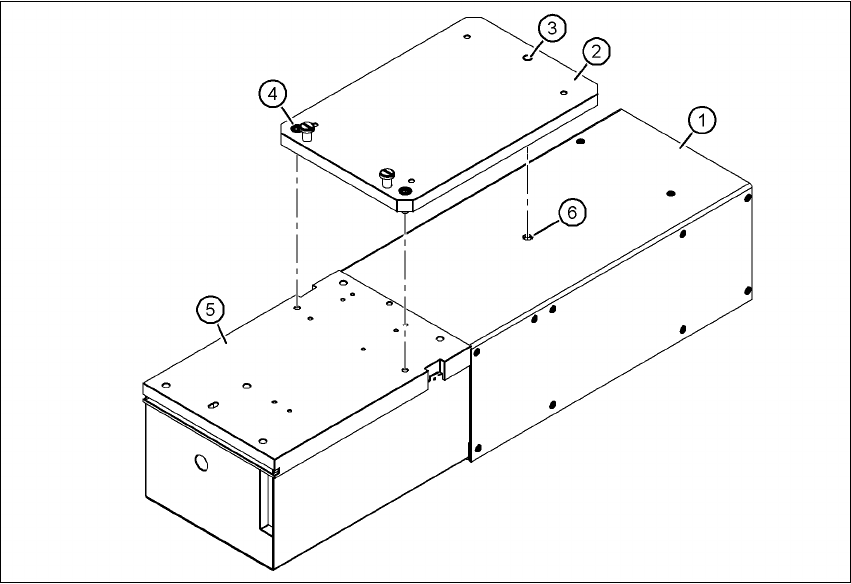
Turn the camera 180° about its long axis so that the base plate (item 5) is pointing up.
Place the mount (item 2) on the camera so that the parallel pin (item 3) slides into the hole (item
6) in the
illumination head (item 1).
Fix the mount (item 2) to the base plate (item 5) using the two hexagon socket head screws
M6 x 16 (item 4).
The illumination head can no longer become detached from the base module.
5
Fig. 5.1 - 6 Fitting the mount for camera type 33
(1) Illumination head
(2) Mount for type 33/36, item no. 03039467-xx; mount for type 25, item no. 03039471-xx
(3) Parallel pin
(4) Hexagon socket head screw M6 x 12, 2x
(5) Base plate
(6) Hole for parallel pin
Vision Teach Station 5.x.x User Manual 5 Installing the cameras
05/2019 Edition 5.1 Installing stationary cameras, type 25, 33 and 36
35
5.1.2.3 Fixing camera types 33, 36 and 25 to the pillar
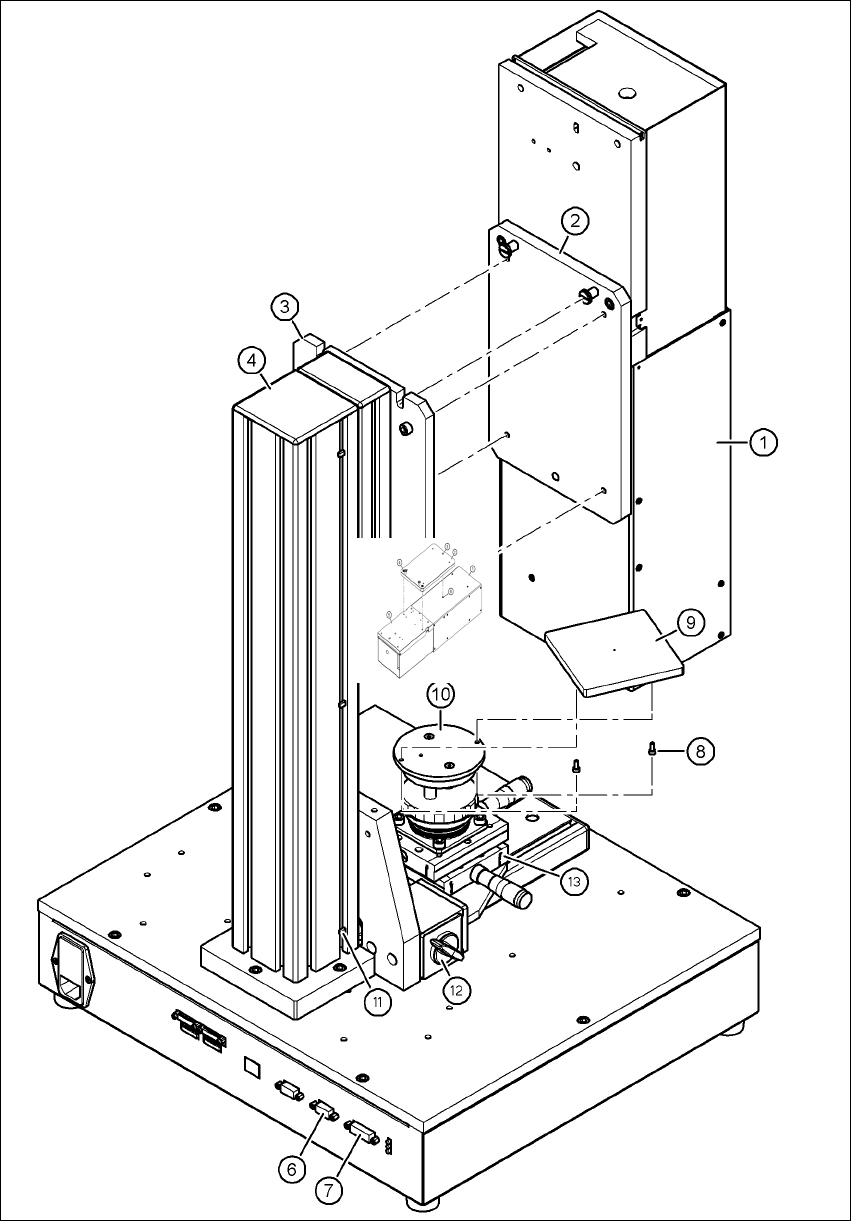
Use the two special screws to fix the camera (item 1 in Fig. 5.1 - 7, page 36) in the cut-outs in
the mounting plate (item 3 in Fig. 5.1 - 7
, page 36).
Fix the mount (item 2 in Fig. 5.1 - 7, page 36) to the mounting plate (item 3 in Fig. 5.1 - 7, page
36
) using the 4 hexagon socket head screws M6 x 20 (item 5 in Fig. 5.1 - 7, page 36).
WARNING 5
Make sure that the camera is attached firmly to the mounting plate (item 3 in Fig. 5.1 - 7
, page
36
). For safety reasons, it must be screwed to the mounting plate with the 4 hexagon socket
head screws M6 x 20.
Release the lock on the positioning unit (item 13 in Fig. 5.1 - 7, page 36 by turning the knob
(item 12 in Fig. 5.1 - 7
, page 36) on the magnetic switch towards the pillar.
Push the positioning unit (item 13 in Fig. 5.1 - 7, page 36) out of the camera range.
Fix the component support (item 9 in Fig. 5.1 - 7, page 36) using the two hexagon socket head
screws M3 x 8 (item 8 in Fig. 5.1 - 7
, page 36) to the holder (item 10 in Fig. 5.1 - 7, page 36).
After fitting the component support, lock the positioning unit once more.
5 Installing the cameras Vision Teach Station 5.x.x User Manual
5.1 Installing stationary cameras, type 25, 33 and 36 05/2019 Edition
36
5
Fig. 5.1 - 7 Fixing camera type 33 to the pillar