00195044-22_UM_VisionTeachStation_5.x.x_DE_EN.pdf - 第151页
Vision Teach Station 5.x.x User Manual 7 Software 05/2019 Edition 7.3 Licensing 59 7.3 Licensing As of the 5.0.2 version, the SIPLACE Vision T each Station is available as a pu re licensed soft - ware product. 7 A "…
7 Software Vision Teach Station 5.x.x User Manual
7.2 Software upgrade 05/2019 Edition
58
7.2.4.3 Installing the "SIPLACE Pro Languages"
Installation of the language package is optional. If you want to install it, you must do this before
you install the Vision Teach Station software.
Follow the instructions in the "SIPLACE Pro Installation Manual".
7.2.4.4 Installing the "Software Vision Teach Station"
Run the "InstallAll.bat" script file. Follow the instructions. Restart the computer at the end of the
installation.
The script installs the following components:
Tab. 7.2 - 2 Script components of theVisionTeachStation software
7
Component Directory
CAN drivers \SvTeachStation\CAN\Setup.exe
SIPLACE Vision .\SvTeachStation\SiplaceVision\SiplaceVision.msi
SIPLACE Vision Teach
Station
.\SvTeachStation\SvTeachStation\Setup.exe
Vision Teach Station 5.x.x User Manual 7 Software
05/2019 Edition 7.3 Licensing
59
7.3 Licensing
As of the 5.0.2 version, the SIPLACE Vision Teach Station is available as a pure licensed soft-
ware product. 7
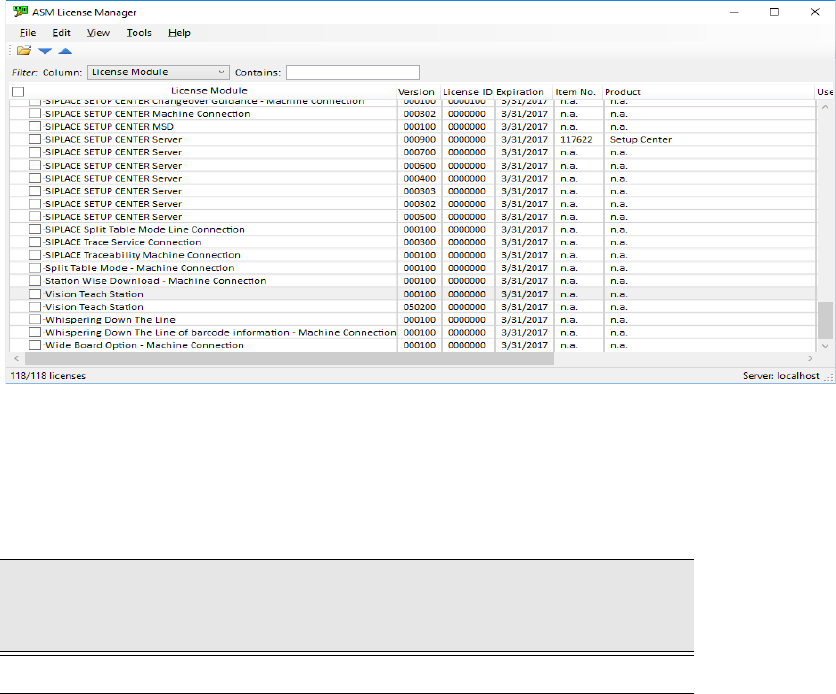
A "Vision Teach Station" license is required in the ASM License Manager for operation. The
ASM License Manager has to run on the same computer as the SIPLACE Vision Teach
Station software. 7
Fig. 7.3 - 3 License entry for the SIPLACE Vision Teach Station in the ASM License Manager
The SIPLACE Vision Teach Station can be ordered as a licensed software product with the
following data:
Tab. 7.3 - 3 Vision Teach Station with software license
Software
Vision Teach Station with
software license
Software package required
V5.x.x
SIPLACE Vision Teach Suite V5.x, item no. 00711258-xx
7 Software Vision Teach Station 5.x.x User Manual
7.4 Error report 05/2019 Edition
60
7.4 Error report
7.4.1 SIPLACE Vision Station
The "BugReporter" is provided on the following path for reporting errors that occur while the
SIPLACE vision teach station is in use to SIPLACE Service:
<Install path for SIPLACE Vision Teach Station>\BugReporter.exe 7
Alternatively, you can also run the BugReporter from the Start menu -> Programs -> TeachStation.
This allows you to save information about the SIPLACE vision teach station in a compressed file
(Zip file) and to send it to the Service for investigation, if necessary.
7.4.2 SIPLACE Pro
Errors that occur in association with SIPLACE Pro can be reported via the ASM Error Reporter
Service. This is started from Start – Programs – ASM Net – Enterprise Service – ASM Error
Reporter Service.