SM411F_Service Manual.pdf - 第113页
在线预览 SM411F_Service Manual.pdf PDF 文档。
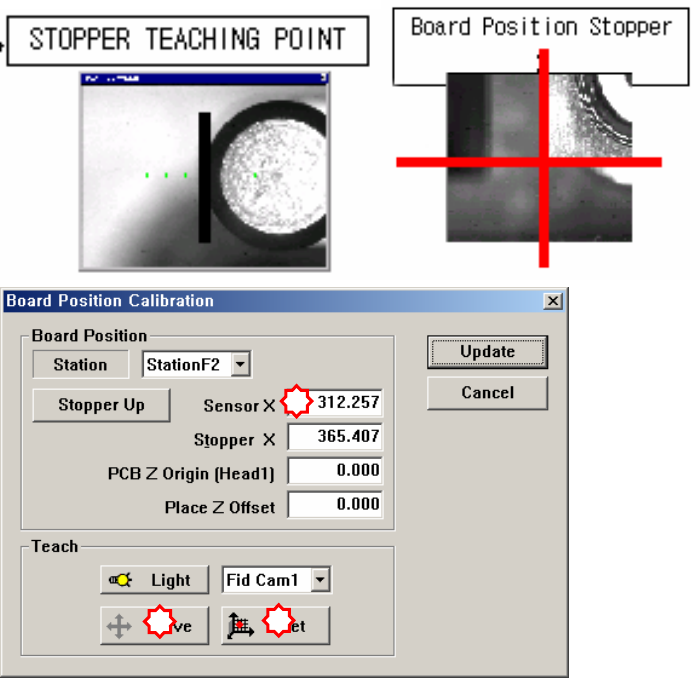
1.2.11. Board Position Calibration
Teach the stopper position in the conveyor installation area and the X position of
the sensor. The following is the board position calibration procedure.
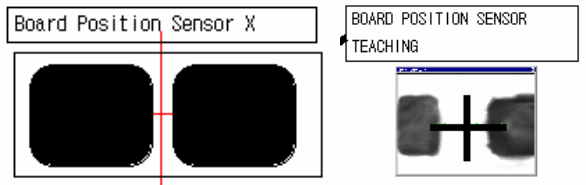
1. Select the edit box for the < Sensor X> using the mouse and move the
downward camera (Fiducial Camera) to the position of Sensor X by clicking
the <Move> button.
2. Perform teaching of the exact position using the teaching box. Enter the precise
coordinates for ‘Sensor X’ by pressing the <Get> button of the teaching box.
3. Select the <Stopper X> combo box using the mouse and then select the stopper
to teach and click the <Move> button, move fiducial Camera to position of
Stopper X.
4. Click the <Stopper Up/Down> button in the left of the <Stopper X> edit box
first to move the stopper up and then teach the stopper position correctly using
the teaching box.
5. Click the <Get> button to enter the coordinates in the <Stopper X> edit box.
6. move the stopper down by clicking the <Stopper Up/Down> button.
1
2
3
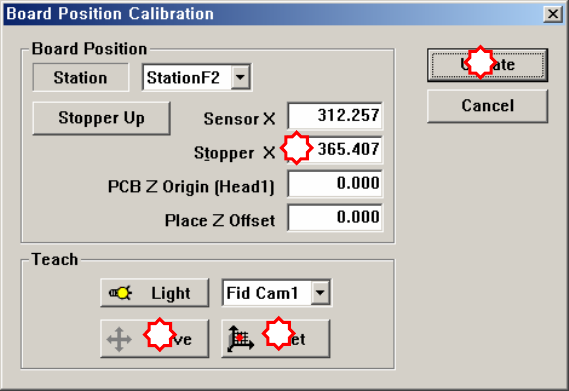
7. Save the data by clicking the <Update> button.
1
2
3
4