SM411F_Service Manual.pdf - 第115页
1.3. Feeder Base Origin Setup This is a process to find the pickup positions of all feeders by teaching the origin of a feeder . If this process is not performed properly , a pickup error occurs. The following is the pro…
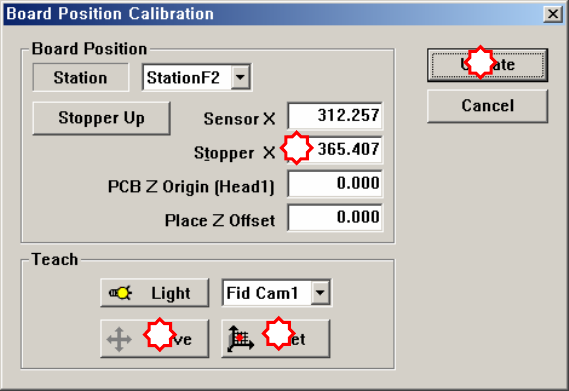
7. Save the data by clicking the <Update> button.
1
2
3
4
1.3. Feeder Base Origin Setup
This is a process to find the pickup positions of all feeders by teaching the origin of
a feeder. If this process is not performed properly, a pickup error occurs.
The following is the procedure to set the origin of the feeder base by using the
8mm tape feeder;
1. Load the reel for the smallest part (0603, 1005) on the tape feeder and install
the feeder on the 21st slot of the feeder base. Before installing the feeder, check
if there is any part left on the feeder base and if so, remove it.
2. Select the <21st 8mm Tape Pickup Point> edit box using the mouse and select
the ‘Fid Cam’ from the combo box in the <Teach> group.
3. Click the <Move> button to move the fiducial camera to the pickup point of
the tape feeder installed on the 21st slot of the front feeder base.
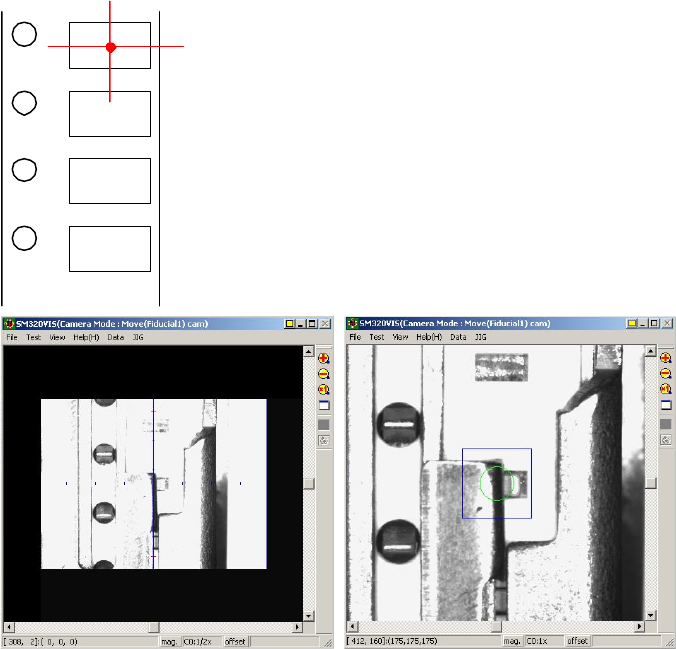
4. Teach the pickup point of the tape feeder by using the fiducial camera. At this
time, teach the center point as shown in the following figure. At this time, teach
the pocket center, not the part center.
5. Fit the center of the cross lines of ‘Fiducial Camera’ indicated in the SMVision
window to the pocket center, and input the value of the present coordinates to
the selected edit box by clicking on the <Get> button.
6. In the same way, install the feeder in the 21st slot of the rear feeder base, and
perform teach

Software
SW & Control Part