SM411F_Service Manual.pdf - 第147页
Softwar e 2.3. How to Use Recover y CD How to use the Recovery CD Caution Before using the Recovery CD, the ‘PartDB’ fol der, ‘System’ folder and ‘PCB’ folder in the MMI Installation Folder must be backed up. (Because …

Software
2.2.4. SBC BIOS Setup
In order to provide the optimum environment for machine operation, set the initial
setup items of the entire BIOS items as follows. (The default password is “admin”
when the machine is shipped.)
2.2.4.1. Standard CMOS features
Drive A: None
Halt On : All Errors
2.2.4.2. Advanced BIOS features
First Boot Device : CDROM
Second Boot Device : HDD-0
Third Boot Device : Disabled
Boot Up Floppy Seek : Disabled
2.2.4.3. Integrated peripherals
Onboard I/O Chip Setup:PWRON After PWR Fail:On
Caution
This must be turned on in order to turn on/off the ATX
power supply.
2.2.4.4. Power management setup
ACPI Func : Disabled
Software
2.3. How to Use Recovery CD
How to use the Recovery CD
Caution
Before using the Recovery CD, the ‘PartDB’ folder,
‘System’ folder and ‘PCB’ folder in the MMI Installation
Folder must be backed up. (Because all existing data
contained in the HDD are deleted.)
After executing the Recovery CD, install the MMI and
overwrite the backed up folder. Then the machine can be
operated.
After inserting the Recovery CD in the CD-ROM, execute the computer
again with boot priority given to the CD-ROM in the BIOS setup. The PC
is booted to the Restoration CD automatically and the following selection
menu is displayed. Select the No. 2 item and press the ‘Enter’ key.
If the No. 2 item was selected in the previous step, the following menu
appears. Select the No. 1 item.
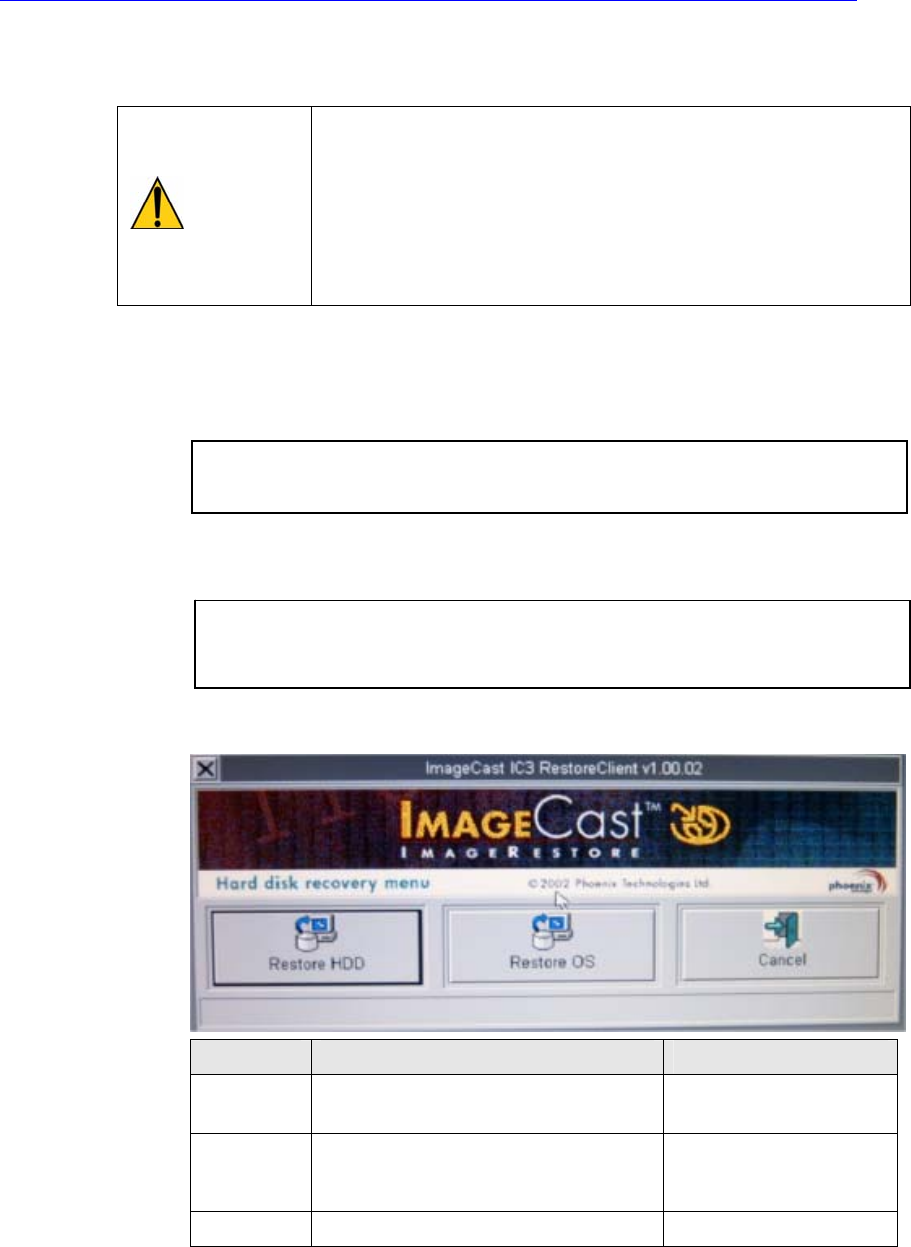
Once the previous steps are completed successfully, the following dialog
box appears.
Button Executed Item Cautions
Restore
HDD
Sets the drive partition and installs
the OS in the new HDD.
All data in the HDD are
deleted.
Restore
OS
Installs the O/S only in the C: Drive in
the HDD in which the O/S is already
installed.
All data in the C: Drive
are deleted.
Cancel
Cancels the recovery.
Select the button for the necessary execution item.
The Recovery CD program installs the drive partition and O/S for 5~6
minutes according to the user’s setup.
1. Boot from Hard Disk
2. Boot from CD-ROM
1. Restore Hard Drive from CD-ROM
2. Start computer with CD-ROM support
3. Start computer without CD-ROM support
Software
Chapter 3. Board Assembly
3.1. Required Materials for Board Assembly