SM411F_Service Manual.pdf - 第233页
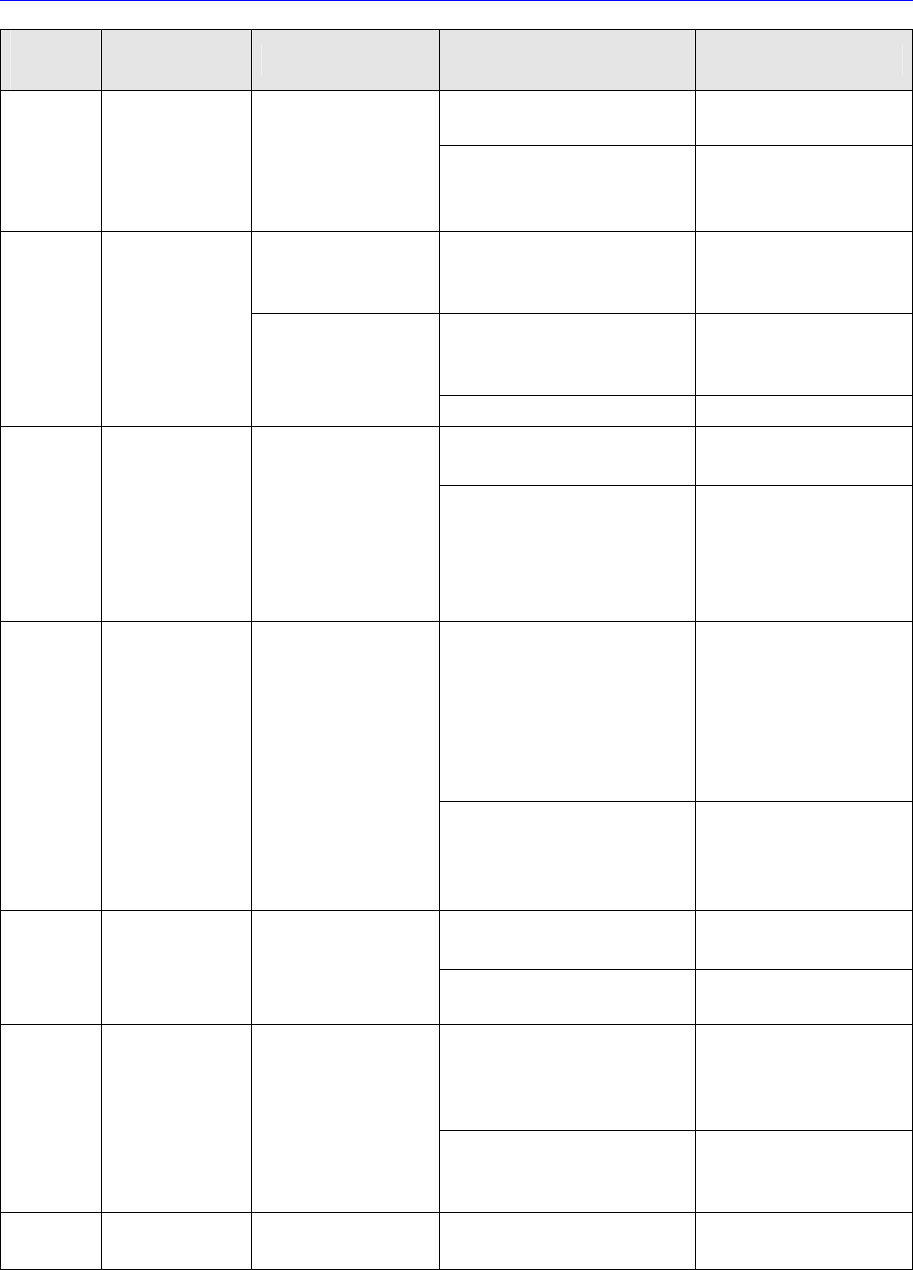
Softwar e Alarm Code No. Alarm Contents Operating Condition Causes Measures While the motor is running y Servo-motor starting failure in response to the input pulse y Extremely small limit of positioning error y Servo tu…
Software
Alarm
Code No.
Alarm Contents Operating Condition
Causes Measures
Wrong connection or
shortage of the motor cable
Check and rectify the
motor cable
running
Tentative overload owing to
mechanical collision
Release the
alarm, restart and
check
When the motor is
running (when
stopped)
Over-charging of the Servo-
Amp. internal owing to the
overload
y Reduce the load
y Modify the operation
pattern
y Over-charging of the Servo-
Amp. internal owing to the
high speed operation
y Reduce the load
y Change the operating
speed
18 *
Regenerationover
load alarm
While motor is running
(during operation)
y Rectifier was damaged. y Servo-Amp. change
y Motor encoder A/B phase
failure
y Servo-Amp. change
y Servo-motor change
20 *
Motor encoder
A/B phase
Check alarm
After the control power
is turned on
Motor encoder cable
connection error or failure
y Motor encoder cable
check and change
y Motor encoder
communication parts failure
y Servo-Amp. change
y Servo-motor change
21 *
Motor encoder
Communication
check
alarm
After the control power
is turned on,
y Motor encoder cable
connection error or failure
y Motor encoder cable
check and change
y Motor encoder input error
y Servo-Amp. change
y Servo-motor change
22 *
Motor encoder
Wiring check
alarm
After control power is
turned on,
y Motor encoder cable
connection error or failure
y Motor encoder cable
check and change
y Communication error due to
the noise
y Check the power input
to the encoder (+5V ±
5%)
y Check the FG wiring
23 *
Motor encoder
communication
data trouble
alarm
After control power is
turned on
While the motor
is running
y Motor encoder cable
connection error or failure
y Motor encoder cable
check and change
24
Positioning error
limit alarm
After control power is
turned on
y Servo-Amp. damaged y Servo-Amp change

Software
Alarm
Code No.
Alarm Contents Operating Condition
Causes Measures
While the motor
is running
y Servo-motor starting failure
in response to the input
pulse
y Extremely small limit of
positioning error
y Servo tuning
adjustment
(Pr.5E increase)
y Motor cable check
y Servo-Amp change
y Servo-motor change
25
Excessive Hybrid
positioning
error alarm
While the motor
is running
y Servo-motor starting failure
in response to the input
pulse
y Extremely small limit of
positioning error
y Servo tuning
adjustment
(Pr.74,75,76 )
y Motor cable check
y Increase Pr.71
36 *
Servo-Amp.
parameter
setting failure
alarm
After control power is
turned on
y Data loss in the Servo-Amp.
memory
y Servo-Amp. damaged
y Re-setting the
parameter depending
on the Servo-Amp.
y Servo-Amp change
37 *
Servo-Amp.
Parameter check
failure alarm
After control power is
turned on
y Data loss in the Servo-Amp.
memory
y Servo-Amp. damaged
y Re-setting the
parameter depending
on the Servo-Amp.
y Servo-Amp change
48 *
Motor encoder
Z phase check
alarm
After control power is
turned on
y Z phase power output failure
In the Servo-motor encoder
y Motor encoder cable
connection error or failure
y Servo-motor change
y Motor encoder cable
check and change
49 *
Motor encoder
CS phase check
alarm
After control power is
turned on
y CS phase power output
failure In the Servo-motor
encoder
y Motor encoder cable
connection error or failure
y Servo-motor change
y Motor encoder cable
check and change
99
Other failure
alarm
After control power is
turned on
After main power is
turned on
While the motor
is running
y Malfunctioning of the control
circuit owing to the noise
y Alarm raised by the self-
diagnosis function of the
amp.
y Turn off the power &
then turn the power on
again and check
y If the error continues,
change the
Servo_Amp.
Software
An alarm which has a “ * “ mark at the side of the Alarm Code No. in the above table
cannot be cleared. In such case, turn the power off and then on again to release the
alarm if the machine is in normal condition.
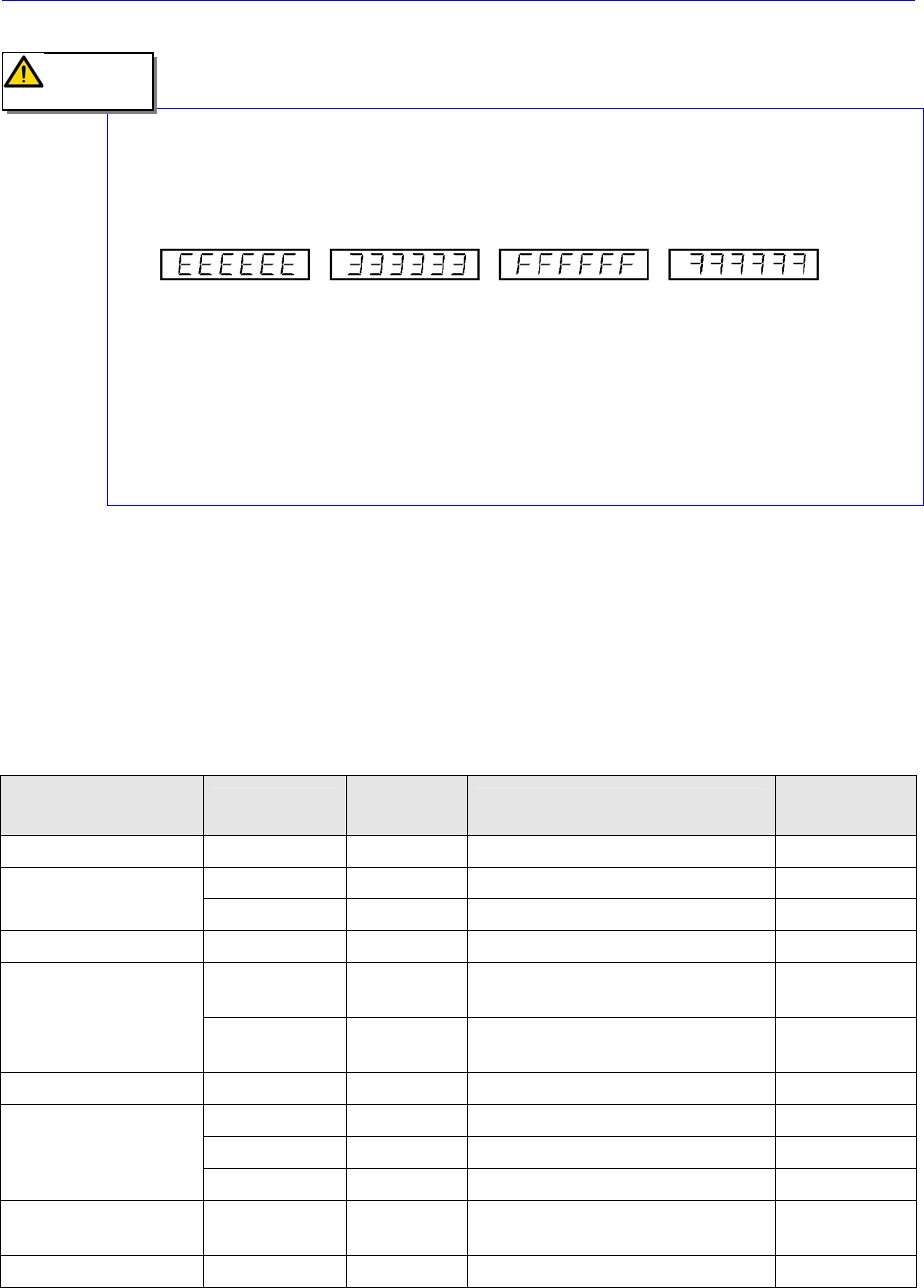
When an error occurs in the internal control circuit of the Servo-Amp. due to
excessive noise, etc., the following alarm codes may be displayed.
In this case, immediately turn off the power and check both the cable wiring and the
connection of the frame ground.
If any alarm that is not included in the above alarm code table occurs, input the
parameters of the Servo-Amp. again using the exclusive program. Next, turn the
power off and then on again, and check the machine to determine if there still is a
problem.
If the alarm still continues after taking the above third measure, it is caused by a
damaged amplifier in most cases. In this case, change the Servo-amp.
5.2.2. Conveyor Suttle ,Width and Rail -Axis
Since this product is equipped with the LED to indicate the alarm state of the amplifier
itself, occurrence or not of failures can be checked immediately. The failure cause can be
found out by the number of times of flickering of the LED or by the alarm code through
the PC I/F. Indicated below are the failure causes and corrective measures Meanwhile,
contact us if it is not possible to make restoration to the normal state
Table 5-2. Suttle, Width and Rail-Axis Alarm code
Number of times of
flickering of LED2
Abbreviation
Alarm
code(hex)
Alarm content
Possibility of
restoration
Will not light No alarm 00 - -
CPUE - CPU failure Not possible
Will light continuously
EEPER 10 Non-volarile memory operation Not possible
1 DE 01 Open circuitry of the sensor Not possible
OV 02
Supply voltage exceeds the
specification
Possible
2
MPE 03 03
Supply voltage is below the
specification
Possible
3 RSTE 04 Initialization movement failure Not possible
OVF 05 Excessive positional deviation Possible
OL 06 Servo failure (8S stop) Possible
4
OS 07 Over-speed Possible
5 RGOL 08
Regenerative voltage exceeds the
specification
Possible
6 ORG 09 Zero point resetting operation failure Possible
Caution