2OM-1075-002.pdf - 第129页
AHB01ESPP 2. "AUTO OPN." Window (Submenu) • Window Layout When the [AUTO OPN.] button on the submenu bar is pressed, the following window opens. Fig. 2E3 "AUTO OPN." Window (Submenu) • Window Composit…
AHB01ESPP
1.1.1 Submenus and Tabs
The "AUTO OPN." window is provided with the following submenus.
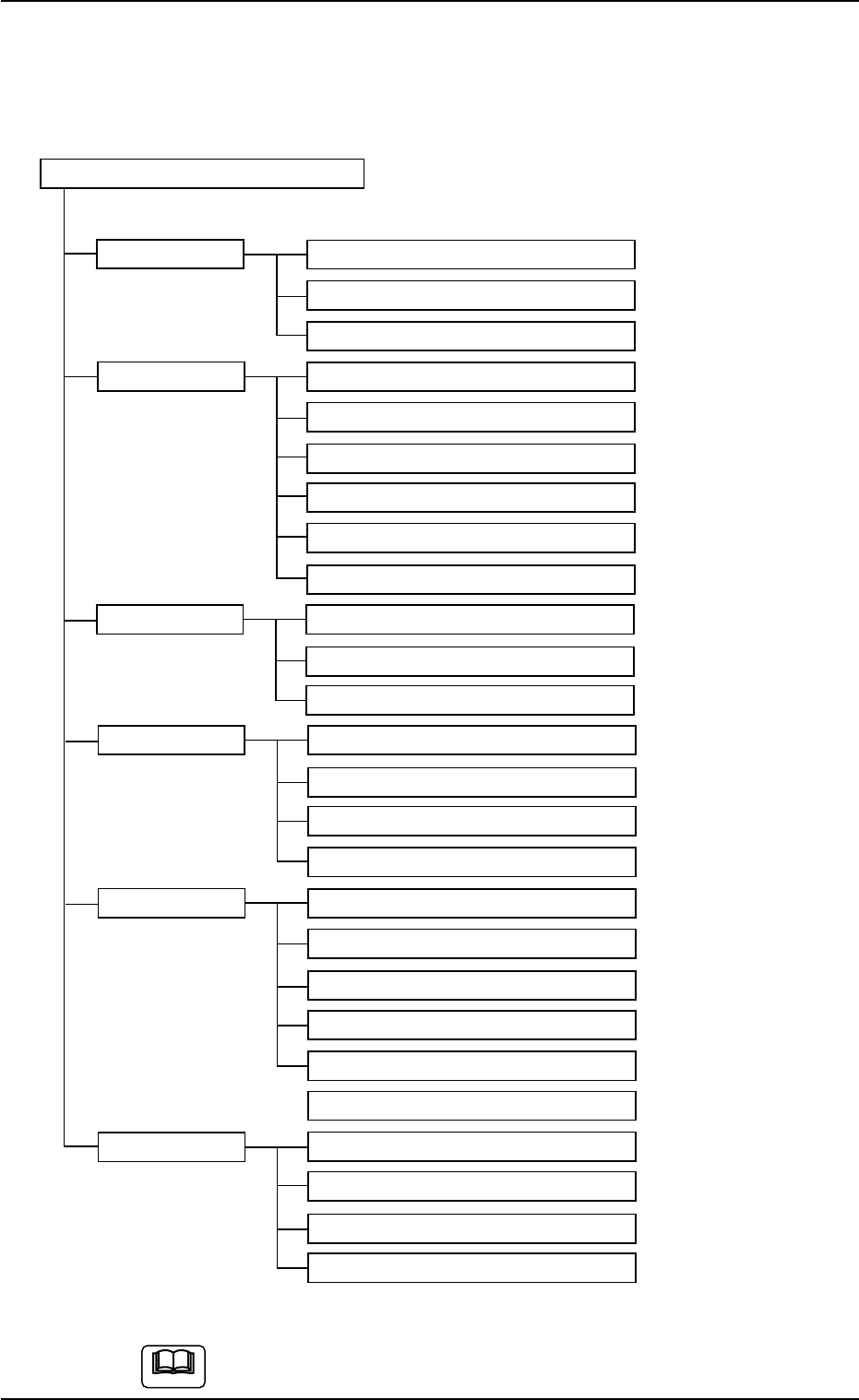
Menus for Automatic Operation
Submenus Tabs (Tab Sheets) Reference Item Nos.
AUTO OPN. Message "2.2" in "Section 5"
State "2.3" in "Section 5"
Origin/Signal Info. "2.4" in "Section 5"
OPN. MODE Run Mode "3.1" in "Section 5"
Altn Fdr Mode "3.2" in "Section 5"
Opn. Mode "3.3" in "Section 5"
Test Run "3.4" in "Section 5"
Head/Noz. Bypass "3.5" in "Section 5"
Camera Bypass "3.6" in "Section 5"
Feeder Reload Feeder Reload "4.1" in "Section 5"
Pickup Tray Matrix (Option)
Tray Comp. Dt (Option)
RECOVERY Current Dt "5.1" in "Section 5"
Comp Carriage Dt Edit "5.2" in "Section 5"
P.C.B. Origin Offset Teach "5.3" in "Section 5"
Place Pos Teach "5.4" in "Section 5"
RECALL Device Err "6.1" in "Section 5"
Handling Err "6.2" in "Section 5"
Machine Info "6.3" in "Section 5"
Comp. Recog. Err "6.4" in "Section 5"
Servo Alarm "6.5" in "Section 5"
Recog. Image "6.6" in "Section 5"
PRGM. CHG. Program Change "7.1" in "Section 5"
Product Change "7.2" in "Section 5"
PCB. Support Pins Set-up Mode "7.3" in "Section 5"
Feeder Unit Set Status "7.4" in "Section 5"
Fig. 2E2 Composition of Menus for Automatic Operation
The above tree is based on the selection of the multi-layer tray
feeder (option).
1. Outline of "AUTO RUN" Window (Main Menu)
0308-004 5-3
Note
AHB01ESPP
2. "AUTO OPN." Window (Submenu)
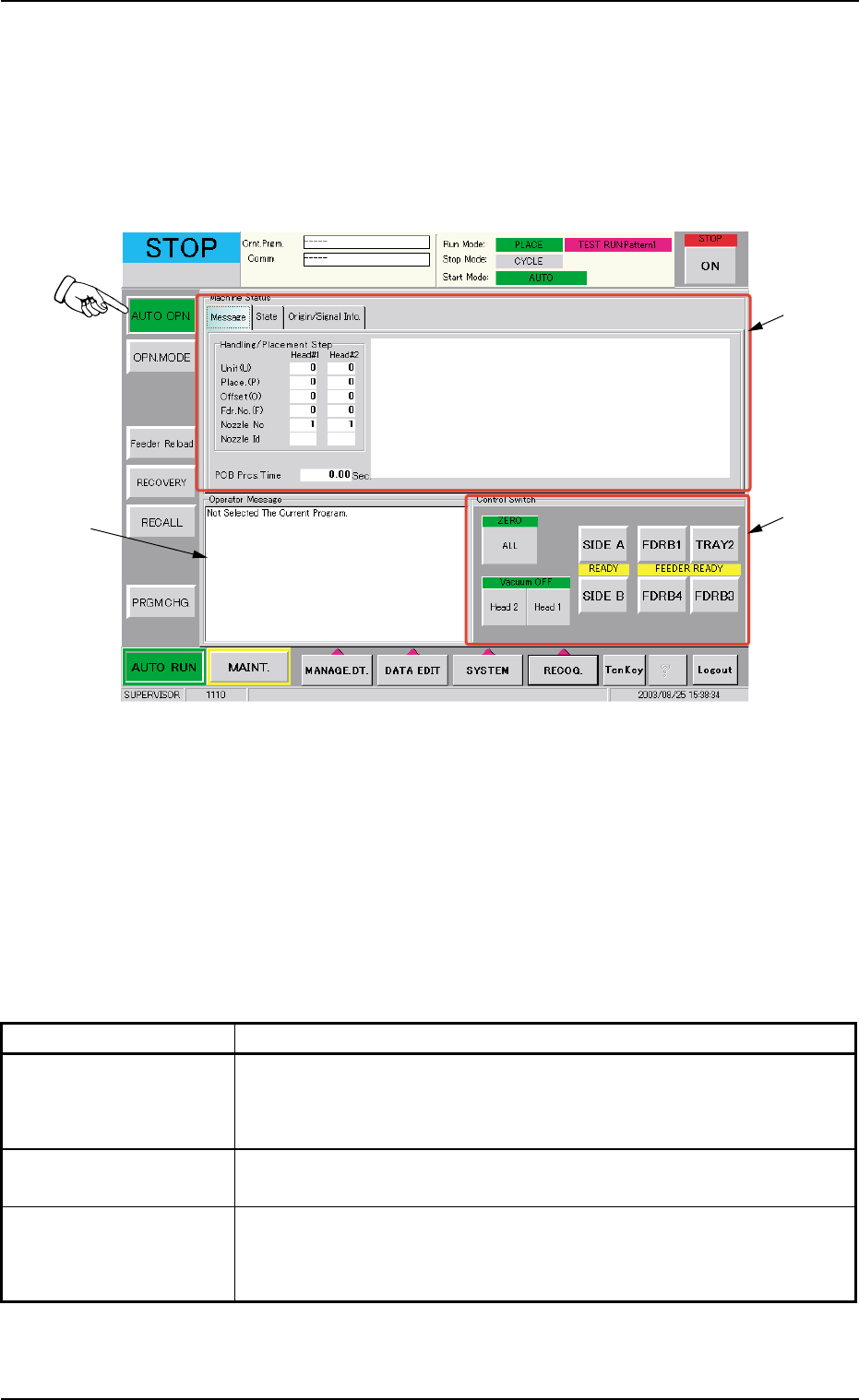
• Window Layout
When the [AUTO OPN.] button on the submenu bar is pressed, the
following window opens.
Fig. 2E3 "AUTO OPN." Window (Submenu)
• Window Composition
*1 Tabs and Tab Sheets
The "AUTO OPN." window (submenu) is provided with the following
3 tabs. When a tab is pressed, the corresponding tab sheet ap-
pears inside the window.
Table 2E1
Tabs Description
Message This tab sheet displays the step Nos., the feeder Nos., the nozzle
Nos., the nozzle IDs, etc., (related to the picked and placed compo-
nents) in the pattern program.
State This tab sheets displays the management data such as the number
of processed P.C.B.’s, etc.
Origin/Signal Info. This tab sheet displays the origin information on each device and
the real-time signal exchange condition between the main machine
and the input/output machines.
2. "AUTO OPN." Window (Submenu)
*1
*2
*3
0308-004 5-4
AHB01ESPP
*2 Operator Message
Displayed are the running condition of the machine, etc.
*3 Control Switch
Displayed are the following buttons.
[ALL] Button (Entitled "ZERO")
When the [ENABLE] button on the operation panel is pressed in 2
seconds after the [ALL] button (entitled "ZERO"), all devices dis-
played in the "Origin Information" group box in the "Origin/Signal Info."
tab sheet are zeroed.
Before pressing the [ALL] button, confirm that the front
and rear safety doors are closed.
[Head 2] and [Head 1] Buttons (Entitled "Vacuum OFF")
When the [ENABLE] button on the operation panel is pressed in 2
seconds after the [Head 1] or the [Head 2] button, the vacuum valve
for Head #1 or #2 is turned OFF.
[SIDE A] and [SIDE B] Buttons (Entitled "READY")
When the [SIDE A] or the [SIDE B] button is pressed, the electro-
magnetic lock of the front or the rear safety door is turned OFF or
ON.
[FDRB1], [TRAY2], [FDRB4], and [FDRB3] Buttons (Entitled
"FEEDER READY")
After a feeder is replaced and the operation is set ready, press the
button for the related feeder.
2. "AUTO OPN." Window (Submenu)
0308-004 5-5
CAUTION